Adding more Outlook Level 1 attachment blocks
As well as removing file types from Outlook’s extreme protection, you can also add ‘banned’ file types.
It’s done in a very similar way to unblocking ‘Level 1’ attachments.
The Outlook attachment blocks can be added in the Registry at:
HKEY_CURRENT_USER\Software\Microsoft\Office\<version>\Outlook\Security
The <version> of Outlook is
- Outlook 2016 16.0
- Outlook 2013 15.0
- Outlook 2010 14.0
- Outlook 2007 12.0
- Outlook 2003 11.0
- Outlook 2002 (XP) 10.0
- Outlook 2000 9.0
For Outlook 2016 it’s
HKEY_CURRENT_USER\Software\Microsoft\Office\16.0\Outlook\Security
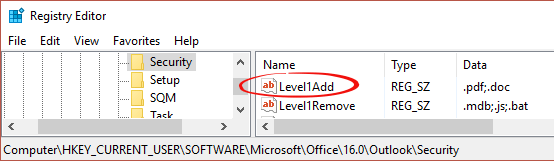
Now add a String value Level1Add
The data is a list of extensions you want blocked with a dot/period and a semi-colon to separate.
To block PDF file use .pdf
To block .PDF and .DOC files use .pdf;.doc
We are NOT suggesting that you totally block .pdf files. While .doc files are more of a virus/security concern, totally blocking them might be overkill.
Restart Outlook and any attachments with those extensions won’t be accessible at all:
