Word Can Now Link to Any Paragraph, But Check This Setting First
Word for Windows and Mac can now make a link that opens a document at an exact paragraph, not just at page one. Select any text in a document saved to OneDrive or SharePoint, right click, and choose Copy Link to Location. It is a real time saver for long contracts, specs and policy documents. But there is a catch Microsoft does not mention anywhere in its announcement: the link defaults to Anyone with the link can edit. Before you paste that link into an email or Teams, click Settings and change it.
In other words, you can now share a link to a specific part of a document, not just the whole thing. Instead of saying “Verify that the statements on page 25, paragraph 4 are correct” you can say “Check this paragraph and make sure the statements are correct”.
If you circulate long documents, this kills the “scroll down to the section on payment terms, about two thirds of the way in” instruction that clutters so many emails. Review cycles on specs, contracts, policy documents, and audit reports get noticeably faster.
That’s the good news. Copy Link to Location is a good feature, in theory.
But, as we’ll explain “Copy link to Location” is very poorly documented by Microsoft, with too many unanswered and important matters left open. Things that Microsoft usually says are a high priority are totally ignored in their announcement.
How to link to a location in a Word document
Microsoft’s instructions for “Copy link to Location” are simplistic and incomplete. First we’ll give Microsoft’s advice, then we’ll add how the feature really works.
- Open a document stored in OneDrive or SharePoint.
- Select the text you want to point someone at.
- Right click and choose Copy Link to Location
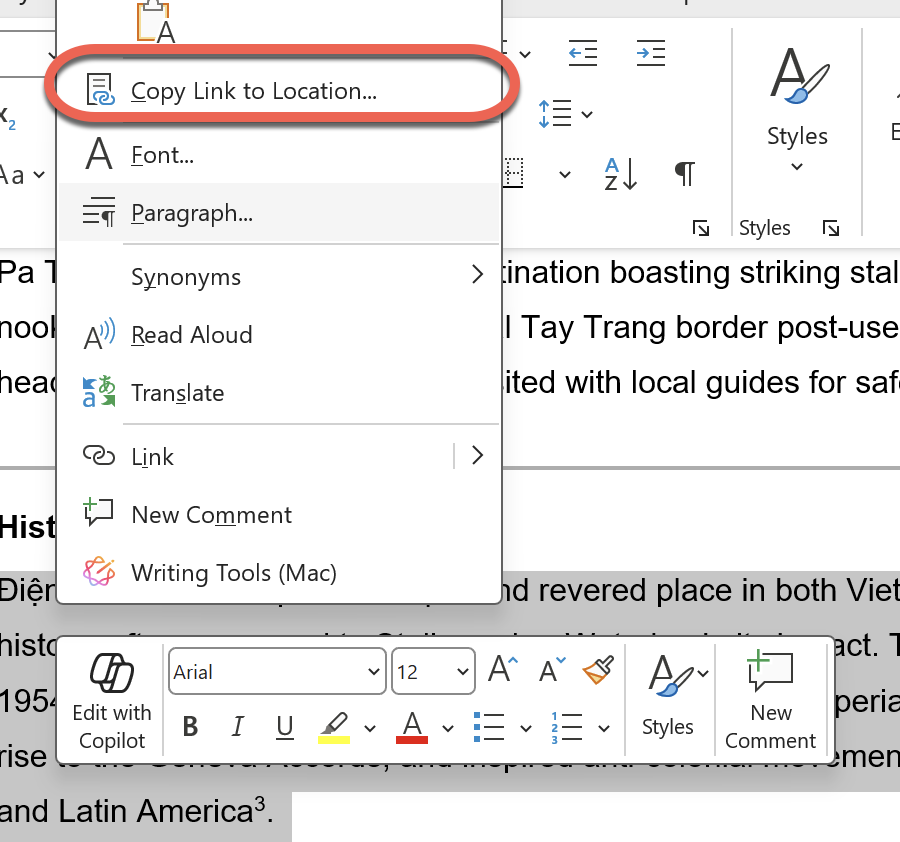
- Paste the link into email, Teams, or wherever you are sending it
Anyone getting the link can click on it. The document opens and jumps straight to the selected text.
The important detail: it works on any selected text, not just headings or bookmarks. That is the real advance. Word already had heading links, bookmarks, the Navigation pane, and tables of contents, all of which required the document to be structured in advance. This works on an unmarked paragraph buried on page 112 of a contract nobody bothered to format properly.
How “Copy link to location” really works
At Office Watch we always test what Microsoft says to see how their software really works.
We discovered that Microsoft skipped over an important part of the new feature. It’s hard to understand why, because it’s important for privacy and security. Maybe the company wanted to dumb down the explanation?
What Microsoft hasn’t even mentioned is the vital question of permissions: who is allowed to view or edit the document.
After choosing “Copy link to location”, you’ll see a box confirming that the link is in your clipboard and something Microsoft’s announcement doesn’t even hint at.

The default is “Anyone with the link can edit”, which might not be appropriate. It seems that linking to a location can override any permissions set for the entire document. See below for other permissions options.
The options and defaults might vary depending on the organization’s privacy settings.
Click on Settings to see the other permission options: specific people, a required password and an expiry date.
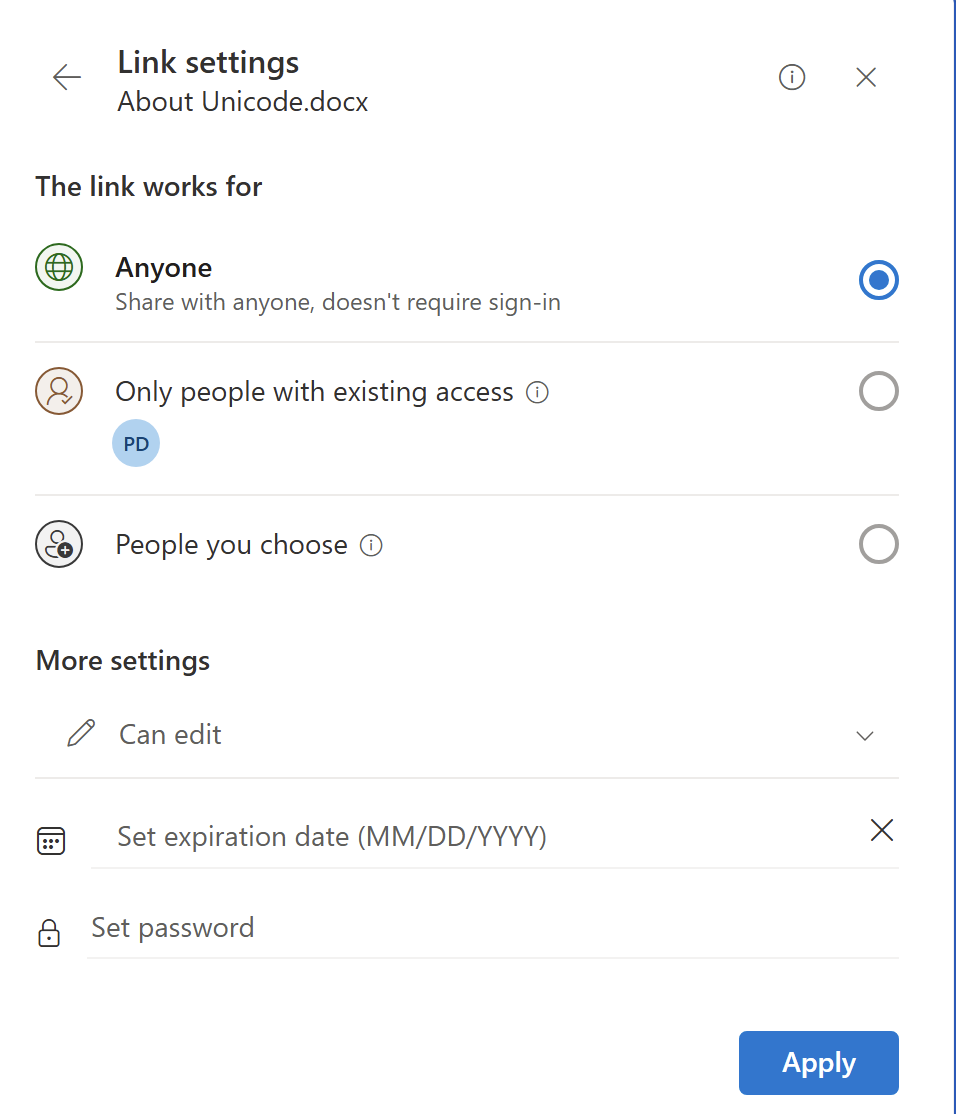
The most appropriate options are:
- Only people with existing access
- Can edit or Can view
These are the two options to consider before sending a link to location.
Limits and concerns
Copy Link to Location only works on documents saved in Microsoft’s cloud. The link resolves against the OneDrive or SharePoint copy. A document sitting on your local drive or a network share cannot produce one of these links.
“Copy link to location” might need some more work because there are three things Microsoft has either ignored or glossed over.
What about Permissions?
It’s hard to understand what Microsoft is doing about document permissions with “Copy link to location”. They’ve not mentioned it at all in their announcement. It’s a vital part of any collaboration feature and we know that because Microsoft has told customers “ad nauseam” how access permissions are an important part of the company’s cloud service.
“Copy link to location” appears to default to open access for anyone who gets the link. That’s the least secure option available.
Surely the default should be “Only people with existing access”, which is one of the choices available under Settings?
At the very least, Microsoft should properly document their own new feature. We often see new Microsoft features released with plenty of hype but little proper explanation. The “Copy link to location” announcement is especially poor and incomplete.
What happens when the text moves or disappears?
Microsoft has not said whether a link survives the linked paragraph being rewritten or deleted.
It’s quite possible that someone could delete or completely overwrite a linked paragraph, which would remove the location anchor that the link relies on.
Until that is documented, treat these links as convenient rather than permanent, and do not bury them in anything you need to work on a year from now.
What about older versions of Word?
All the focus is on making a link to location. There’s no mention of compatibility for opening a link to a location within a document.
What happens if someone clicks a link to location in Word 2024, 2021 or earlier? What about earlier versions of Word 365 including the current public releases?
Hopefully, the document will open but presumably not jump to the location.
Paying customers should not have to guess; Microsoft should tell them.
Which Word version do you need?
This is a Microsoft 365 Insider release at first, so most people will not see it in Word 365 yet.
To make a link to location you’ll need:
- Windows: v2605 build 20011.20000 or later
- Mac: v16.109 build 26051019 or later
As mentioned above, Microsoft is silent on compatibility for opening these newer links.
The Word for the web gap
Word for the web can open these links but cannot create them yet. If your team lives in the browser, this feature does nothing for you today. Microsoft says browser support is planned but has given no date, which in practice means months rather than weeks.
The Copy link to location video
Microsoft has made a too short video showing “Copy link to location”, a mere 15 seconds. It shows the “Link copied” dialog but has no mention of access permissions.
More Ways to Point People at the Right Part of a Word Document
If you cannot wait for Copy Link to Location to reach your build, Word already has three older ways to point someone at an exact spot, all covered in Word links: three ways to make internal clickable links. They need a little setup in advance, but they work in every version of Word and they do not depend on the cloud.
For moving around a long document yourself rather than sending someone else there, Mastering Word Navigation Pane: A Complete Guide digs into the side pane options most people never touch, and Navigating Word Documents: 12 Useful Tips collects the keyboard shortcuts that beat scrolling. If your document is long enough to need location links, it probably needs a proper contents page too, and Table of Contents Made Easy in Word shows how to make every entry clickable.
The permission problem in this article is not new to Word. Password Protected file sharing links with OneDrive explains the password and expiry options hiding behind that Settings button, and they are worth turning on for anything sensitive.
Once the link is sent, there is the question of where it opens. Open Office Files in Browser or Desktop App: How to Take Control untangles the scattered settings that decide whether a shared document lands in a browser tab or the full app, and OneNote users finally get the same choice as described in OneNote Open Links in Desktop App.
Copy Link to Location arrives first through the Insider program, so it is worth reading Microsoft 365 Insiders: The Risks Microsoft Does Not Mention before you sign up to get features early.