New Office for Windows features coming
Office Insiders are starting to get a look at some new features coming in Office for Windows.
At the moment these features are for the beta testers (aka Office insiders) and come with little help and no support.
Here’s what’s coming, with our look at them in practice.
Researcher in Word
A new web search pane in Word lets you insert web results, with citations, directly into a document. It’s on the References tab next to Smart Lookup.
It’ll be great if used responsibly with citations but teachers are already worried that it will just encourage more blatant plagiarism from the web into essays.
Publish to Docs.com
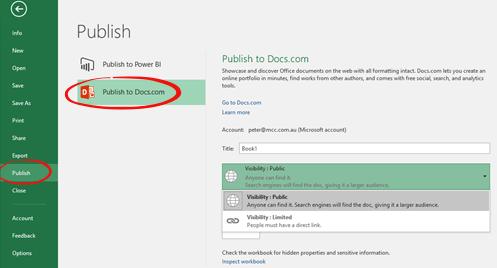
Docs.com is Microsoft’s place for people to save documents for public access. Until now Office documents had to be manually uploaded. Now they can be saved directly from inside Office for Windows. Use the File | Publish pane in Word, Excel or PowerPoint.
Zoom in PowerPoint
On PowerPoint’s Insert tab is a new Zoom option.
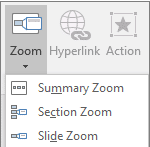
Zoom is a new way to view parts of your presentation and jump between slides. It’s called ‘Zoom’ because you can click/tap on a thumbnail to see the whole slide. It comes in three flavors:
Summary – is like a home page of selected slides
Section – for larger presentation already broken into sections.
Slide – a selection of slides for easy navigation
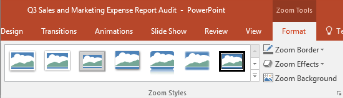
Once you’ve made a Zoom there are more display options on the Zoom Tools | Format tab. There’s an interesting Zoom Background option to make the background transparent so it seems to merge into the overall presentation.
Source: Microsoft
@ option in Outlook
Typing the @ symbol in an Outlook message body lets you insert a contact into the message and the TO field. A list appears as you type, taken from matches in your Contacts list and email autocomplete list.
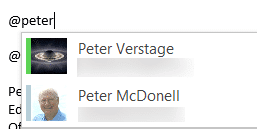 Select one of the options and that person will show in the TO: field of the email and a link to the contact in the body of the message.
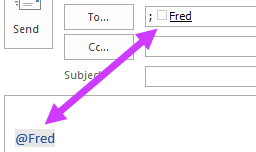
The link in the message body works best in organisations with a shared address book.
The @ symbol in Outlook has no relation to @ usernames common on Twitter.
Travel tools
According to Microsoft “Outlook now helps you verify and track reservations with summary cards available in your Inbox and Calendar. It’s also easy to change your hotel and rental car reservations, and you can stay on top of your flights info with Outlook reminders.”
We’ve not been able to see any evidence of how this feature works and not for want of trying. Perhaps this feature isn’t fully deployed to Office Insiders or there’s some trick to it that’s being kept secret? As regular travelers, we look forward to seeing this in action.
Excel Data Transforms
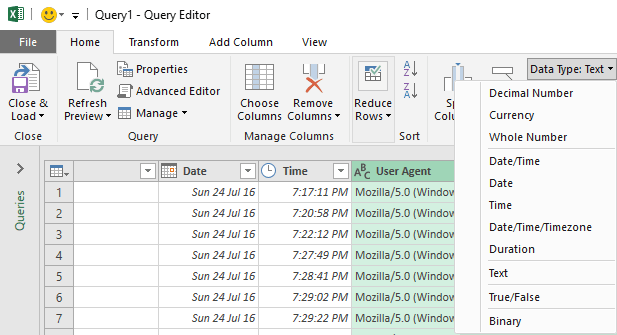
Check out the Query Editor for more options like better Date/Time and Text manipulations plus documenting transformations within the Editor. Migrate workbooks to a different environment and group two or more clauses for row filtering.
Power BI
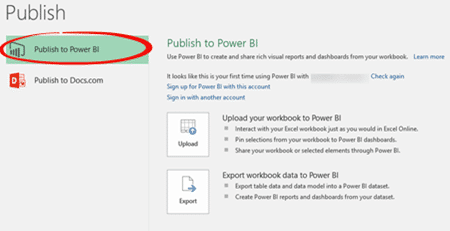
Microsoft continues to push its extra cost ‘Power BI’ service. Now you can take a locally stored worksheet and publish it to Power BI.