Pi 𝜋 choices in Word, Excel, PowerPoint and Outlook
There are twelve different choices for the Pi symbol 𝜋 to type to Microsoft Word, Excel, PowerPoint or Outlook. Both in Office for Windows and Office for Mac. We’ll show you all twelve including the most common 𝜋.
Pi is the famous math constant. 𝜋r2 calculates the area of a circle from its radius (r) or in Excel the formula =Pi()r^2 . See Circle and Sphere formulas for Excel.
Typing 𝜋 is easy once you know the tricks, including a Word shortcut.
See Pi 𝜋 Day for a complete list of the Office Watch Pi (and Pie) articles.
3.14159265358979 …. Pi in Excel
But you don’t have to memorize that. Excel has a Pi() function to enter the exact value to 14 decimal places (3.14159265358979) which is more than enough for Earth-bound uses. Even NASA and JPL only need one more digit (15) precision for their interplanetary calculations. See Circle and Sphere Formulas in Excel using Pi 𝜋
A dozen PI symbols
The 𝜋 symbol was originally a lower-case Greek letter π but there are a dozen separate characters for the math Pi.

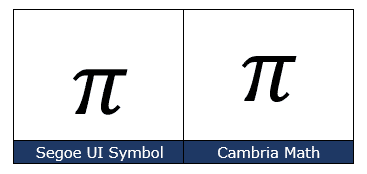
How Pi 𝜋 looks in different fonts.
Here’s how Pi 𝜋 looks in two common Office fonts. In many cases modern Word will insert the Cambria Math version because the selected font doesn’t support the symbol. Pi is also in Segoe UI Symbol.
The most common Pi 𝜋 symbol
There are many Pi symbol variations, commonly used is “Mathematical Small Pi Italic” Unicode 1D70B.
These are the important code numbers or values you’ll need to enter the Pi or ℼ as a small italic character.
Hex: 1D70B
Web: π or 𝜋
(web codes aren’t used in Microsoft Office, we’ve included them for the sake of completeness.)
Quick Pi shortcut in Word
Word for Windows has a Ctrl + Shift + Q shortcut to make the Pi symbol.
Ctrl + Shift + Q then P — makes the capital PI
Ctrl + Shift + Q then p – makes the lower case Pi 𝜋
A few things to keep in mind:
- Ctrl + Shift + Q only works in Word for Windows – not Mac. Grrrrr
- This shortcut hasn’t been updated for a long time and still displays the Symbol font which doesn’t use the Unicode system. Switching to another symbol font (like Segoe UI Symbol or Cambria Math) will NOT show the same character.
Many other Pi symbols
The Unicode system has twelve different versions of the Pi Symbol. Bold, Italic, Bold Italic and Sans-Serif variations – all shown at the top of the article. They are all available in the Cambria Math font.
Use the Alt + X trick to type any of these into Word for Windows.
Mathematical Bold Capital Pi
Hex: 1D6B7
Mathematical Bold Small Pi
Hex: 1D6D1
Mathematical Italic Capital Pi
Hex: 1D6F1
Mathematical Italic Small Pi – the usual 𝜋
Hex: 1D70B
Mathematical Bold Italic Capital Pi
Hex: 1D72B
Mathematical Bold Italic Small Pi
Hex: 1D745
Mathematical Sans-Serif Bold Capital Pi
Hex: 1D765
Mathematical Sans-Serif Bold Small Pi
Hex: 1D77F
Mathematical Sans-Serif Bold Italic Capital Pi
Hex: 1D79F
Mathematical Sans-Serif Bold Italic Small Pi
Hex: 1D7B9
Double Struck Capital Pi
Hex: 213F
Double Struck Small Pi
Hex: 213F
Pi emoji
There is no Pi emoji, best we can offer is 🍰 <grin> see Pie or Pi emoji and more in Microsoft Office
Pi in the Equation Editor
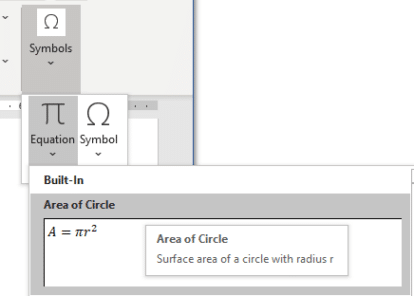
Of course, the Office Equation Editor has the Pi symbol.
In an Equation, pull-down the Symbols gallery and click on the 𝜋 symbol.

Or go to Insert | Symbols | Equation and the first Built-In option includes 𝜋
Word and Outlook
The Pi 𝜋 sign does NOT have an inbuilt shortcut in Word.
Use the standard Word Alt + X symbol shortcut 1D70B , Alt + X or whichever version of Pi you like from the list above.
Once in a document you can copy it to AutoCorrect and make your own shortcut.
Word, Excel, PowerPoint and Outlook
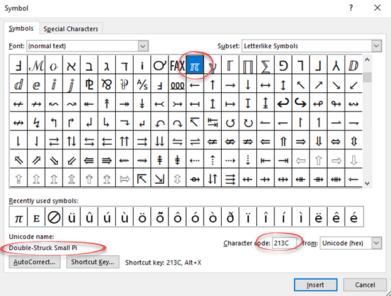
Insert | Symbols | Symbol and look for the Pi symbol. Enter the Unicode U+ value from the list above.
Windows
In Windows there are several shortcuts to enter the Pi 𝜋 character into any program, but they use a numeric keypad, not the number row above the letters.
Alt + 8508
Windows Character Map
The Windows Character Map accessory in all Windows releases

Character Map has a search feature, something missing from the Insert | Symbol in Office. Unfortunately it can’t find whole words and isn’t case-sensitive. Searching for ‘Pi’ finds many symbols with those two letters like Capital.
MacOS and Office for Mac inserting characters
On a Mac, to enter the Pi 𝜋 symbol:
- Command + Control + Spacebar shortcut to open the Character Viewer.
- Choose ‘Math Symbols’ from the category list.
- Scroll down to find the Pi you want.
- Sadly searching for ‘Pi’ shows a lot of other symbols.
- Once you have found one ‘Pi’ symbol, others show up in the Related Characters list.

Despite the name Character Viewer, the Apple system tool will also insert characters into any program, including Office for Mac.
Circle and Sphere Formulas in Excel using Pi
Pie or Pi emoji and more in Microsoft Office
Excel’s five Pie Chart tricks
Pi 𝜋 Day has a complete list of the Office Watch Pi (and Pie) articles.
Ohm symbol Ω in Word, Excel, PowerPoint and Outlook
Not Equal ≠ symbol in Word, Excel, PowerPoint and Outlook
Word’s symbol trickery, the good and the bad
More right pointing hand symbols in Word, Excel and PowerPoint