Typing some simple fractions automatically in Word and Outlook
As part of Word’s Autocorrect settings, some simple fractions will show as a symbol when you. For example, if you type in 1/4 and then space straight afterwards it’ll show as ¼.
It’s done automatically from File | Options | Proofing | AutoCorrect Options | AutoFormat as you type | Fractions (1/2) with fraction character (½).
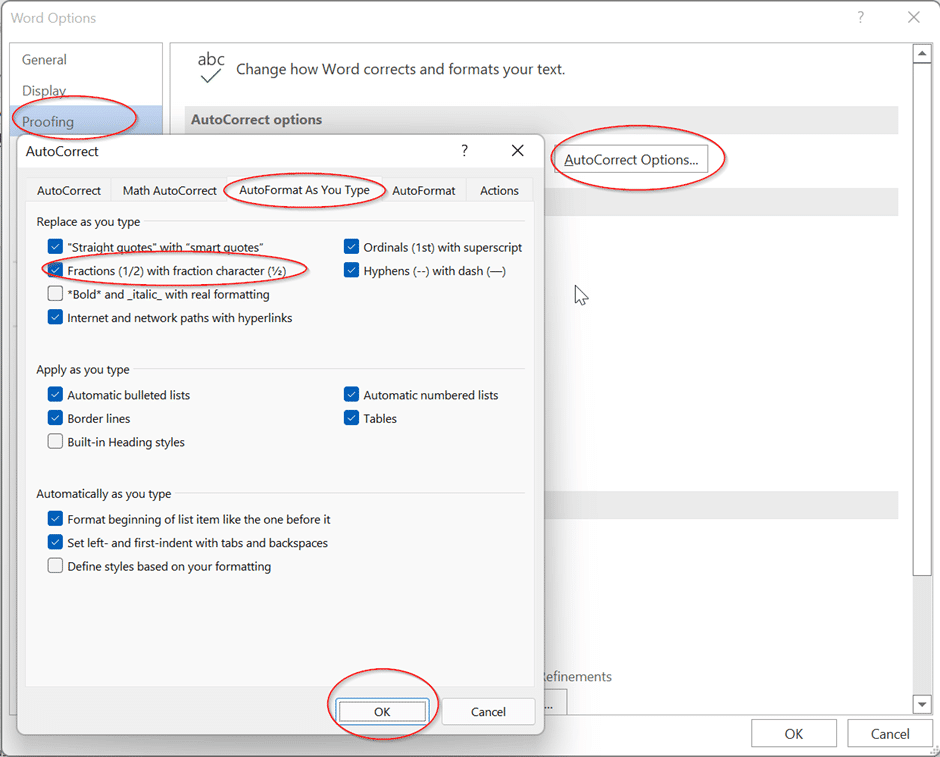
It’s on by default but you can turn it off.
Only three fractions
The AutoFormat as you type, Fractions option only works for THREE fractions half, quarter and three-quarters.
Only ½ ¼ ¾ are setup.
Not even some other common fractions like 1/3 and 2/3 are included.
For other fractions, you have to use either Insert | Symbol or some other trickery like AutoCorrect to make fractions.
See Typing common fractions in Word and Outlook