Direct Send is a huge Microsoft security lapse that’s finally being fixed
For years, Exchange Server has a feature which can be used to infiltrate organizations. Only now that Direct Send is being exploited is Microsoft finally acting to warn customers and provide a way to turn it off.
In other words, Microsoft is “closing the barn door after the horse has bolted” </cliche>
Direct Send is a way for devices to send messages to only internal mailboxes within an Exchange Server organization. For example, a printer could send an email when paper or toner is low or when a security camera or lock is triggered. These devices sometimes can’t login to Exchange Server in the usual way, so there’s a limited way for them send messages without name/password login.
Happily most devices or apps that send emails should now come with a login feature.
Direct Send is being used to send phishing messages within an organization. A simple Powershell command, Send‑MailMessage, can spread messages to others in the organization with the regular security checks bypassed because the email is considered ‘internal’.
Phishing emails via Direct Send
Criminals are always finding new ways to trick people. Varonis have found PDF attachments that contain links to bogus voicemail messages or with QR codes that supposedly go to a voice message.
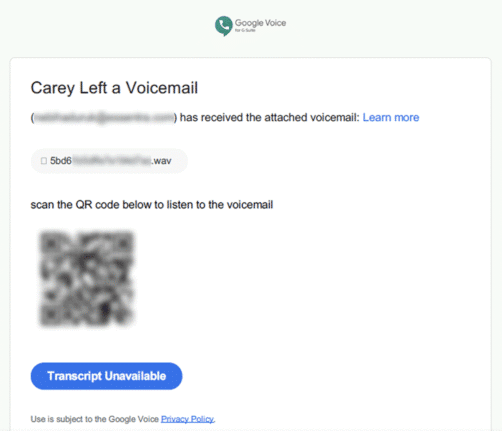
Hackers do that because standard web links can be detected and blocked by security software but a link in a QR code is not.
Why so long?
Only now that Direct Send is being exploited has Microsoft decided to act.
How did Direct Send exist for so long without better protections or a least a way to turn it off?
Microsoft is supposed to have security audits and procedures yet none of them noticed a way to send messages into Exchange Server without authentication. Or did Microsoft know about the risk but decide it was too hard or too expensive to fix?
Amazingly, Direct Send is ON by default. Only now is Microsoft considering a change saying “We’re working on an option to disable Direct Send by default to protect customers.”.
What to do?
Exchange Server admins will probably want to turn off Direct Send. A switch to control Direct Send was only added in April this year, as a preview feature.
Other steps to take include
- Change to a strict DMARC policy p=reject).
- Enforcing “SPF hardfail” within Exchange Online Protection (EOP).
- Add a static IP address in the SPF record to prevent unwanted send abuse – as recommended by Microsoft.