Text boxes are different in Microsoft Publisher and Microsoft Word. The Publisher features can, mostly, work in Word as well. Understanding how text boxes work in Word is essential with the end of Publisher later in 2026. This guide breaks down the most important differences clearly and practically.
Publisher text boxes have some features on the Text Box ribbon that Word users can only dream of. But many Publisher text box features have the same or similar Word features, if you know where to look.

Text Fit
Most important is “Text Fit” in Publisher. Text can be resized to fit the text box or vice-versa.

Microsoft Designer changes a text box to fit the text automatically.
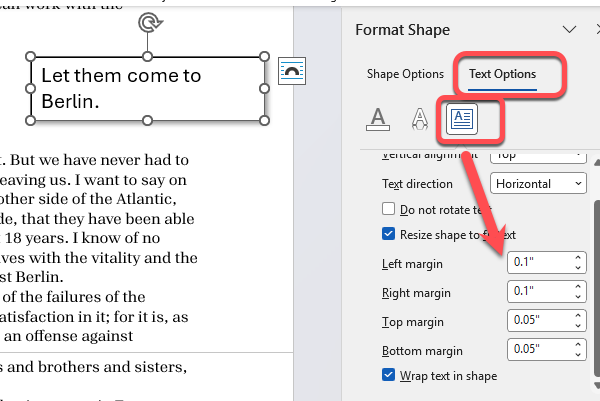
The nearest equivalents in Word are at Format Shape | Text Options | Layout & Properties but these change the text box to fit the text.

Resize shape to fit text –expands/contracts the text box.
Wrap text in shape – text will wrap to fit inside the text box width.
Linked Text Boxes
Both Publisher and Word have linked text boxes to let text flow between boxes, but the Publisher implementation is clearer with an option to move between boxes.
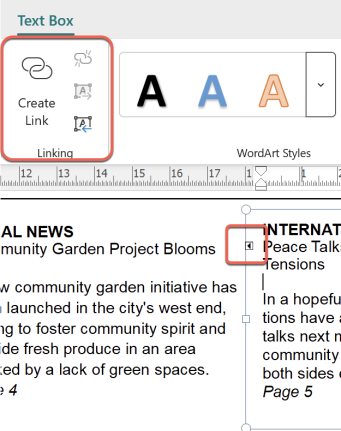
In Word there’s just a small ‘Create Link’ button on the Shape Format ribbon. Nothing on screen to show that text boxes are linked, aside from the “Break Link” button on the Shape Format tab.

Continued on page …
Publisher has choices to automatically add “Continued on …” or Continued from …” with page number into linked text boxes.

In Word you must add that text manually and make sure the “Continued …” text doesn’t flow to another box. Messy. The page number can be added automatically with a Word bookmark and cross-reference.
Columns and Margins
Columns and Margins can be managed in each Publisher text box. Word also lets you change the inner text box margins from Format Share | Text Options | Layout & Properties.
Multiple columns aren’t possible within a Word text box. The nearest equivalent would be a multi-column table but that would not have text flowing between columns.
Text and Typography
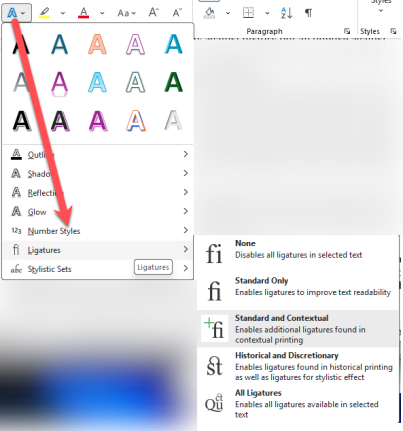
Publisher has a Typography button on the Text Box ribbon which shows additional text formatting options like Drop Caps, Ligatures and Stylistic Sets.
Word has the same font formatting options, just presented in a different way on the Home
Font | Text Effects and Typography.
Publisher and beyond about the end of Publisher, your options and replacement features.
Beware the Publisher 365 “Kill Switch” deadline
Microsoft Publisher Ends in October 2026 – Key Dates, Alternatives & How to Keep .pub Files
Publisher to Word Conversion Tested: Microsoft’s Method in the real world
