Hidden Inbox Rules That Let Hackers Spy on Your Microsoft 365 Email
When an attacker breaks into a Microsoft 365 or Exchange account, changing your password is not enough to stop the damage. Hackers can silently plant inbox rules that forward, redirect, or delete your emails without you knowing. Worse, a known flaw in Microsoft Exchange allows those rules to be made completely invisible, hidden from you, from Outlook, and even from your IT administrator’s standard tools. This loophole has existed since at least 2018, and Microsoft has done almost nothing about it.
When an attacker gets hold of someone’s Microsoft 365 or Exchange account (usually through phishing), one of the first things they do is set up inbox rules on the victim’s mailbox. These rules can forward, redirect, or delete messages without the account holder knowing. A forwarding rule, for example, can silently copy every incoming email to another address. The attacker gets ongoing access to sensitive information even after the victim changes their password, because the rule keeps running independently of how the attacker originally got in.
A secret hidden rule
That alone is bad enough. But here’s the really concerning part: attackers can use a Microsoft Messaging API (MAPI) editor to make those inbox rules completely invisible.
The trick is surprisingly simple. By blanking out two low level properties on the rule (called PR_RULE_MSG_NAME and PR_RULE_MSG_PROVIDER), the rule remains fully functional but no longer shows up in Outlook, Outlook on the Web (OWA), or even the Exchange Management Shell that administrators use to investigate compromised accounts.
In other words, neither the victim nor the IT team can see the rule using the tools they’d normally rely on.
The whole account is at risk
This security bug is only possible if the users account has been compromised, meaning a hacker can gain access to everything linked to that account; email, contacts, documents, chats, other files … the works.
These days criminals are more cunning than just breaking into an account, changing the password and copying or deleting content.
Now they quietly sneak around a compromised account, getting all the info they can and for as long as they can. Days, weeks or months.
Even if the attacked account is secured, the hidden email rules remain.
Outlook/Exchange hidden rules are a problem but the hacked account is a more serious issue. As we’ll see, Microsoft uses an insecure account as an excuse to do little or nothing.
Hidden even from Administrators
Detection of these hidden inbox rules can be tricky. Depending on the rule and how it is created, the event won’t show up in Office 365’s Unified Audit Log.
Administrators may be able to detect forwarding rules if they have alerting configured, but in Soteria’s testing, this only worked for rules with the “Forward” action. It did not appear to work for rules that delete messages, move them to folders, redirect them, or forward as attachments.
That’s a big gap, because attackers commonly use delete rules to suppress security alerts and password reset notifications so the victim never realizes anything is wrong.
Just one way to find hidden rules and that’s hidden too!
Since the original report of this security bug, Microsoft quietly added a -IncludeHidden switch on the Get-InboxRule PowerShell cmdlet, giving administrators at least one reliable method to find these rules.
This command will show all rules, including hidden ones.
Get-InboxRule -Mailbox $mailbox -IncludeHiddenBut that requires knowing to look for them in the first place, and running specific PowerShell commands that go beyond what most organizations do in their standard incident response playbook.
Deleting Hidden Outlook Rules
There are two ways to delete hidden Outlook/Exchange Rules, neither of them is very elegant.
The Microsoft account needs to be secured because that’s the larger problem; change account password, implement or reset two-factor authentication and educate the user on better security practices.
PowerShell
Soteria has PowerShell scripts to find and delete hidden rules for admins.
Outlook classic
Outlook classic for Windows (only) has a command line option to remove ALL rules, it’s very much a “Baby and Bathwater” fix.
Use this command in the Windows Run box.
Outlook.exe /cleanrules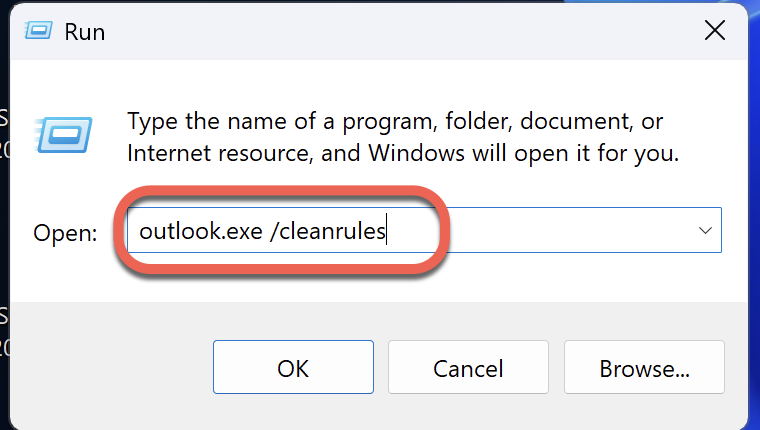
Beware, that deletes all rules, visible or hidden. Make sure you get a copy of all the existing rules first, so you can reapply them later.
Beware online help on this topic. Some might be well-meaning but wrong. Microsoft’s own AI help in a Microsoft forum is wrong:

That’s wrong, PowerShell does not display hidden rules be default.
This later suggestion does not include the necessary -IncludeHidden switch. It misleads customers into thinking the standard PowerShell command will show hidden rules.

Get-InboxRule -Mailbox youraddress@example.com can help uncover any rules not visible in the standard settings.What Microsoft needs to do
When Compass Security originally reported this issue to Microsoft’s Security Response Center back in 2018, Microsoft reply was dismissive with no substantive action aside from the -IncludeHidden extra.
Here’s what Microsoft’s Security Team (MSRC) said about the bug back in 2018.
Our engineering team investigated the behavior that you described. They determined that it is not considered a security issue because it requires control of the account to create these rules. However, they are considering ways to improve the software in the future.
[…] MSRC will not be tracking the issue and we won’t have future updates about it
Paying customers are welcome to rearrange these words into a sentence: “head sand burying”.
By Microsoft’s logic, the company is absolved of all responsibility if the account security is compromised. A convenient excuse for Microsoft that ignores some important points:
- Hidden rules are only possible because Microsoft added that feature without considering the consequences for customers. It was seemingly added as an option for internal use.
- At the time, none of Microsoft’s tools for analysing server rules have been properly written to expose ALL rules. Only later was
-IncludeHiddenquietly added.
Some modest proposals
Here’s some ideas for what Microsoft should do to improve mailbox security by easily detecting and removing hidden rules.
- Make -IncludeHidden the default for all PowerShell mailbox rule commands.
- Add a -ShowHidden option to Get-InboxRule. That will allow let admins create automated scripts to detect hidden rules (either a list or a count) across all mailboxes instead of clumsy scripts from third-parties.
- End users should be able to see hidden rules, perhaps a check box in the Rules list ‘Show Hidden’.
- Or at the very least have some warning that there are unseen rules not appearing in the users Rules list. This might not be hard, just a comparison of the counts for rules, with and without hidden. If the counts don’t match, post a notice in the Rules dialog.
- Admit that the whole concept of “Hidden Rules” is wrong and certainly not appropriate in the 21st Century.
We don’t seriously think Microsoft will do anything about this. After all, eight years have passed without only a token little change. Paying customers and administrators can only hope and dream.
Which New Outlook Rules Features are Missing (And What That Means for You)
Outlook Email Rules Explained: How to Automatically Sort, Flag and Manage Your Inbox
Beyond Outlook Rules: 8 Hidden Features That Manage Your Email Without You Knowing
Look Inside a Real Microsoft 365 Phishing Attack
Office 365 Hack Copies Your Emails Without You Realizing
A New Outlook Attack Method: Microsoft in Denial
Hackers and Microsoft Accounts: How to Stay Secure
Don’t Fall for the Two Factor Authentication Myth