Math is now more inclusive in Microsoft 365
Microsoft 365 has added more accessiblity features into the Office Math or Equation part of Office. More keyboard shortcuts, better screen reading and paste options.
These recent improvements in Microsoft 365 for communicating and collaborating with math were developed in collaboration with the DAISY Consortium, researchers, educators, instructional designers, and others who use math regularly.
Keyboard Shortcuts
PowerPoint now includes keyboard shortcuts for inserting and editing native Office Math / Equation, similar to those already available in Word. These shortcuts are particularly helpful for users who cannot easily use a mouse or other pointing device, as well as for LaTeX users since conversion to and from professionally formatted math isn’t done automatically as they type.
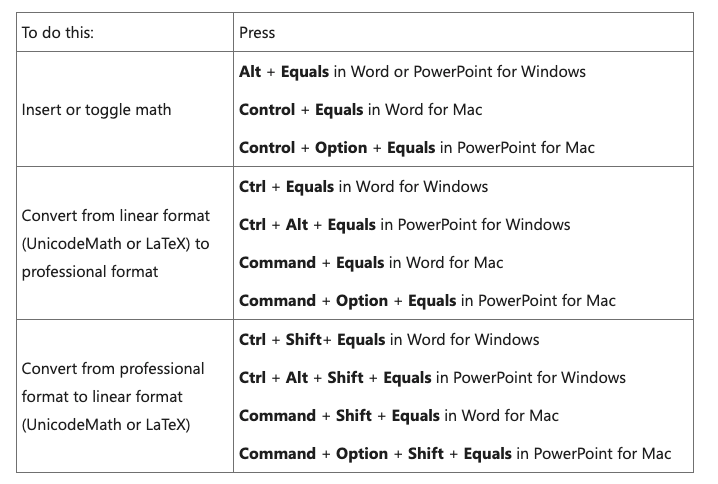
The following shortcuts are now available:
- Insert or toggle math:
Alt + Equals in Word or PowerPoint for Windows;
Control + Equals in Word for Mac;
Control + Option + Equals in PowerPoint for Mac - Convert from linear format to professional format:
Ctrl + Equals in Word for Windows;
Ctrl + Alt + Equals in PowerPoint for Windows;
Command + Equals in Word for Mac;
Command + Option + Equals in PowerPoint for Mac - Convert from professional format to linear format:
Ctrl + Shift + Equals in Word for Windows;
Ctrl + Alt + Shift + Equals in PowerPoint for Windows;
Command + Shift + Equals in Word for Mac;
Command + Option + Shift + Equals in PowerPoint for Mac
Audio Feedback
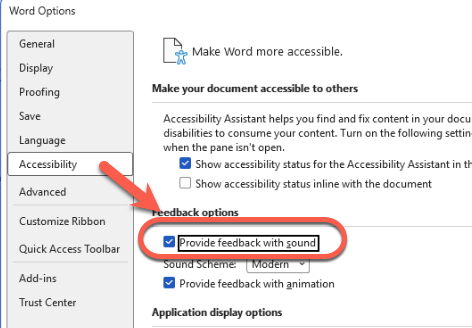
The Microsoft 365 apps for Windows now provide feedback with sound when users enter and exit native Office Math / Equation. This prevents accidental insertion of content inside the math zone that was intended for outside, and vice versa.
Users can enable this feature by going to File | Options | Accessibility and checking “Provide feedback with sound.”.
Screen Reader Editing Support
When editing native Office Math while using a screen reader such as Narrator, the software now reads the content to the right of the insertion point along with context information. This allows users to know precisely where they are in the equation.

For example, when navigating through the equation for the area of a circle, the screen reader announces elements like “cap A,” “equals,” “pi,” “r squared,” “start base,” and “end base,” helping users insert text in the correct location.
Improved Screen Reader Experience
Narrator in Windows 11 25H2 Build 26200.7623 and later has improved the reading of native Office Math in PowerPoint Slide Show and Word using MathCAT, which is described as the industry-leading technology for math reading.
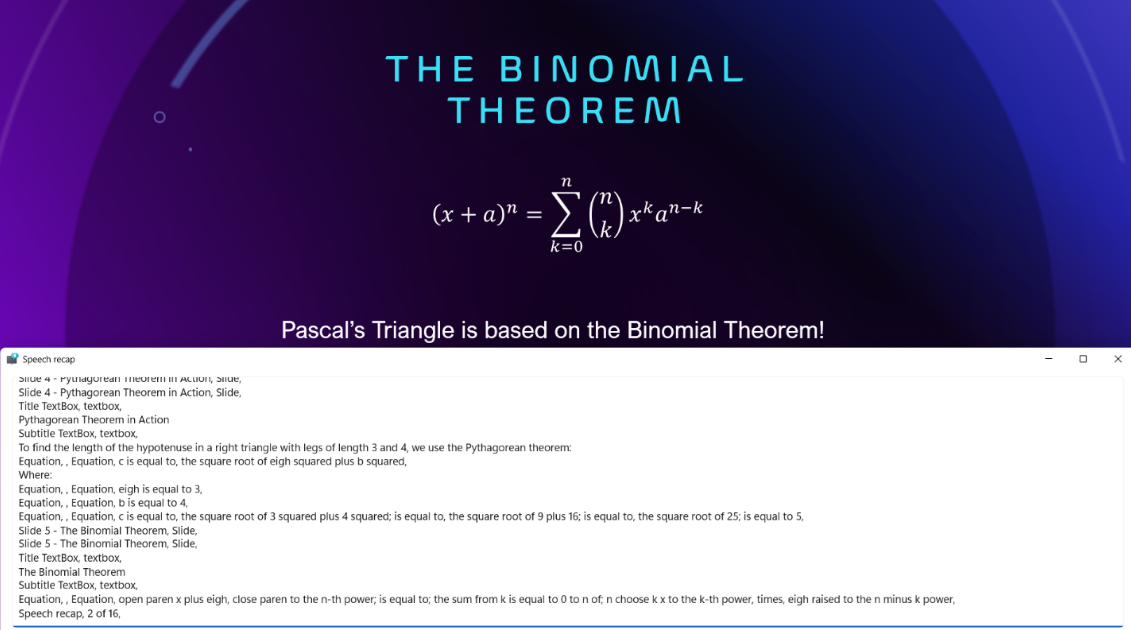
PowerPoint and Word for Windows provide MathML in the accessibility tree that all screen readers and assistive technologies can use for a better experience.
Accessible PDF Exports
When users save or export their files as PDFs, PowerPoint and Word now include MathML in the PDF for native Office Math. When reading the PDF with Adobe Reader and JAWS or NVDA with MathCAT, users can read the math part-by-part to ensure they don’t miss anything.
Pasting Math into OneNote
OneNote now preserves math in MathML format when users copy content from webpages such as Microsoft 365 Copilot or Wikipedia. This feature was recently added to Word, PowerPoint, and Excel, and is now available in OneNote as well.
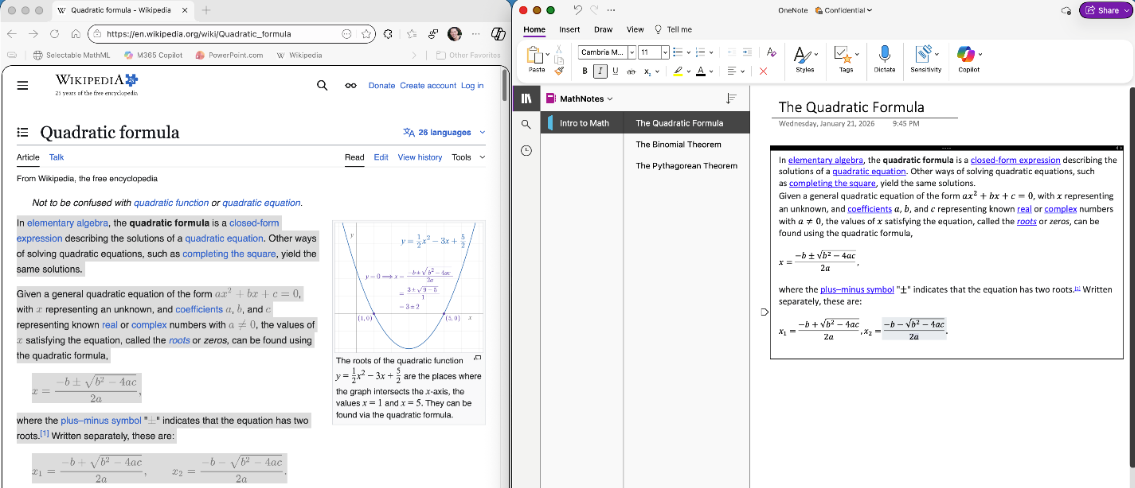
Users can also copy MathML code from text editors like Notepad and paste it into OneNote as native Office Math, or even copy MathML from the xFormula keyboard on iOS into OneNote for easy math entry on mobile devices.
Enhanced Paste Options in Word and PowerPoint
In Word and PowerPoint, MathML is now listed as one of the formats in the Paste Special dialog if the source application supports it.
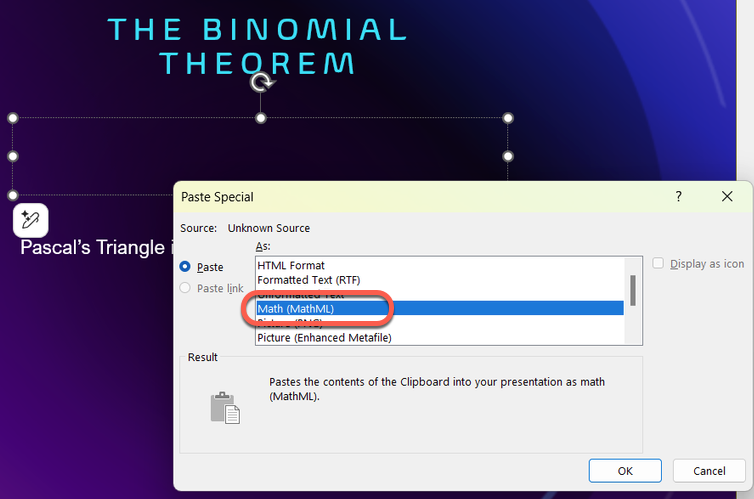
This gives users more control over how math is imported into their documents. When users choose MathML, it is inserted as native Office Math that can be changed in the Equation feature.
Improved MathML Compatibility
Recent versions include numerous improvements to importing and exporting MathML for better compatibility across applications and webpages.
Converting Legacy Equation Objects
For organizations that have used Microsoft 365 apps for many years, documents may contain Equation Editor objects. Equation Editor was included with Microsoft 365 from 1991 until its retirement in 2018. Users can now convert these objects to native Office Math to edit and format them and experience the improved accessibility features described above.
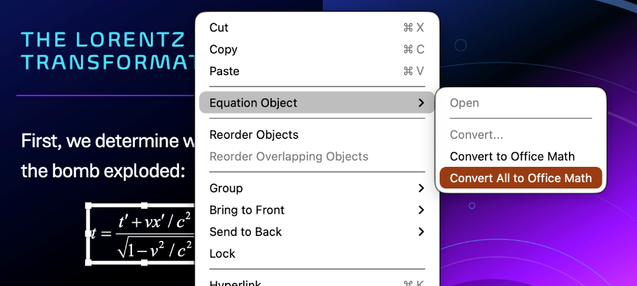
The “Convert to Office Math” command is now available on Mac as well as Windows in Word and PowerPoint. Additionally, a “Convert All to Office Math” command in Word and PowerPoint for Windows and Mac allows users to convert all Equation Editor objects in a document or presentation at once. Both commands are accessible on the context menu that appears when users right-click or press Shift + F10 (on Windows) or Control + Return (on macOS 15 or later) on an Equation Editor object.
The conversion process also works on MathType for Windows objects.
Availability
The availability of these features varies by platform and version:
- Keyboard shortcuts for entering and editing math are generally available in Word for Windows and Mac, and in PowerPoint for Windows Version 2512 (Build 19530.20000) or later and PowerPoint for Mac Version 16.104 (Build 25120915) or later
- Feedback with sound and improved screen reader experience when editing math are available in Word, Excel, PowerPoint, Outlook, and OneNote for Windows Version 2601 (Build 19628.20000) or later
- Improved reading of math with Narrator is available in Windows 11 25H2 Build 26200.7623 or later in Slide Show in PowerPoint for Windows Version 2511 (Build 16.0.19426) or later, and is generally available in Word for Windows
- Improved accessibility of exported PDFs with math is generally available in Word on all platforms and in PowerPoint for Windows Version 2602 (Build 16.0.19623.20000) or later
- Paste MathML from webpages and other apps is available in OneNote for Windows Version 2601 (Build 19628.20000) or later and OneNote for Mac Version 16.105 (Build 26010535) or later
- Paste Special as MathML and Convert All to Office Math are available in Word and PowerPoint for Windows Version 2602 (Build 19711.20000) or later and in Word and PowerPoint for Mac to Beta Channel users running Version 16.106 (Build 26011120) or later
Microsoft is doing their usual gradual rollout, meaning features are released over time to ensure and may not be immediately available to all users.