Google Just Bumped AI Pro to 5TB: How Does It Stack Up?
Google has quietly upgraded its AI Pro plan, bumping the included cloud storage from 2TB to 5TB at no extra cost, while keeping the monthly price at US$19.99. The extra space can be used across Gmail, Google Drive, and Google Photos. It’s a well-priced combo of more cloud storage and AI services, not a direct rival to Microsoft 365. Here is the practical breakdown every Office user needs to know.
Google quietly dropped a significant upgrade on April 1, 2026, and it was not a joke. The Google AI Pro plan’s storage jumped from 2TB to 5TB, with the monthly price holding steady at US$19.99+ or US$199.99+ a year. Existing subscribers get the upgrade automatically, with no opt-in required.
That’s a 150% increase in storage for the same price. It is worth pausing on that number because it’s a competitive price for 5 Terabytes of cloud storage alone.
To reach 5TB on OneDrive, Microsoft 365 customers have to pay an extra $480 on top of their plan.
Google’s Gemini AI can work alongside Word, Excel and PowerPoint just like other non-Copilot services. Google Drive can sync with Windows or Mac for use in Office apps.
What Is Google AI Pro, Exactly?
The Google AI Pro plan is mainly, but not just, an AI chatbot subscription. It’s a bundle of services, especially Gmail, Google Drive, and Google Photos. The 5TB storage pool is shared across all three.
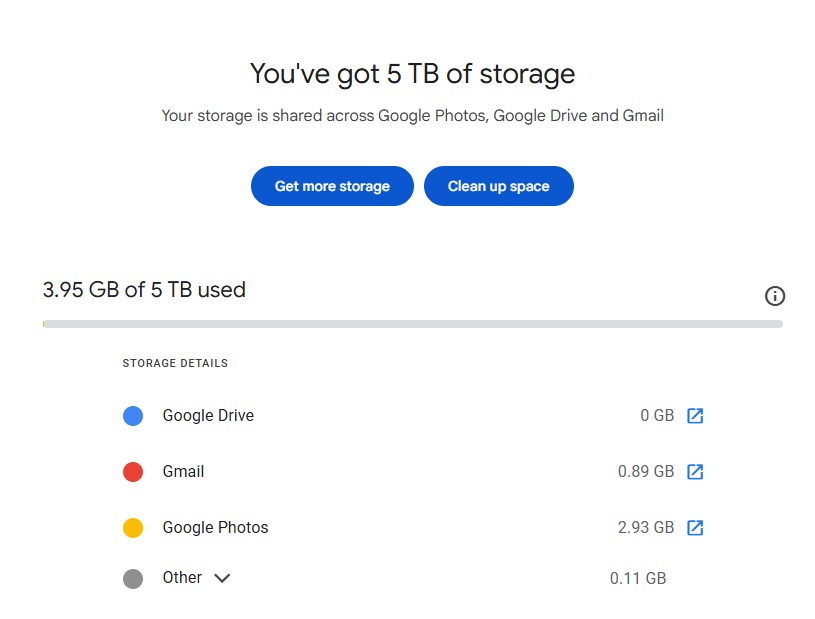
Google’s plan pages also show that subscribers receive 1,000 monthly AI credits, and the plan includes family sharing with up to five other people. You’re essentially getting Gemini Advanced, a giant shared storage pool, and family sharing under one $19.99 monthly bill.
Family members share the AI access and overall 5TB quota but each persons files and prompts are private to each Google account. 5TB shared across six people isn’t a lot, but for one or two people the Google AI Pro plan is an interesting option for more online storage.
The Big Comparison: Who Offers What?
Here is how the major consumer cloud storage options line up right now. Direct comparison isn’t practical because each product bundles different services with cloud storage.
Google AI Pro at $19.99/month gives you 5TB, Gemini Advanced AI access, family sharing for up to 5 others, and storage across Gmail, Drive, and Photos. Google Docs, Sheets and Slides free versions are available and Gemini AI is integrated into those apps with the Pro plan.
Microsoft 365 plans give 1TB of OneDrive storage to each user plus full desktop Office apps including Word, Excel, and PowerPoint. To get 5TB of OneDrive, you’d have to pay a whopping US$480 extra.
iCloud+ (Apple) charges $9.99/month for 2TB shareable among 5 people. No annual billing option. The top tier goes up to 12TB at $59.99/month.
Dropbox Plus costs $9.99/month (billed annually) for 2TB. Dropbox is platform-agnostic and has strong sync technology, but it does not bundle any productivity apps.
ChatGPT charges $24 month for AI access with no cloud storage or other features.
Claude charges $20/month for AI alone, also no cloud storage.
The Honest Assessment
Google’s move is aggressive. At $19.99/month, 5TB plus AI plus family sharing is a strong package.
One or two people needing more cloud storage might consider Google AI Pro for the 5TB of online storage with the other features as bonuses.
This is not a direct competitor for Microsoft 365 plans because there’s no Office-like desktop apps. However Google AI Pro can work as an AI service alongside Microsoft Office, much like many people do with either ChatGPT or Claude.
Microsoft 365 Family remains hard to beat on pure value for households. Six people, each with 1TB of OneDrive plus full Office apps is a compelling package for anyone whose daily work runs through Word, Excel, or PowerPoint.
Google Drive can be used with Office apps for Windows or Mac using the Drive sync software. Google AI Pro’s 5TB could be used for additional storage like photos, videos and backups that would be too expensive to keep on OneDrive. OneDrive’s 1TB should be enough for Office documents that you use directly with Word, Excel and PowerPoint.
This is squarely aimed at pulling people into the AI subscription tier. Google has not changed its standard Google One plans. If you are not paying for AI features, you will not get this upgrade. The standard Google One tiers remain unchanged.
What Does This Mean for You?
If you already pay for Google AI Pro: You just got a free upgrade. Check your Google One dashboard or the Google One app to confirm the 5TB has appeared in your account.
If you are a heavy Google Photos or Gmail user: This plan now makes real sense. Five terabytes gives you room to stop worrying about storage for years.
If you are a Microsoft 365 owner: Microsoft 365 Personal or Family gives you full desktop Office apps alongside 1TB OneDrive storage, and that bundle is extremely hard to replicate. But Google AI Pro is worth considering for use alongside the Office apps and as additional online storage.
If you are a Microsoft Office or Microsoft 365 sharing user: Google AI Pro is a way to get AI services alongside the Microsoft Office desktop apps without paying for Copilot integration. M365 sharing users have 1TB OneDrive storage. Microsoft Office users can add 5TB of online storage to use with their Office apps.
If you use Apple devices exclusively: iCloud+ remains the most seamless option, but Apple charges more annually since there is no annual billing discount, and the storage per dollar still high.
If you are on Dropbox: The sync quality and cross-platform reliability are Dropbox’s real selling points. On raw storage per dollar, it no longer competes at the top end.
Get Up to 11 TB: How to Add More Microsoft OneDrive Storage to Your Microsoft 365 Plan
Copilot Access Levels for Microsoft 365 Consumer Plans: What You Actually Get
AI Credits in Microsoft 365: What They Are and How They Impact Your Copilot Usage
Microsoft 365 Premium: Copilot AI, new Features and Pricing Explained
Microsoft Kills Free Copilot Chat in Word, Excel and PowerPoint: What Happens on April 15
Microsoft 365 Plans in 2026: Complete Overview of Pricing, Features, and Changes
Apple Takes Aim at Microsoft 365 and Google Workspace with Free Business Platform
Your Outlook.com Emails Could Kill Your OneDrive Storage: Here is Why
Microsoft 365 Copilot Explained: Features, Limitations and Your Choices
Microsoft 365 Copilot Expands for Personal and Family Plans: But Limits Remain