The Find My Phone feature in an iPhone or Android device is great even if you think the device is lost for good after a long swim in over 45 feet of water. An iPhone was lost in 15 meters (49 feet) of water off an Australian beach. It was
Our favorite compression tool, WinRAR, has just released version 7. WinRAR supports all the file compression formats including ZIP. We like the RAR format mostly for the ‘Solid’ option which can give better compression across many files in the same archive. ‘Solid’ is great for making a smaller archive of
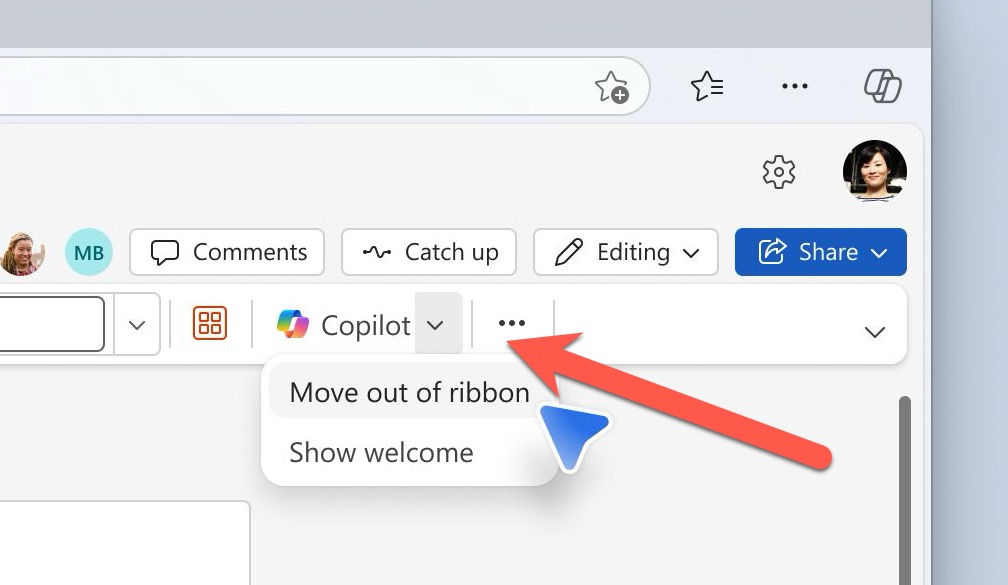
Get rid of the over large ‘AutoSave’ slider on the Word, Excel or PowerPoint status bar. The Autosave button (strictly a label plus slider) takes up a lot of room on the top row of modern Office apps. That space is quite crowded and you need it to fit as
Copilot can change the style or look of an AI generated image to make endless variations on the same theme with a few clicks. We’ll show you how it really works and how to make it work even better. Ask Copilot for an image such as “make image of a
Cells in a PowerPoint slide table can be split or merged (combined) in PowerPoint for iPad. Word for iPad can already combine or split table cells and now the PowerPoint app works the same way. Select two or more cells in a table and choose Merge | Merge Cells from
WhatsApp can send any file, photo, video or text notes to yourself, in other words between your computers or devices. Files up to 2GB can be moved quickly and securely between machines. Sometimes you need to copy something between two computers or devices you have. That could be a little
Excel has some useful options for printing less than an entire workbook. Printing a selection, active sheets or just a table. As Office-Watch.com has discovered before, there’s a lot more available in Office than a quick look suggests. See Print options are at File | Print then choose the menu
There are shortcuts that automatically format bold and italic text in Word. The same shortcuts and more work in WhatsApp texting as well. There are now four more formatting options; bullet lists, numbered lists, quotes and inline code. AutoFormatting Bold and Italics as you type In Microsoft Word and Outlook
Make an unpleasant point with the world’s ugliest color. A ‘drab dark green’ can be used in any Word document, Excel sheet or PowerPoint slide. And we’ll explain the recommended complement color and font. It’s not our opinion, but the market researched result of an effort to find the most
The British have 546 ‘drunkonyms’ or words for drunkenness according to a new academic study. We could not resist seeing how the Microsoft Word handles them (after we’ve had a quick drink to get us going 😀) We compiled a list of 55 drunkonyms and ran them past the Word
Copilot now has some in-built editing of the background of an AI made image, some borrowed from similar features in Designer. Request an image from Copilot e.g. “Make an image of a koala in the desert”, select one of the thumbnail pictures to see the full size version. Click on
Here’s a way to ensure your outgoing emails include DKIM and SPF details all setup correctly. DKIM email verification is becoming more important for deliverability of emails. This is mostly for anyone using Microsoft 365 email hosting, especially individual or small business users who have change their email verification setup.
Ever wondered what fonts say to each other. How newcomer Aptos treats Calibri? How Dingbats dance and what Comic Sans wears? Elle Cordova answers these and other important typographical questions in two Instagram videos. Fonts Hanging Out part 1 https://www.instagram.com/p/C2cZBIAr24m/ Fonts Hanging Out part 2 https://www.instagram.com/reel/C2sxcszyLnN/ Enjoy … Excel –
All Outlook for Windows have a critical bug which makes it too easy for any hacker to gain access to a computer. It just needs a simple link clicked from an email to bypass Office Protected View protections, even from the Preview pane. So all Outlook’s should be updated asap.
A good part of Designer has been deleted with no notice or explanation. Erase is missing with only a ‘dumb’ alternative. The feature is Erase it let you select and remove parts of an image and automatically fill the area with surrounding content. The entire ‘Erase’ option has disappeared for
All Microsoft 365 administrators should make sure this setting is completely ON to ensure emails are delivered and not marked as spam. It’s a setting many administrators might assume is already on but it’s not. Some email hosts have started stronger enforcement of two email verification systems called SPF and
Microsoft Loop has a new feature that should be added to Word and PowerPoint, see what text has been written by Copilot AI instead of a human. Loop is adding a tag (‘floatie’) which shows who wrote some text and includes ‘Copilot’ as one of those authors. That’s a very
Need a heart symbol or image for your Valentine’s Day message, email, slide or card? Microsoft Office Icons have many choices available including Icons. Many of the stock or supplied resources in Office have passionate ‘heart’ symbols. As you’ll see, there are some anatomically correct icons among the romantic ones,
The latest AI tools can help add a personal touch to Valentine’s Day images, graphics and text like a love poem. Add some details about your loved one (name, hobbies etc.) and AI can do its magic. Free AI tools like Copilot, Microsoft Designer, Dall-E or ChatGPT can make something
Just by using Copilot you’re giving Microsoft free access to anything you do or get from their AI system. It’s a legal trap that everyone needs to keep in mind. We found this buried in the Copilot Terms and Conditions (T&C’s) starting on the Bing web site https://www.bing.com/new/termsofuse (strange place
Most readers of Office Watch will have a Microsoft account but is it as secure as it should be? Two-step authentication is becoming essential for the key Microsoft account. If you have Microsoft 365, OneDrive, Outlook.com, Windows 11/10/8.1/8, Windows Phone or (likely) Skype then you’ll have a Microsoft account. It’s
While a lot of Word, Excel and PowerPoint might appear to be the same for decades, there’s a lot of work happening ‘under the hood’ to keep Office working. Gilad Oren at Microsoft has written an interesting piece on how the whole real-time collaboration feature in Microsoft Office has been
For yet another way to make AI images, perhaps with a different look, you can now try Google Bard. Bard is Google’s AI helper, now available in ‘most countries’ (Google’s wording) but only in English for the moment. It does all the things we’ve come to expect from a broad
Two economics professors have been caught using Excel’s Autofill feature to fill in the blanks to complete a published academic paper. A study on green innovations and patents in 27 countries by two professors has come under scrutiny by a student as reported, by Retraction Watch. The paper was said to use