Microsoft 365 – the subscription / annual fee plan for Microsoft Office on Windows, Mac, iPhone, iPad and Android.
Includes Word 365, Excel 365, PowerPoint 365, Outlook 365 and many other ‘365’ programs, apps and services.

Common Sound effects for PowerPoint
A PowerPoint presentation sometimes needs that extra oomph, such as an occasional sound effect. Here are a few common ones that you’ve heard from movies and TV shows. You can use them as a trigger sound, or novel background noise. It’s all about the sounds: Wilhelm Scream – stock sound effect used in several TV shows and movies, originally from the […]

Make your Mouse Cursor easier to see in Windows 10 and 11
A very small set of mouse cursor options is included in Windows 11, but they are fairly simple and basic. Perhaps you’d like something easier to see? A larger or more colorful mouse pointer? There are options to change the colour of your mouse, and even adjust the size, however if you wanted to add some more fun or […]

Fancy Themed Mouse Cursors for Windows 10 and 11
Make your extra fancy mouse cursors using a feature buried in Windows 11, Windows 10 and earlier Windows too Download mouse pointer themes for free, from sites like Open Cursor Library. Microsoft has made the option to change your Pointer Icons a little tricky, it takes a few steps, but is fairly easy to manage once you’ve downloaded your theme. As Microsoft has left little creativity when it comes to cursor themes, it’s important […]

Nine hidden tricks for Auto Fill in Excel
Typing or formatting cells of repetitive data can be very boring, but Excel has an Auto Fill feature to make it easier by automatically filling in data for you. We thought we knew Auto Fill, but just found nine surprising and useful tricks. Auto Fill goes beyond simple incrementing numbers or dates which is what […]
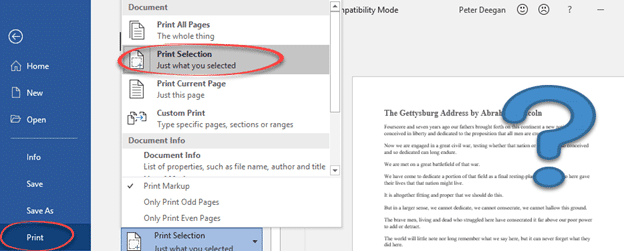
Print selected part from a Word document
Microsoft Word can print the selected parts of a document, not just the whole document, Select the part of the document you want to print. Word won’t let you print separated selections (made using the Ctrl key). Go to File | Print (or Ctrl + P) and from the Settings list choose Print Selection. The […]
New Prime Number is too big for Excel
In 2013 they discovered a new Prime number but not for Excel. The GIMPS project has discovered a new prime number – that’s a number that can only be divided by itself and one. The new arrival is a bouncing bonny number 257,885,161-1 which is 17 million digits long. Prime numbers aren’t just mathematical curiosities, they […]
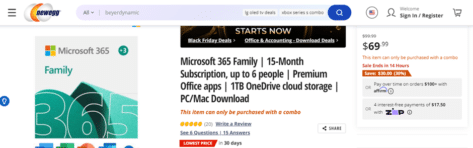
Save $60 on Microsoft 365, if you know the trick
NewEgg has a promising 15-month deal for Microsoft 365 Family charging $69.99 instead of over a hundred dollars. It’s a good deal and, we’ll show you the trick to save another $10 on their headline price. Office Watcher, Richard H, sent us a tip about a good Microsoft Office deal. We love when readers do […]

Solving “There’s already an account …” Microsoft login problem
Trying to login to Microsoft can get into a strange loop being told “there’s already an account” but then “That Microsoft account doesn’t exist.” for the same address! Amazingly both messages are right but not well worded. How can a Microsoft account login (email address) both exist and not exist at the same time? Has […]
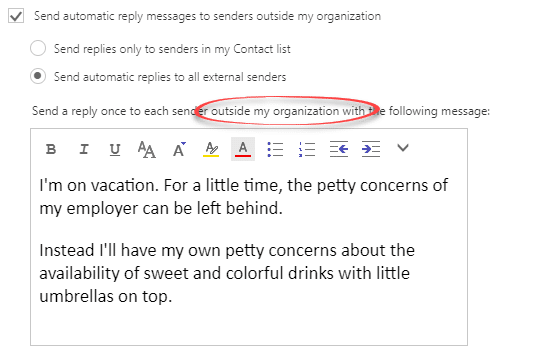
The best way to ‘Out of Office’ or vacation message
Outlook can setup an Out of Office response, depending on the type of email connection but there’s a better way that works for everyone. ‘Out of Office’ or ‘Vacation’ autoresponses will automatically reply to incoming messages. Clever systems have options like different messages for people inside or outside an organization or only those in your […]
New look Office 365 isn’t loved by Microsoft’s paying customers
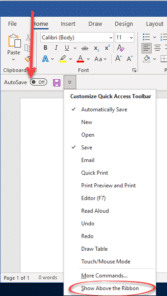
The new look Office 365 and Office 2021 is rolling out and the complaints are coming thick and fast. We’ve been working thought the messages we’ve received and tried to figure out the problems and possible solutions. Missing Quick Access Toolbar? It might seem like the Quick Access Toolbar QAT and all its buttons have […]

Two Microsoft 365 deals to get, while they last
Walmart’s $70 deal for 15-month of Microsoft 365 Family has gone but there are still two other offers available to extend or start a Microsoft 365 Family plan. As often happens a very good offer for Microsoft 365 Family doesn’t last long before it’s replaced (using the same link) with a higher price. If you […]

Reversed Tilde ∽ symbol in Word, Excel, PowerPoint and Outlook
Type the Reversed Tilde ∽ into Microsoft Word, Excel, PowerPoint, or Outlook. Both in Office for Windows and Office for Mac. Reversed Tilde ∽ symbol is the vertically flipped version of the usual tilde ~ symbol. A tilde starts with the downward curve while the reversed tilde has a rising curve at left. How Reversed […]
White Chess Queen ♕ symbol in Word, PowerPoint and Office
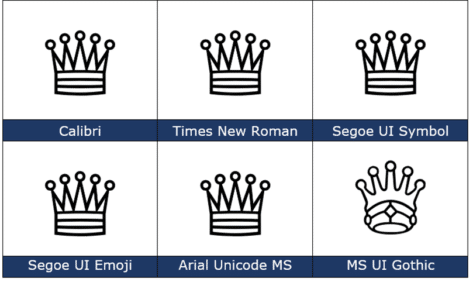
How to insert the White Chess Queen ♕ into Microsoft Word, Excel, PowerPoint or Outlook. Both in Office for Windows and Office for Mac. White Chess Queen ♕ symbol is useful for users that want to represent the chess piece as a symbol, rather than an image. Or just a generic ‘Crown’ graphic. How White Chess […]
A simple way to convert PowerPoint slides to Word document
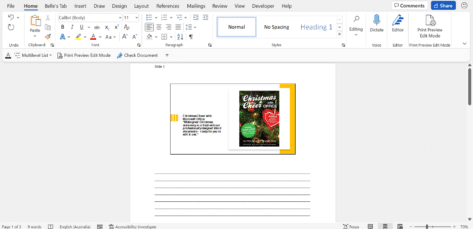
There’s an easy way to make a Word document version of a PowerPoint presentation and it’s another way to make a handout for your audience. It’s a simple step by step process of converting your PowerPoint (.pptx) presentation file into a Word Document (.docx). Firstly, you will need to open your PowerPoint Presentation (amazing but true) Next, select File | Export Select Create Handouts | then the Create Handouts button This section will allow you to put […]

Beyond simple Undo in Microsoft Office
There’s a lot more to Undo than just reversing the last thing you did in Microsoft Office The UNDO command is surely one of the greatest time-saving inventions of the digital age. According to Jensen Harris, the head honcho of the Microsoft Office User Experience Team back in 2008 , undo is the fourth-most used […]

Microsoft 365 great deal now from Walmart
Walmart in the US has had a good deal on Microsoft 365 Family edition, saving $54 on the standard price. Used for renewing/extending an existing Family plan or joining for the first time. Update: Two Microsoft 365 deals to get, while they last The offer is for a 15-month extension/start to Microsoft 365 Family for […]