Microsoft 365 – the subscription / annual fee plan for Microsoft Office on Windows, Mac, iPhone, iPad and Android.
Includes Word 365, Excel 365, PowerPoint 365, Outlook 365 and many other ‘365’ programs, apps and services.

Turn talk into text in Word 365 for Windows
Modern Word has a powerful ‘Speech to Text’ option ‘Dictate’ which works a lot better than similar options in the past. If you’d tried and been disappointed with dictating into Word, it’s time to give it another try. Dictate is only available to Microsoft 365 subscribers with Office 365 software for Windows, Mac, iPhone, iPad […]

Blood Type and Star Signs now in Outlook for Mac
One of the most curious feature additions is now in Outlook for Mac. Each Contact can have their Blood Type and Star Sign included along with phone numbers, address etc. These details and many more have always been possible in Outlook Contacts via custom fields. In the latest Outlook for Mac preview the list of […]

Get 11 Indian languages translated by Microsoft 365
Microsoft 365 Translator now has the language Odia (or Oriya), taking the list of Indian languages supported to 11. in Odia, according to Microsoft …. Microsoft 365 ଅନୁବାଦକ ବର୍ତ୍ତମାନ ଓଡ଼ିଆ ଭାଷା (କିମ୍ବା ଓଡ଼ିଆ) ଅଛି, ଯାହା ଦ୍ୱାରା 11ଟି ଭାରତୀୟ ଭାଷାର ତାଲିକା ଗ୍ରହଣ କରାଯାଇଛି । Microsoft Translator is a cloud-service so Odia is now on the list […]

Alumni and Student discount for Microsoft Office
Microsoft has a Microsoft 365 offer for students and recent graduates that’s worth a look but watch out for the fine print. The offer is Microsoft 365 Personal for $12 instead of $69.99 which is a good deal if you qualify. It’s available to students and recent graduates of colleges/universities that have a Microsoft 365 […]

Get money back after billing bugs with Microsoft 365
There are strange and worrying reports of double billing, disconnection of service and other anomalies that leave some Microsoft 365/Office 365 paying more or getting less than what they paid for. Here’s what to do if your Microsoft 365 account and billing has gone wrong, Just some of the troubles being reported: Double charging. The […]

Gene names changed to stop confusing Excel
The names of genes are being changed just to stop Excel confusing them with dates during the import process. We’ll explain two ways Excel already works to avoid the geneticist’s problem. Genes named like MARCH1 and SEPT1 which Excel converts into dates when imported the wrong way, usually directly via a CSV text file. Office […]
Excel’s General problem that messes up what you type
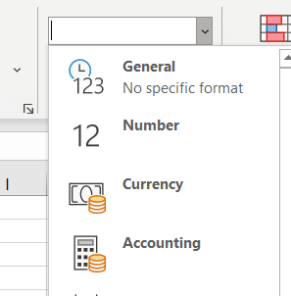
Why does Excel change what people type or import, sometimes in ways they don’t want? It’s the General cell format that messes with what you type or import. It’s the default cell format ‘General’. It’s top of the Formats list and most of us haven’t given it a second thought. Microsoft short explanation is ‘No […]
Outlook stores settings in the cloud – but which ones?
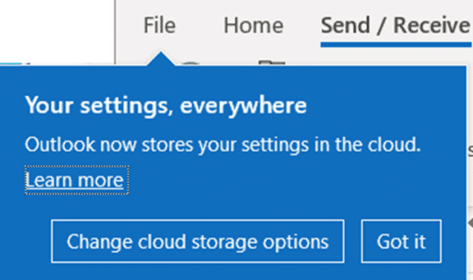
The latest Preview version of Outlook 365 for Windows includes a cloud storage option for settings. Which settings are being saved? Customers have long wanted the ability to share Outlook settings, especially Signatures, across different installations of Outlook. That’s now coming though the vital details aren’t easily available. In recent Outlook 365 for Windows previews […]
Find your Microsoft 365 plan, expiry date and when Microsoft charges for renewal
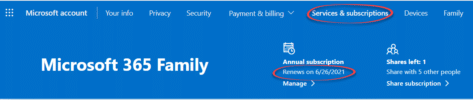
It’s easy for forget when your Microsoft 365 (Office 365) plan is up for renewal or even which plan you’ve purchased. These are vital points if you want to avoid being overcharged for Microsoft 365 renewals, which is what Microsoft will do if you’re not careful. Go to https://office.com and login using your Microsoft 365 […]
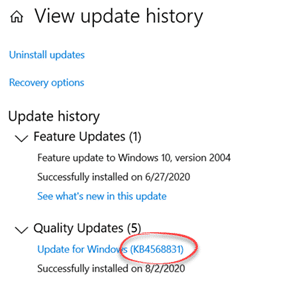
Important Windows 10 patch fixes Office bugs
A new Windows 10 update includes fixes for some Office related bugs for Word, Excel and Outlook. The patch is called KB4568831 released July 31, 2020 . It’s for the latest Windows 10 May 2020 release (aka ‘2004’ or ‘Build 19041.423’). It’s a large update which fixes many different Windows 10 bugs. During the lockdown, […]

How to get a refund of Microsoft 365
Getting a refund on an Office 365 /Microsoft 365 plan isn’t easy but can be possible depending on the reason for cancellation and your local consumer laws. There’s a lot of misleading or out-of-date information on the web, including details from Microsoft itself. Here’s the hard information we’ve been able to find. Microsoft 365 is […]

Microsoft 365 subscription refunds – the real rules
Many people talk about what’s possible in getting a refund of Microsoft 365 plan but it’s mostly copied from other social media or forums and some completely wrong. We’ve gone looking for Microsoft’s real rules for cancelling and refunding a ‘subscription’ they are quite different from what’s commonly ‘known’. Zombie Facts Most of the references […]

Immersive Reader in Teams and Word Online
The Immersive Reader features of modern Word 365 are also available in Microsoft Teams and Word Online (browser based Word) to view documents and messages. Look for the Immersive Reader option on the menu for post threads. It’s also available on the View menu for any Word documents opened in Teams or Word Online. The […]
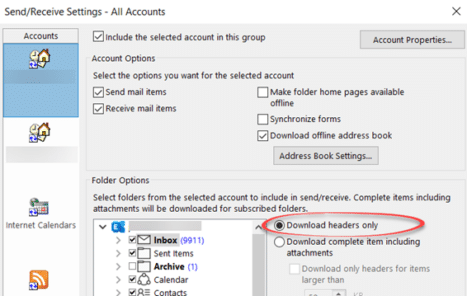
Outlook 365 bug deletes messages
An unfixed Outlook 365 bug can delete messages before you get a chance to see them. Microsoft has been ‘investigating’ for about two weeks with no fix. The only saving grace is that it’s a relatively uncommon use of Outlook and not a default setup. Even so, any bug which loses messages should be fixed […]

Read Aloud in Word for Mac
Word 365 and Word 2019 for Mac have the same Read Aloud option that’s in other Word releases. Word 2016 and earlier have other options to speak the words in a document. Word 365 and Word 2019 Read Aloud starts from the Review menu. That opens a control panel with the usual options. Back – jumps […]

Bogus Microsoft 365 message “We can’t cancel your subscription”
Customers trying to cancel their recent Microsoft 365 plan might see a totally bogus message which wrongly claims that a cancel and refund isn’t possible. A thread on Microsoft ‘Answers’ includes a web page image from a customer trying to cancel Microsoft 365 Family. Microsoft had auto-renewed the plan but the customer didn’t want that. […]