Microsoft 365 – the subscription / annual fee plan for Microsoft Office on Windows, Mac, iPhone, iPad and Android.
Includes Word 365, Excel 365, PowerPoint 365, Outlook 365 and many other ‘365’ programs, apps and services.

Text Spacing tricks for better PowerPoint slide titles
PowerPoint includes quick access to character spacing features that make slide titles stand out. In PowerPoint there are two useful features to make a slide title jump out at the viewer. Character Spacing is quickly changed on the Home tab. More subtle is Kerning. When it comes to Design, and clarity in Design, Space is almost as important as Content. This is also true when […]
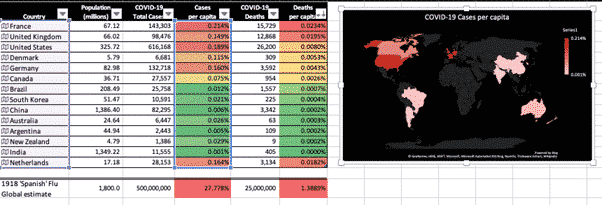
COVID-19 stats in Excel 365 for Mac
We’ve made a new version of our COVID-19 statistics workbook that’s compatible with Excel 365 for Mac. Keep track of COVID-19 statistics using this Excel spreadsheet that shows the latest cases and deaths for countries you choose and populations also added for you. Excel 365 for Windows has a separate download available here. Excel for […]
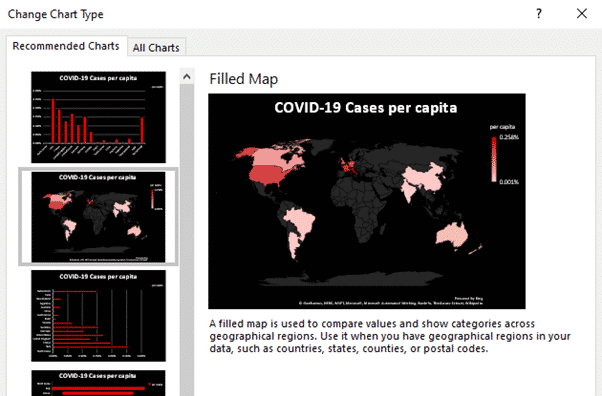
COVID-19 Excel workbook – under the hood
Some of the features and tricks in our COVID-19 worksheet for Excel 365. We’ve made this workbook as a practical and timely example of some important recent Excel features and how they can be used. Open up the workbook in Excel 365 for Windows and add some countries to see the whole table and chart […]
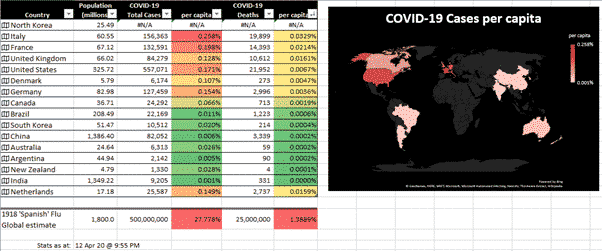
Track COVID-19 stats in your own Excel spreadsheet
Keep track of COVID-19 statistics using this automatically updating Excel spreadsheet that shows the latest cases and deaths for selected countries with populations also added for you. We’ve been a little annoyed at media coverage that deals with raw numbers without adjusting for population. We opened up Excel 365 and made use of its Geography […]

Great price on Office 365 Home in the UK
Amazon UK are selling Office 365 Home for very near their lowest price, saving ₤28 on the usual price. As we type this, the price is ₤51.09 here. That’s as good as you’re likely to get. Microsoft will sell you exactly the same thing for ₤79.99! That’s the Home (soon to be Microsoft 365 Family) […]

Microsoft 365 licences, are you paying too much and for too many?
A new report suggest that many organizations are paying too much for Microsoft 365 (Office 365). The same might apply to some individuals with Microsoft 365 Family/Home. The Coreview report identifies three costly mistakes with Microsoft 365 licencing. Buy too many licenses; ‘err on the side of caution’. Not assigning inactive licenses to new users, […]

Subtle effects with Snap Camera – beyond the potato
Snap Camera is a way to ‘fancy up’ your webcam with fancy effects including the now infamous potato. There are other subtle effects that will work with Zoom, Skype, Teams or any other online calling service. Also a color slider inside some lens effects. Get Snap Camera from https://snapcamera.snapchat.com/ it’s free for Windows and Mac. […]
Skype meeting links revealed – good and bad
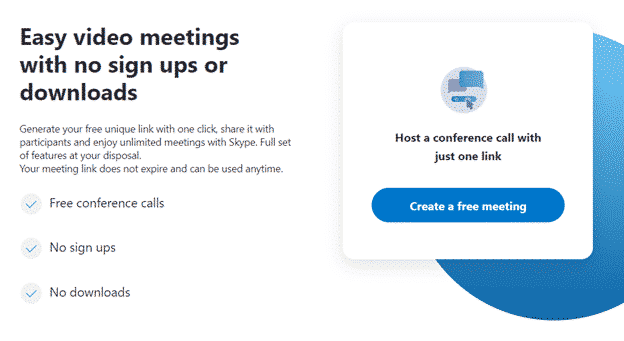
Microsoft has rushed out a new Skype feature that lets you setup an online meeting or group call with a single shareable link. Of course there a good things about this option and some very bad things. As usual, the setup is more complicated than Microsoft makes out. This new system lets you setup a […]

Zoom problems you can easily fix
Zoom has problems but there are easy settings that will fix your online calls and meetings. It’s time to balance some of the excessively worrying Zoom coverage of recent days. Some people and extreme groups are taking advantage of the open defaults on Zoom. There’s an organized effort to share Meeting ID’s to harass targeted […]

Zoom changes meeting defaults but there’s more to do
Zoom has changed some meeting defaults to make their group calls, webinars, classes etc a bit more secure from intruders. There’s more for a Zoom host should do to protect their meetings, classes and calls. Two default settings have changed. Passwords must be set for all meetings and the Waiting Room is now on by […]
Hospital Go Bag – a checklist
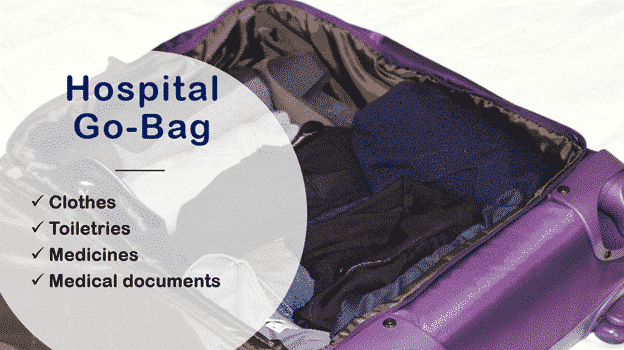
Continuing our look at what to put in a bag ready for an emergency trip to hospital. A checklist to ‘Prepare for the worst’. In part 1 Get ready for hospital – have a ‘go bag’ ready we looked at the devices to take, what to put on them and setup. Now we’ll list some […]

Get ready for hospital – have a ‘go bag’ ready
If you get so sick they send you to hospital, you’ll be too ill to get ready. ‘Prepare for the worst’ by making up a hospital ‘go bag’ with what you’ll need. Visitors to hospitals are being severely restricted so make sure you have communication options. Prepare your computer for isolation or quarantine Because we’re […]

Get Office Watch ebooks in your currency
We’re pleased and relieved to return multi-currency support to our Ebook store. Look for the pull-down list of supported currencies at top right of any shop page. Prices will change to the amount charged in your chosen currency. Choose from these currencies: US dollars Canadian dollars UK Sterling Euro Australian dollars New Zealand dollars * […]

You don’t need a tripod or camera stand – ask Prince Charles
You don’t need a tripod or camera stand, just a few books and other bits can do the job. Don’t believe us? See the example set by His Royal Highness Prince Charles Philip Arthur George, Prince of Wales, KG, KT, GCB, OM, AK, QSO, CC, PC, ADC, Earl of Chester, Duke of Cornwall, Duke of […]

Wide angle lenses easily added for online meetings
There’s a simple and cheap way to expand the view of computer and smartphone cameras. Simple clip-on wide angle lenses can change the narrow view of a iPhone, iPad, smartphone or laptop camera into a wide view. They give you a wider view of a room which is great for a group of people in […]

Making AutoText or AutoCorrect entries in Word
If you have words or longer sections of text that you type frequently and don’t want to have to type in full each time, Word allows you to set your own shortcuts to automatically enter this text in a few keystrokes either AutoCorrect or AutoText. There are two ways to do this. For shorter pieces […]