Microsoft 365 – the subscription / annual fee plan for Microsoft Office on Windows, Mac, iPhone, iPad and Android.
Includes Word 365, Excel 365, PowerPoint 365, Outlook 365 and many other ‘365’ programs, apps and services.
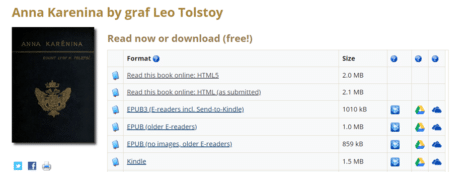
Listen to free audiobooks from Microsoft and Project Gutenberg
Microsoft and Project Gutenberg have joined to create thousands of audiobooks for free, using modern ‘text to speech’ technology that’s amazingly good. And we have some tips on how to create audiobooks with more variety in voice, accent and pace. Since 1971, Project Gutenberg has compiled a wide range of copyright free ebooks in many […]

Microsoft’s font substitution for Aptos really sucks
Microsoft’s alternatives for the new Aptos fonts range are very poor. In some cases, the substitutions make no sense at all. We’ve looked at what happens if a document with Aptos fonts is opened Office 2016 and earlier versions of Word, Excel, PowerPoint and Outlook. Aptos fonts are the new default for Microsoft 365 and […]

Two Important Differences to Know about the Python Excel Trial Release
The trial release of Python in Excel is very interesting but it’s not the usual “Insiders” feature release with two important differences that will cost you later. “Insiders” is Microsoft’s name for their beta testing option to try upcoming features to the public Office apps. Excel gets Python – who, when and why Usually features […]

Join the ‘Office Insider’ Movement: Uncover the Surprising Benefits and lesser-known Risks!
Microsoft has many little ‘ads’ or suggestions that Microsoft Office 365 users (Windows or Mac) join the Microsoft 365 Insiders program (formerly Office Insiders). Is it safe to become an ‘Office Insider’ and why is Microsoft pushing it so much? Office Insiders is the testing program for new Office features. It’s what used to be […]

Discover Office Keyboard Shortcuts in Windows 11 and 10
There are some keyboard shortcuts to open or switch to Office apps in Windows 11 and Windows 10, if you have enough fingers! They are all based around the Ctrl + Alt + Shift + Win combo plus a letter. That might seem like a keyboard shortcut for an octopus but it makes a little […]

Python Editor for Excel is out and essential
The Python Editor for Excel is a welcome innovation of the Microsoft Garage project making editing and debugging Python code in Excel a lot easier. Python Editor add-on for Excel mirrors the functionalities of renowned integrated development environments (IDEs) using the code management system behind Visual Studio Code. Sample code from A new way to […]
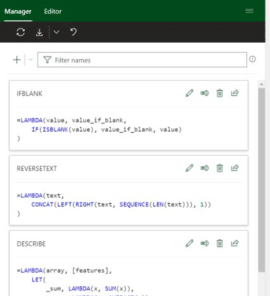
Microsoft fixes a big hassle with Excel’s great Lambda()
Microsoft has fixed the big hassle that comes with the otherwise excellent Lambda() feature in Excel 365 with the new Advanced Formula Environment. Office Watch has sung praises over the power that Lambda brought to Excel. It’s the ability to write custom functions within Excel but without VBA macros. Proper IDE for Excel formulas But […]

Copying images from Designer to Office documents
Unfortunately, copying an image made in Designer isn’t as simple as it should be. Here’s how to grab images made with Designer to use in your own Office documents. Don’t wait, start using Microsoft Designer now It’s easy to paste an image into Designer. Just copy the image from your app (like Word or PowerPoint), […]

Designer mobile now on iPhone and Android
Here’s how to get the new Microsoft Designer app for iPhone and Android smartphones. Also how to share designs between the mobile app and the full Designer web app. Get the Designer app Go to https://designer.microsoft.com/install and scan the QR code provided on that page That will open the App Store or Google Play to […]

Get current UTC time into Excel with Python
Python in Excel adds lots of new possibilities to Excel including a new way to the latest UTC time. Here’s the full code, how it works and a fix for an annoying problem. Knowing the UTC / GMT time is important for comparison with the ‘Last Trade Time’ data from Excel’s Stock / Currency data […]
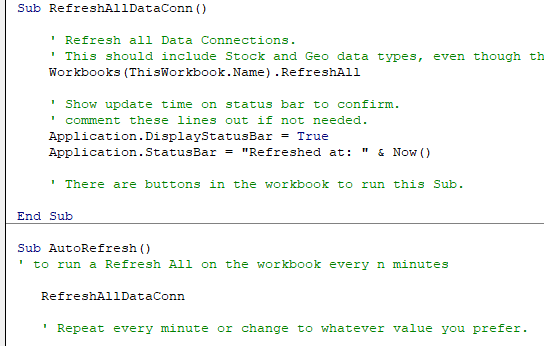
Two Excel workarounds for automatic refresh and recalculation
There are two ways to make Excel automatically refresh data connections and recalculate a worksheet. These tricks are important with the Stock and Currency data type in Excel 365 but also other situations. Normally Excel will update itself when you change a cell value. These days there are situations where cells change value but Excel does […]

Gun 🔫 emoji in Word, Excel, PowerPoint and Outlook
Insert the Water Pistol or Gun emoji 🔫 into Microsoft Word, Excel, PowerPoint or Outlook. Both in Office for Windows and Office for Mac. AND how to make the ‘gun’ point to the right. Water Pistol 🔫 symbol is the only ‘gun’ style symbol in the emoji collection. It’s officially called ‘Water Pistol’ but searching […]

Ten ways to Reverse, Mirror or Flip Text in Microsoft Word
There are at least ten ways to ‘reverse’ ‘mirror’ or ‘flip’ text or images in a Word document. Horizontal, vertical, reversed, combined or any angle you like. When people say those terms they can mean different things so we’ll look at many options and how to do them. Also along a curve, but that’s a […]

PowerPoint linking to slides – now hidden but still there
Modern PowerPoint has made an ‘improvement’ to slide linking in PowerPoint which hides an important feature that’s been in PPT for years … linking to slides or web pages. Sometimes Microsoft gets so enthusiastic about some innovation they forget the basics that customers use on a daily basis. Insert | Link in PowerPoint is one […]

Inspect without color in PowerPoint
Inspect without color is one of the more interesting and useful Accessibility tools in PowerPoint 365. It shows a slide in ‘black and white’ or ‘greyscale’ which is useful for more than helping color blind people, Inspect without Color can help improve the readability and design of any slide. Inspect without color is designed to […]

Was Microsoft 365 email down or not?
Microsoft 365’s mail service had troubles on Monday 4th for almost 24 hours. Or did it? Microsoft’s reporting of the incident has been inconsistent and had more than the usual self-serving blather. The Microsoft 365 email outage started on Monday 4th September about noon UTC (early morning in the US) and was described by Microsoft […]









