Microsoft 365 – the subscription / annual fee plan for Microsoft Office on Windows, Mac, iPhone, iPad and Android.
Includes Word 365, Excel 365, PowerPoint 365, Outlook 365 and many other ‘365’ programs, apps and services.

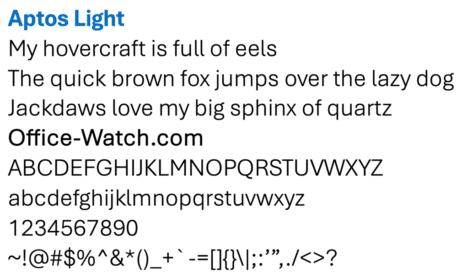
Surprise! Office 2021 & Office 2019 has the all Aptos fonts
An undocumented surprise for Office 2021 and Office 2019 customers. The new Aptos fonts are automatically installed in Office 2021/Office 2019 even though Microsoft insists they are for Microsoft 365 only. However, there’s a crucial difference and strange anomaly between how Aptos fonts work in Office 2021/2019 vs Microsoft 365. According to Microsoft the Aptos […]

Fun Eyes 👀 symbol in Word, Excel, PowerPoint and Outlook
Type the fun Eyes 👀 symbol into Microsoft Word, Excel, PowerPoint or Outlook. Both in Office for Windows and Office for Mac. Eyes 👀 symbol / emoji is a bit of fun for documents and PowerPoint slides. How Eyes 👀 looks in different fonts. Eyes is available in symbols fonts like Segoe UI Emoji and Segoe […]

Make Cloud Fonts available to all programs, not just Office
Microsoft 365 / Office 2021 Cloud Fonts are only available in Office programs … that’s the official line unless you know the trick to make the fonts available in other Windows or Mac apps Cloud Fonts can be selected and installed for Word 365/2021, Excel 365/2021, PowerPoint 365/2021, Outlook 365/2021 and Publisher 365/2021. You might […]
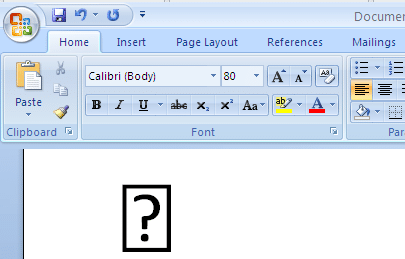
Word’s symbol substitution, the good and the bad
A few years ago, Microsoft quietly added a little Word trickery to make it easier to Insert Symbols and not get the dreaded blank box or box with question mark. Here’s what Word does and how to workaround the, sometimes unhelpful, fix. Back in the olden days of Word 2007 and before, it was possible […]

Outlook meeting organizers now appear in Google Calendar
Google unveiled a little update designed to streamline the experience for Outlook enthusiasts. Outlook meeting organizers will now appear as that in Google Calendars. According to the Google Workspace blog, Google introduced a subtle yet notable modification in the integration between Calendar and Outlook. The update clarified: Previously, if a Microsoft Outlook user invited a […]

Ballot Box with Ballot 🗳 emoji in Word, Excel, PowerPoint and Outlook
Insert the Ballot Box with Ballot 🗳 symbol into Microsoft Word, Excel, PowerPoint or Outlook. Both in Office for Windows and Office for Mac. Ballot Box with Ballot 🗳 symbol can be used for any situation around voting or choice. For example to decorate this PowerPoint slide. How Ballot Box with Ballot 🗳 looks in […]
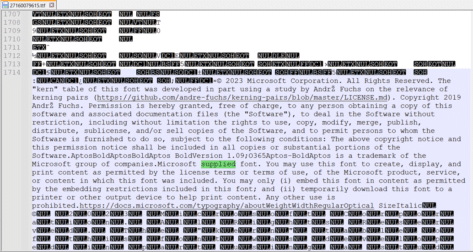
Aptos & Microsoft fonts, what can you legally do with them?
What are the legal limits on fonts supplied by Microsoft in Windows or Microsoft Office? Is there anything special for the Microsoft 365 only Aptos fonts? A few readers have asked us about the font license rules that apply to fonts provided by Microsoft. Can the fonts be embedded in documents or PDF’s for portability? […]

Statue of Liberty 🗽 emoji in Word, Excel, PowerPoint and Outlook
Insert the Statue of Liberty 🗽 symbol into Microsoft Word, Excel, PowerPoint or Outlook. Both in Office for Windows and Office for Mac. “Lady Liberty” has symbol/emoji plus stock images, SVG icons or 3D models. How Statue of Liberty 🗽 looks in different fonts Two standard Windows fonts have the Statue of Liberty symbol, Segoe UI […]

Finding more SVG or Icons for your Office documents
There are a lot more Office Icon or SVG graphics available than the ones in Microsoft 365, Office 2021 or 2019. Jazz up your documents, emails or presentations with a wider range of graphics than the (overused) ones that come with modern Word, Outlook or PowerPoint. Microsoft 365, Office 2021 and 2019 have Icons which […]
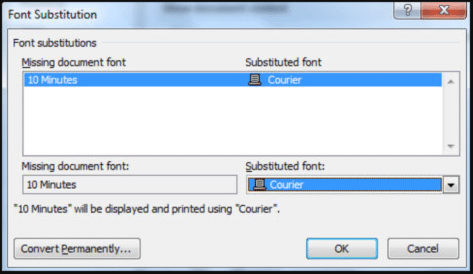
Font embedding problems in Office
Word and PowerPoint have options to embed a font into the document, so why doesn’t it work? In theory you can select the ‘Embed fonts’ option for a document / presentation and all the necessary fonts will be included in the document. That means the fonts will appear, as the doc/slide maker intended, when opened […]

Font Embedding in Microsoft Office
Inside the Microsoft Office (Word and PowerPoint) embedding fonts feature within documents. Font embedding adds the font into the document/presentation file itself so that anyone reading will see the same text as the creator. Normally fonts are installed on the computer and used by whatever programs need them. If the font you want to use […]
Heading fonts in Office, new and old side-by-side comparison
A ‘side by side’ comparison of the current Office default font for headings (Calibri Light) and the new default Aptos Display. Aptos Display has thicker strokes/lines than Calibri Light and is, perhaps, more prominent as a heading font. See the slider below to compare the two heading fonts. See New and old Office font – […]
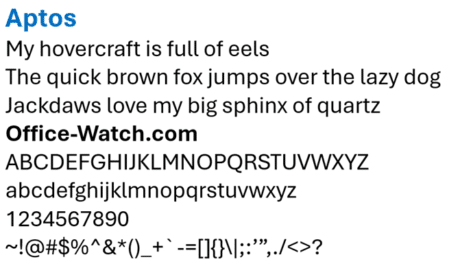
New and old Office font – side-by-side comparison
Here’s a ‘side by side’ comparison of the current Office default font (Calibri) and the new default Aptos. There’s not a lot of difference between Aptos and Calibri fonts to the unpracticed eye. See the slider below to compare the two. See Heading fonts in Office, new and old side-by-side comparison to compare Aptos Display […]
Is Office 2021 really Microsoft 365 in disguise?
It seems possible that Office 2021 is really installing Microsoft 365 with the license details controlling what features are available. In some cases, it’s an important difference to keep in mind. A few bits of information suggest that there’s more commonality between Office 2021 and Microsoft 365 than you might expect. Microsoft 365 features ‘leaking’ […]
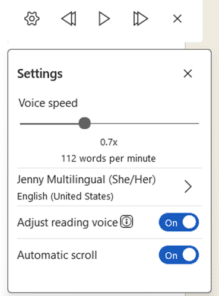
Read Aloud voice changes coming to Word
There are some interesting and useful changes coming to Read Aloud in Microsoft Word. More voices and languages, reading speed and (at last!) text scrolls as it’s being read. The current Read Aloud settings are limited. Review | Read Aloud then click the little ‘cog’ icon. That’s changed in some Insiders Beta releases to this: […]
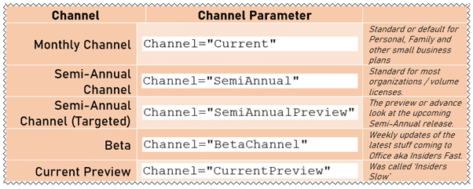
All the options for Microsoft Office 365 update channels
Here are all the current options for Microsoft Office 365 update channels, in other words how often the software is updated with new or changed features. Microsoft never gets tired of changing the names of the Office software releases or ‘channels’. Even though the channel schedule doesn’t change, Microsoft can’t resist the urge to change […]









