Microsoft 365 – the subscription / annual fee plan for Microsoft Office on Windows, Mac, iPhone, iPad and Android.
Includes Word 365, Excel 365, PowerPoint 365, Outlook 365 and many other ‘365’ programs, apps and services.
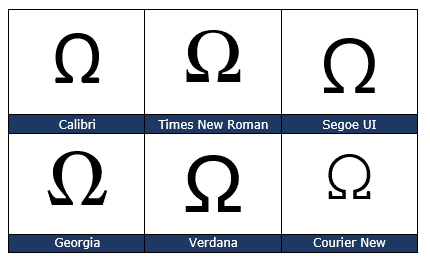
Ohm symbol Ω in Word, Excel, PowerPoint and Outlook
Type the Ohm symbol Ω into Microsoft Word, Excel, PowerPoint or Outlook. Both in Office for Windows and Office for Mac. Also the unofficial Siemens symbol, an inverted Ohm ℧ . Ohm is a measure of electical resistance with the symbol Ω It’s an official SI Unit of measurement just like gram, metre and many […]

So many power selection tricks hidden in Word
Here’s some power selection tricks in Microsoft Word for text, tables, pictures and more. You might think that selecting text and other things in Word is simple. Like many things in Office, there’s a lot more available than the simple methods that we all learn. There are quick ways to choose a word, paragraph, objects, […]

Omega upper Ω or lower ω symbols in Word and Office
Type the Greek letter Omega in upper case Ω or lower case ω in Microsoft Word, Excel, PowerPoint, or Outlook. Both in Office for Windows and Office for Mac. Omega (uppercase Ω / lowercase ω) is the twenty fourth and final letter of the Greek alphabet. It is used to often denote the last or ultimate […]

Flowing column text in Word with break-out or sidebar
Sometimes there’s more than one way to do something in Microsoft Word like having four blocks of text on a page with images or text breakout with flowing columns of text with a side-bar or break-out. “How can I do a magazine-like layout with four blocks of text, one in each corner with a box […]

The best ways to get Microsoft Forms results into Excel
Here are the best ways to get results from Microsoft Forms into an Excel workbook. Sadly they aren’t the elegant and efficient ways available in modern Microsoft Excel 365, 2021 or 2019 for Windows. We’ll explain how to get Microsoft Forms results into Excel for better filtering and analysis. Then we’ll explain how Microsoft could […]

Named Ranges and Objects in the Excel Name Box
I said there are at least six tricks with the Excel Name Box and that’s before you get into using named rangers and objects. The Name Box lets you select a cells and give them a name or jump to an existing named range. It’s the same as going to Formulas | Define Name | […]
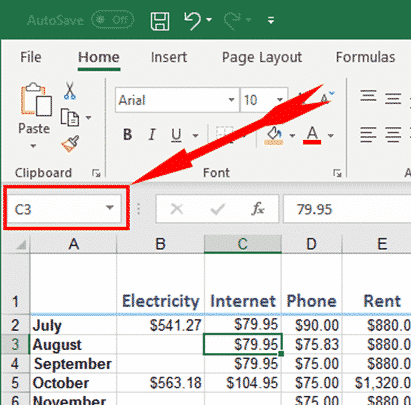
Six clever tricks (at least) in Excel’s Name Box
I found at least six uses for the Excel Name Box beyond just displaying the current cell address. The Name Box is an unassuming little box at the top of your Excel worksheet that you may not have thought about much, but it has a powerful range of uses for selecting and moving around a […]

Limitations of Word Sort feature for name sorting
Microsoft Word’s Sort feature is OK but has its limitations. We humans insist on variations of the simple ‘first and last’ name that confuse a computer. Here’s some name sorting traps and workarounds. For short lists, it’s probably enough to do a Word surname sort then manually adjust the list for any anomalies. Longer lists […]

All mailbox limits (& how to find yours) in Outlook.com and Microsoft hosting
An Outlook.com or Microsoft hosted mail storage quota can be anything from 2GB to 100GB. Here’s a full list of the mailbox limits, how to check your current usage and total allowed size. We’re talking here about Microsoft mailbox hosting services including Outlook.com. NOT the various and confusing types of Outlook software. Outlook.com free account […]

Full CONVERT() measurement list for Excel
A full and searchable list of the measurements and multiplier prefixes available for Excel’s CONVERT function. This is a table of the abbreviations used in the Excel CONVERT() function. The basic units inbuilt to the function are all listed plus some of the common measures available using the Multiplier prefixes. Below that are a list […]
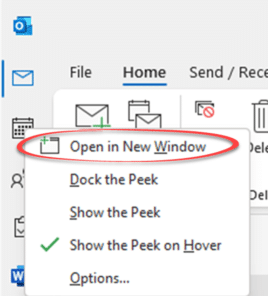
Outlook for Windows – restoring windows
What happens to all the different windows open in Outlook for Windows when the software crashes? How can you restore the open windows when Outlook restarts? In case you didn’t know, it’s possible to have many windows open in Outlook. Many people don’t realize that because Outlook first starts with just one window and clicking […]
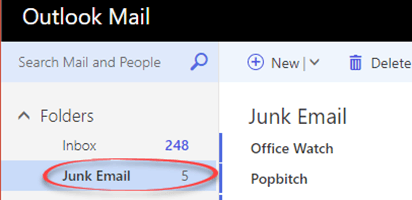
Saving Office Watch from Outlook.com
Microsoft’s mail service Outlook.com might move Office Watch or Office for Mere Morals to Junk Email. Here’s how to stop it doing that for any email, The same advice applies to other newsletters and emails that are wrongly marked as Spam / Junk Email. The famous UK newsletter, Popbitch, is treated the same way. Spam […]

Converting SVG into JPG, PNG or other raster image format
Converting SVG icons into JPG is essential for older Word and Office versions that don’t have native icon/SVG support. Here’s some options for conversion or sourcing alternatives. SVG’s are great with many advantages for Office 365 and Office 2021/2019 users. Not everyone has the latest Microsoft Office or shares documents with others who have earlier […]

Make your own ‘handwritten’ letters with Word
Microsoft Word has almost all you need to make ‘hand written’ notes and letters for a fraction of the cost of a special service. Dig into some of the lesser known Word font and line spacing settings to get that ‘written by hand’ effect. The New York Times has a report on Bond – a […]
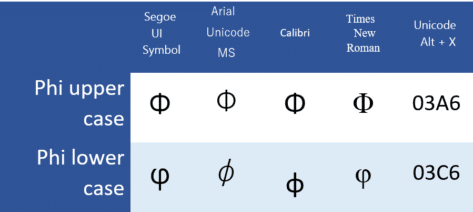
Type Phi uppercase Φ or lower φ in Word and Office
Insert the Phi uppercase Φ, and Phi lowercase φ / φ symbols in Microsoft Word, Excel, PowerPoint, or Outlook. Both in Office for Windows and Office for Mac. Phi (uppercase Φ / lowercase φ / φ) is the 21st letter of the Greek alphabet. The uppercase symbol has various uses, such as the cumulative distribution function of standard normal deviation in statistics. The lowercase symbol has […]
Word documents might write themselves and more
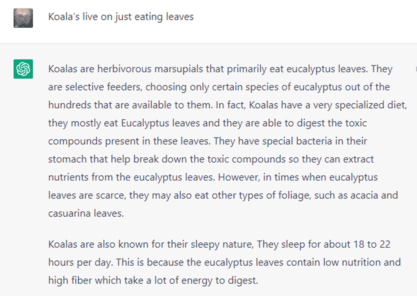
Microsoft is working on extending OpenAI features like ChatGPT to help people write Word documents based on a short suggestion. And there’s a lot more possible given Microsoft’s investment in OpenAI, even a koala poem ‘written’ by Dorothy Parker. Office Watch has been looking at ChatGPT’s ability to write Office VBA programming code (with mixed […]









