
Easy and better lists with Excel 365’s Filter()
Filter is another Excel 365 dynamic array formula that’s really useful and far better than similar options in earlier versions of Excel. Just like SORT() and SORTBY(), FILTER() refreshes automatically whenever the source values change. The older pull-down filter and sort choices don’t update properly. Dynamic Arrays also give you the choice to show the […]

April 2021 updates for Office 365, 2019 and 2016 – Windows
Details and warnings about the April 2021 security and non-security updates for Office 365, Office 2019 and Office 2016 for Windows. There are some side-effects to watch out for. All these update will, or have been, pushed to your computer already. We’ve included a tip on how to force an update to the latest release. […]
April updates for Office 2016, Office 2013 and 2010
Here’s all the security and general bug fixes for April, aimed at Office 2016, Office 2013 and Office 2010 for Windows. Most customers will have their Office updated automatically unless you’re one of the cautious who wait a little while to see if there’s any bugs in the bug fixes. See Why updating Office is […]

Comments have changed for the better in Excel 365
Microsoft has been changing the way comments work in Office 365 and now it’s the turn of Excel 365 to get the new-style conversational comments. If you’ve opened up Excel 365 recently you might have seen a notice like this: “ Comments can now be used for discussions. When you put one in, you’ll see […]

Better live sorting in Excel 365
In late 2018, Excel 365 got an important new feature, Dynamic Arrays . Here’s a simple way to use the feature to make your workbooks sort better and automatically. It also fixes a long-standing problem in Excel. We’re going to focus on a very simple and useful part of dynamic array that anyone can use; […]

Double Vertical Bar ‖ in Word, Excel, PowerPoint and Outlook
How to insert the Double Vertical Bar ‖ into Microsoft Word, Excel, PowerPoint or Outlook. Both in Office for Windows and Office for Mac. Double Vertical Bar ‖ symbol is used to represent norms in mathematics, (for example ). It can also be used to signify parallel lines. It can be used as a visual […]

Cross of Lorraine ☨ symbol in Word, Excel, PowerPoint and Outlook
Type the Cross of Lorraine ☨ into Microsoft Word, Excel, PowerPoint or Outlook. Both in Office for Windows and Office for Mac. Cross of Lorraine ☨ symbol was originally a heraldic cross. In more recent times it was used in the global distribution systems, Sabre, Apollo, and Wordspan, as a delimiter in a variety of input […]

Hidden picture info in your Office documents
The BBC has a ‘long read’ about hidden information inside almost all photos. Office Watch has talked about this problem many times before including how the extra image data hides in Microsoft Office documents, despite the ‘Document Inspector’. It’s too easy just to think of an image as just what you see on the screen […]

The case of the missing file extension
You’ve received a document, but when you try to open it, the file stubbornly won’t appear! We explain how to fix it. Our editor-in-chief saw that problem in an Internet cafe‚ in Ketchikan, Alaska and was surprised when neither the manager of the store nor the cruise computer ‘expert’ knew the answer. As you probably know, […]

Black Right Pointing index ☛ symbol in Office
How to insert the Black Right Pointing index ☛ into Microsoft Word, Excel, PowerPoint or Outlook. Both in Office for Windows and Office for Mac. Black Right Pointing index ☛ symbol can be used for pointing a direction on a sign or as a different bullet symbol. There’s also a similar, lesser known symbol Black […]

Right-click menus now in Office for iPad
The Word, Excel and PowerPoint apps for iPad are getting right-click menus when there’s a external mouse or trackpad connected. It’s a good move with more iPads being used with separate keyboard & mouse as a mini-PC. Sadly the new menus aren’t all they could be. Right-click (Microsoft calls a ‘secondary click’) on an image […]

Broken Vertical Bar ¦ symbol in Word, Excel, PowerPoint and Outlook
Type the Broken Vertical Bar ¦ in Microsoft Word, Excel, PowerPoint or Outlook. Both in Office for Windows and Office for Mac. Broken Vertical Bar ¦ symbol was sometimes used in computing. These days there’s no specific use for the broken vertical bar but it’s good to keep in mind as a design alternative to […]
Windows fixes for Office and printing problems
The March 2021 Windows patches have caused at least two major bugs (sorry ‘issues’) that can affect Office users or anyone trying to print. Here’s the fixes and workarounds. Printing bug This is a nasty bug caused by the Windows patch KB5000802 not being properly tested before release. An update to vaguely ‘improve security’ in […]
Excellent Excel for Web improvements
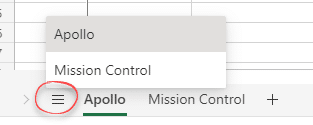
Excel in a web browser has some new improvements, many of them are familiar Excel desktop features moved online but one is unique to the browser-based version. Version history for collaboration, more zoom options for keyboard and screen, multiple range selections and changing regional settings are all now available online. Let’s start with the new […]

New defence against an old problem, Excel XLM Macros
Microsoft has added more protections against nasty Excel 4.0 macros aka XLM macros. XLM or Excel 4.0 macros are an older pre-VBA system that’s still available in modern Excel 365 for Windows and Mac. XML macros have been around since 1992 but gradually replaced by VBA which debuted only a year later. Excel 4 macros […]
Office docs to avoid at all costs, the old formats
There are types of Office documents that you should NOT open, even if they come from someone you trust. Here’s the full list of file extensions for the older Office document formats which are much more likely to be ‘malicious’ docs from hackers and criminals. We’ve talked about the risks of receiving hacked documents using […]









