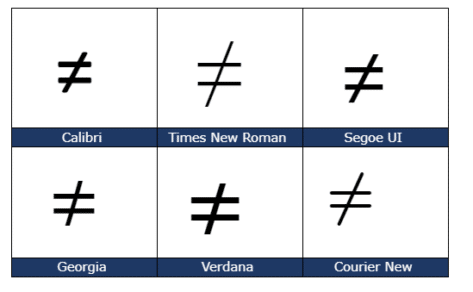
Not Equal ≠ symbol in Word, Excel, PowerPoint and Outlook
Type the Not Equal ≠ sign into Microsoft Word, Excel, PowerPoint or Outlook. Both in Office for Windows and Office for Mac. Not Equal ≠ symbol is used in equations, obviously but it’s also handy shorthand in a heading or slide. The official Unicode name is ‘Not Equal To’. How Not Equal ≠ looks in different fonts. Here’s some examples of how Not Equal ≠ looks in […]

Two new Microsoft Office bundles coming in 2021
Microsoft has announced two ‘perpetual licence’ or non-subscription versions of Office that will be released later in 2021. Both continue Microsoft’s unstated but bleedingly obvious attempts to push customers to annual ‘subscription’ payments. Here’s what Microsoft has disclosed so far with an explanation of the continued reduction of value for perpetual licence purchasers. To replace […]

Office ‘all-in-one’ app, get it now for iPad
The Office ‘all in one’ app, already available for iPhone and Android, is starting its arrival on Apple iPad. The app combines Word, Excel, PowerPoint and other goodies into a single app. The ‘all in one’ app, officially called just ‘Microsoft Office’ has started a limited preview. We’ll explain how to get it now, either […]
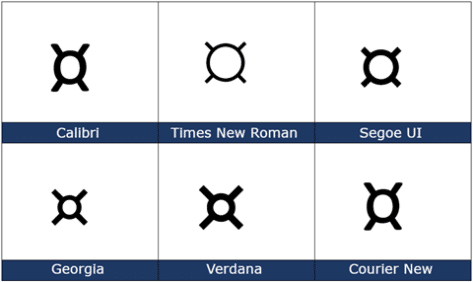
Currency ¤ Symbol in Word, Excel, PowerPoint and Outlook
How to insert the Currency ¤ or scarab symbol into Microsoft Word, Excel, PowerPoint or Outlook. Both in Office for Windows and Office for Mac. Currency ¤ symbol is used to denote an unspecified currency. It’s the generic sign you could use if the correct symbol isn’t available. It doesn’t seem to be used a […]

Table Form, the alternative table view in Excel
An Excel Table Form is a simple no-code way to view a single table row in an editable box. If a row of data is too wide, instead of scrolling left/right to find what you need, use a data form to add, edit, find, and delete rows. Table Form is an automatically generated data form […]
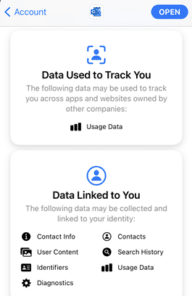
Apple Privacy tags don’t tell the whole story with Office
Apple’s new Privacy tags sound like a great idea but they rely on the honesty of app makers (Ha!) The simple labels can cover an enormous amount of privacy intrusion in Microsoft Office and Outlook mobile apps. The Washington Post is behind a paywall but the ‘general tenor of his spray’ is that each developer […]

More right pointing hand symbols in Word, Excel and PowerPoint
Here are some more ‘right pointing’ symbol options for Word, Excel, PowerPoint or any Microsoft Office app. We’ve already looked in detail at: White Right Pointing Index Hand ☞ Right arrow → symbol Now let’s see some other ‘right pointing’ options that can be used in Office documents. Right pointers are especially handy in bulleted […]

Right Pointing Hand ☞ symbol in Word, Excel, PowerPoint and Outlook
How to insert the white right pointing hand ☞ into Microsoft Word, Excel, PowerPoint or Outlook. Both in Office for Windows and Office for Mac. Officially called “WHITE Right POINTING INDEX” ☞ symbol is a different or novelty form of the right arrow as a hand. It can be used in standard text or a […]

Easier Excel metric conversion and more with Lambda()
Metric to Imperial/US conversion or vice-versa can be a little messy in Excel, the new Lambda() feature lets you make an easier and simpler conversion function. It’s a simple and practical example of what’s possible with Lambda(). See Lambda – strange name for a really good extra in Excel Metric <> Imperial/US conversion with Convert() […]
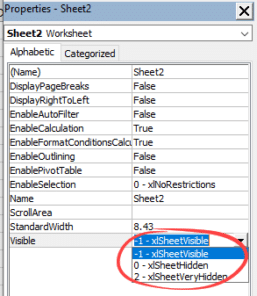
Making Excel worksheets Very Hidden
There are two different levels of hidden sheets within Excel, hidden and the less well-known very hidden worksheets. We can easily hide our worksheets by right-clicking the sheet tab and selecting hide. There’s a more extreme option available. Very Hidden means the sheet/tab doesn’t show up at all in regular Excel and ensures the sheet […]
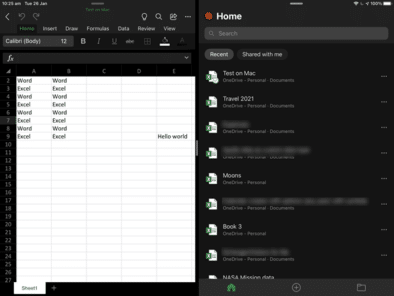
Spilt view arrives for Excel on the iPad
Excel for iPad now has Split View, allowing two workbooks to be seen side-by-side. That’s catching up with Word and PowerPoint for iPad which got Split View in mid-2020. iOS 13 is required for Split View on iPad. Get more about Office on iPad and iPhone from Office Watch for Apple – Mac, iPhone, iPad. […]

Excel’s case of the disappearing feature – Show Changes
For a short time, Microsoft hinted at an important improvement to Excel. But this promise was quickly removed, leaving Excel customers hanging. The feature is/was ‘Show Changes’ and would let you see a history of changes in an individual cell. Show past values or formula in that cell. “Excel can now show you the changes […]

Meet the man behind Excel’s Flash Fill
Excel users owe thanks to Sumit Gulwani . He’s the guy who turned the Flash Fill feature from a vague dream into something that makes life easier for Excel and other Microsoft customers. Flash Fill is a way to join, split or reformat text in Excel without coding. You type in examples and Flash Fill […]

Text and formatting tricks for Excel
Entering blocks of text in Excel is quite easy. What’s not obvious are all the options to make the text easier to enter and look better. Just typing in a cell will enter text. By default it will extend into any unfilled cells. If there’s something ‘in the way’ the text will just stop. Wrapping […]
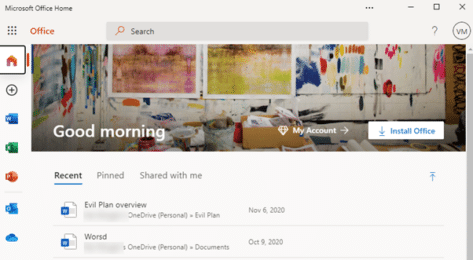
Make Microsoft Office a Progressive Web App or PWA
Microsoft Office (plus Word, Excel and PowerPoint) can be installed as a standalone web apps or PWA. We’ll explain how and the current limitations. This looks like the Office.com web page but it’s not, it’s Office as a standalone Progressive Web App (PWA). It’s available now in Windows 10 with the Edge (Chromium) browser. To […]

What Office users need to know about the new Windows 10X
Windows 10X is coming and you’ll hear a lot about it in the coming months. Let’s see what Windows 10X is, how it will run Office (Word, Excel, PowerPoint, OneNote and Outlook) and why most people won’t need to worry about Windows 10X. What is Windows 10X? Windows 10X is a very scaled-down or lightweight […]









