
Illustrations, new graphics in Microsoft 365 Windows and Mac
Illustrations are a new graphics option coming to Microsoft 365 that supplements the existing Icons with a wider range of visual aids for documents, emails, worksheets and slides. They’ve appeared, without any mention, in preview versions of Microsoft 365 for Windows (version 13415.20002) and Microsoft 365 for Mac (v16.43 20102102) On the same dialog box […]

Sound Recording Copyright ℗ symbol in Word, Excel, PowerPoint and Outlook
Put the Sound Recording Copyright ℗ or Circled P character into Microsoft Word, Excel, PowerPoint or Outlook. Both in Office for Windows and Office for Mac. Sound Recording Copyright ℗ symbol (aka Circled P ) is used to mark musical copyright. The ‘P’ stands for ‘Phonogram’ or the modern ‘Phonorecord’ (a broad term for any […]

Quickly add continent maps to your Office documents
Adding a continent map is easy in Word, Excel or Powerpoint, in fact there’s a few ways to get them for the Americas, Europe, Africa, Asia, Australia and Antarctica. It depends on the quality you need and version of Office. Continental Icons Among the many icons are silhouettes of all the continents – at least […]
Paste Icons or SVG from Office documents to other apps
Microsoft is expanding their support for SVG graphics by allowing these ‘Icons’ to be copied from Office documents into other third-party apps. Users can take an Office Icon or SVG and easily copy it to another app to use or change beyond Office’s in-built features. There’s no special menu item or feature, it’s part of […]
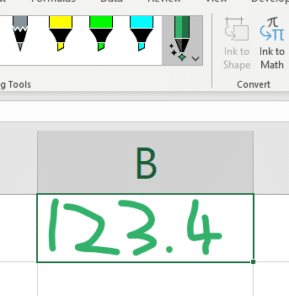
Now you can handwrite directly into Excel cells
Writing into cells is now possible in Excel for Windows using the Action Pen in a new way. Sadly, as we’ll see, the implementation is a bit clumsy and lacks documentation. Action Pen was introduced earlier this year as a way to edit documents with digital ink gestures. Action Pen handwriting into a cell Draw […]
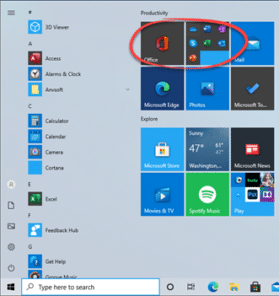
Office dropped onto Windows computers, in a new way
Microsoft is trying a new way to push Office or Microsoft 365 to new customers by dropping links into the Windows Start Menu. We’ve seen this on the Start Menu of Windows 10 preview releases. It’s a group of icons for Word, Excel, PowerPoint, Outlook, OneNote and Skype. Most of the links are to the […]

Microsoft bug fixes have October Outlook surprise
There are 87 different security breaches fixed in this months rollout of Microsoft bug fixes, including an important one for Windows. Also a Critical fix for Outlook and patches for Word, Excel. We’ll start with a very critical Windows bug that’s important to patch right away. Vital Windows 10 bug fix It’s possible to run […]

Is Excel ready for negative interest rates?
Are your Excel worksheets ready for negative interest rates? The world is seeing historically low interest rates. So low that they can drop to zero or even lower rates. Not only can Excel worksheets break with unexpected negative percentages but modelling can accidently move into negative territory. Interest rates might get more precise going to […]

8 tips for great Excel Sparklines
Excel’s Sparklines have a good range of options for highlighting high and low values, text or calculated overlays, changing axis and handling blank or zero values. Sparklines are in Excel for Windows and Mac. Excel Mobile (iPhone, iPad, Android) shows existing Sparklines made elsewhere but they can’t be changed, only resized or deleted. Even the […]
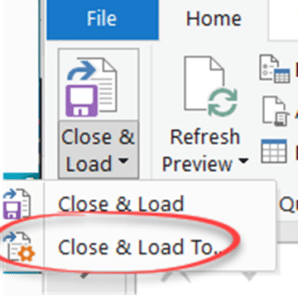
Better management of large databases in Excel
Excel isn’t the best way to store a large database but it’s a great way to sort, filter, analyse, chart and PivotTable from it. Here’s the best way to import and update a large database into Excel. The standard way to store a list in Excel is to import CSV’s or other data into a […]
What happened with UK COVID tracking and Excel?
The UK has been embarrassed (again) with the news that around 16,000 COVID-19 test results were missing from the official database and so contact tracing wasn’t done. The culprit? Excel. Or, to be fair, bad use of Excel is to blame. Not understanding it’s limits and how to workaround them. We’ve tried to figure out […]

Sparklines make simple graphs for Excel
A strange name but Sparklines is a useful new part of Excel which makes simple single-cell graphs in Excel for Windows or Mac. Mea Culpa – we thought that ‘Sparklines’ was a fancy name made up by Microsoft after a long liquid lunch … Office Watch readers, John F, Nick M and Peter B all […]

Custom Data Types are great in Excel 365
Microsoft has done a clever thing, combining two important Excel features into a new and really useful addition – Custom Data Types. Excel 365 for Windows/Mac already has Stock and Geography data types to drop live information into workbooks. It’s now possible to make your own Custom Data Types (CDT) that work the same way. […]

When and how to switch from Office 2010 – your questions answered
Office 2010 ends support on 13 October 2020 and we’ve been receiving questions from readers asking about switching to newer Microsoft Office. We’ll answer questions about when to update, what to replace Office 2010 and important factors to consider. We’re hearing concerns about privacy in modern Office, reliability and the constant, monthly, changes in the […]
Microsoft 365 offline! What happened and what you should do
Microsoft 365 suffered a major outage of their online and cloud services. Here’s what we know, where we stand now and how to reduce your risk of trouble with future problems. The online services from Microsoft could not be accessed from about 5pm Monday (US Eastern) that included Office logins, Outlook/Hotmail, Teams and more. It […]
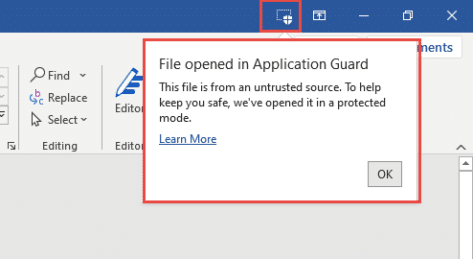
Do you have Application Guard for Microsoft Office?
Microsoft 365 Enterprise customers can now try Application Guard as a new way to protect against malicious documents infecting computers.What is Application Guard and what it means for Office 365 Application Guard is a combination of Windows 10 Defender and Office programs that opens a suspect document in a special way. With hardware virtualization, the […]









