
Easy Office document hacking with VBA Stomping or Purging
Common programming tools can be used to make malicious Office workbooks which bypass both online security checks and Microsoft’s own protections in Word, Excel, PowerPoint or Access. We’ll explain what’s happening and what Microsoft could do better. VBA Purging or VBA Stomping are clever tricks to make an Office documents (e.g. .xlsm Excel workbook) with […]

Customer login now required to use Microsoft 365 apps
There’s a change in the way Microsoft 365 works with a sign-in to a Microsoft account. This applies to Word 365, Excel 365, PowerPoint 365 and other Office apps. Up to recently, Microsoft 365 / Office 365 has worked normally either when signed into a Microsoft account or not. Having a Microsoft account wasn’t required […]
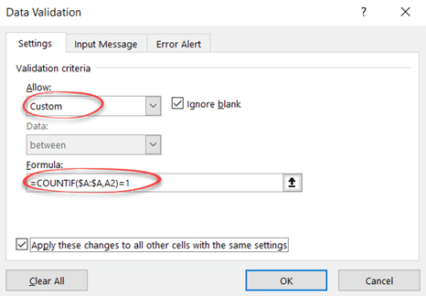
Stop accidental duplicates in your Excel lists or Tables
Stop duplicate names, email addresses or product SKU’s from being added to an Excel list or Table. Adding more rows to an Excel Tables can be done while preventing accidental duplicates creeping into the list. Excel Tables or lists can grow to hundreds or thousands of rows, there’s a risk of someone entering a duplicate […]
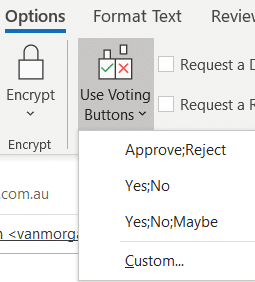
Easy Voting by email in Outlook
Microsoft is releasing a ‘Quick Poll’ option in Outlook ignoring the very similar, voting buttons, option that’s already in Outlook for Windows and Outlook for Mac. Use Voting Buttons to ask a question and Outlook will automatically collect responses. Office Watch also explains how recipient see the voting options and respond. Voting buttons have been […]

Left Right arrow ↔ in Outlook, Excel, PowerPoint and Word
Type the Left Right arrow ↔ into Microsoft Word, Excel, PowerPoint or Outlook. Both in Office for Windows and Office for Mac. How Left Right arrow ↔ looks in different fonts. Here’s some examples of how Left Right arrow ↔ looks in common Office fonts. Left Right arrow ↔ codes These are the important code […]

Auto updating your Excel Charts
How to make an Excel chart that changes as you add more cells or rows is really simple these days. Forget all the old stuff about named ranges or changing the Chart data. Setup your Excel list correctly and any linked charts will update automaticall. In a recent article we looked at making a chart […]

Date formatted charts in Excel
The secret to a timeline chart in Excel is the data. Emily writes asking “How can I make an Excel chart with dates on the X axis with a proper time scale – even if the dates aren’t regular? “ We could not understand Emily’s question until we asked for more details. Making a date […]
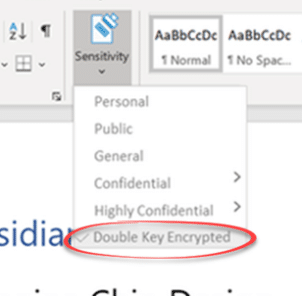
Double Key encryption coming to Microsoft 365
Microsoft is making an important step towards cloud storage security with the public preview of Double Key Encryption. That means, for the first time, Microsoft customers can secure their data from access, even by Microsoft itself. All the ‘secure’ cloud storage from Microsoft can be accessed by Microsoft. For all their talk about security, the […]

Excel Subscriptions Manager
With all the subscription offerings available (Netflix, HBO, Disney, CBS, Apple, Google, Amazon, Office 365 etc), here’s a way to manage them all from Excel. Along the way we’ll show you some interesting Excel features. We were inspired by Brian X Chen in The New York Times, writing about how easy is it to sign […]

Subscriptions Manager for Excel 2007-2016
We’re happy to release a new version of our Subscriptions Manager that’s compatible with Excel 2007-2016. Subscriptions Manager is a way to list and manage the many online plans we sign up for; HBO, Netflix, Amazon, Spotify and so many more. You can track who pays (in a family) and payment method (card, direct debit […]

Gene names changed to stop confusing Excel
The names of genes are being changed just to stop Excel confusing them with dates during the import process. We’ll explain two ways Excel already works to avoid the geneticist’s problem. Genes named like MARCH1 and SEPT1 which Excel converts into dates when imported the wrong way, usually directly via a CSV text file. Office […]
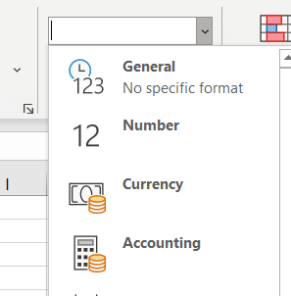
Excel’s General problem that messes up what you type
Why does Excel change what people type or import, sometimes in ways they don’t want? It’s the General cell format that messes with what you type or import. It’s the default cell format ‘General’. It’s top of the Formats list and most of us haven’t given it a second thought. Microsoft short explanation is ‘No […]

Office 2010 – not long before it ‘dies’
Microsoft Office 2010 ends support later this year but there’s no need to panic. Here’s what to do, when to change from Office 2010 and what to replace it. Office 2010 countdown [ycd_countdown id=”31774″][/ycd_countdown] Office 2010 ends support on Tuesday, 13 October 2020 All the Office 2010 programs will keep working. No change there. Tuesday, […]

Excel speaks aloud cells
Excel can speak the numbers, dates and text in cells. It’s a feature that’s been hiding in Excel since Office 2007 through to the latest Excel 365 for Windows. Speak in Excel is like Word’s Speak but with a few useful spreadsheet options. The audio options are mostly intended for proofing or ‘read back’ of […]
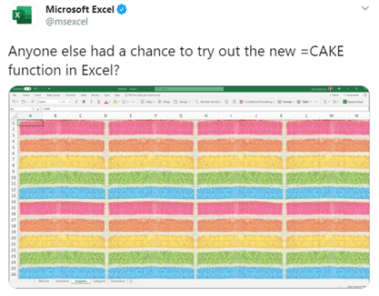
Excel eats Cake
The Excel team has joined the current ‘Cake’ meme with a new Cake() function in Excel. Hilarity ensues … Source: Twitter Ho ho, very funny, it is to laugh. Most people took the message in good spirit with one person implementing it in VBA That code really works. ChrW() returns the character with that Unicode […]

2020 – Year of the Icon?
2020 will be remembered for many things (big sigh) but from a design viewpoint, it could be the Year of the Icon. Many of those graphics are available either in Office directly or imported from elsewhere – we’ll show you both. Everywhere you go there are signs reminding us of the new life we have […]









