All about Microsoft Office for Apple Mac. Word, Excel, PowerPoint, Outlook on macOS, Microsoft 365 for Mac, Office 2021 for Mac and earlier versions.

Saving an Excel Chart as a Template
Excel has a huge range of charts available and endless ways to customize them, but after working to get it just right, you don’t want to have to go through the whole process again next time you want to make a similar chart. Fortunately, you don’t have to because Excel allows you to save your […]

Half-price Office 365 deal in the UK for renewal or new customers
Here in the UK there’s a very good deal on Office 365 Home, saving more than ₤10 on the street price or 50% off the full retail price. Use this offer to extend your Office 365 plan for a lot less than Microsoft will charge. Office 365 Home is the 6 user annual plan and […]

The price trap for Office users in the new iPad
The new iPad has a great price tag and good features but a hidden price trap for Microsoft Office users. It has a 10.2” screen with support for important accessories like an external keyboard and Apple Pencil. Source: Apple. The trap is in the screen size, at 10.2” it’s 0.1 inches more than Microsoft allows […]

October 2019 security updates for Microsoft Office
It’s time again for the monthly drop of security updates for Windows and Office. Here’s what caught our eye; two Excel security bugs and a Windows update which kills VMWare Workstation. Commentators are calling this a ‘light’ month for security patches because there are a mere 59 patches instead of the usual 80 or more. […]

MacOS Catalina update tips and Office compatibility
Mac users can now update their computers to MacOS Catalina release but there’s important things to do before updating and some good reasons to wait a little while. Microsoft Office compatibility As we warned back in June, older Office for Mac will not work with MacOS Catalina. If you have Office 2011 for Mac or […]

The magic phrase to cheaper replacement AirPods
The Washington Post has a useful tip for anyone with Apple AirPods that aren’t maintaining a decent battery life. Use the right wording to Apple support and you should be able to get replacement AirPod’s a little cheaper than retail. Now that AirPods are a few years old, customers are finding the little white plugs […]
Outlook blocks more attachments, but not the most dangerous one
Outlook on the web is now blocking another 38 email attachments because they can be carriers of viruses. But Microsoft doesn’t block the most commonly used files for infecting computers. Far and away the most common infected email attachment is old-style Word documents, with .doc extensions. Excel .xls worksheets and PowerPoint .ppt presentations are similarly […]
Email Attachments blocked by Microsoft Outlook – the new and complete list
Here’s a complete, searchable and sortable list of all the email attachments that are or soon will be blocked by various types of Microsoft Outlook. There’s confusion and inconsistencies in the Microsoft documentation and application of these new blocks. They have a list of blocked attachments for Outlook in “Office 365,, Outlook 2019 Outlook 2016, […]

How the US government accesses your OneDrive and Outlook info with NSL
A recent forced disclosure by the US government demonstrates the use of NSL’s which access your personal data from Microsoft OneDrive and Outlook without a warrant or regular oversight, let alone notice to you. Microsoft, Google, Facebook and many other tech companies (including gaming services) have received National Security Letters which demand information about a […]

More secrets left in Office documents
As we suspected, there are more holes in the Office Document Inspector. Our clever readers came up with some possibilities for revealing secrets in documents, worksheets and presentations. Document Inspector is good but could be better. As you’ll see, there really should be a warning about objects with multiple layers. The biggest problem with Document […]
Four signs that Office 365 will become Microsoft 365
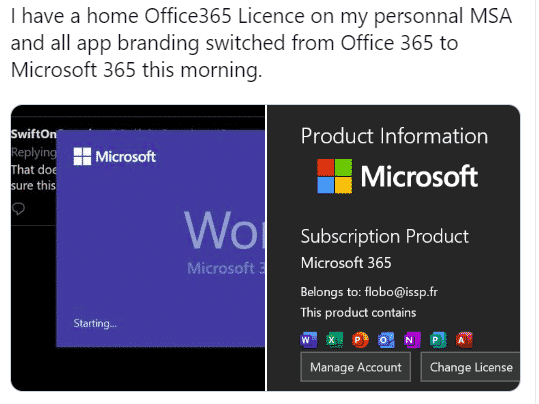
Slowly but surely we’ve moving towards another name change for Office 365. The main Office consumer products are likely to be renamed ‘Microsoft 365’ and here’s just four indicators that a change is coming. This has been looming for some time. Microsoft has been mostly successful getting organizations and consumers onto annual payments ‘subscriptions’ for […]
So-called ‘Edit PDF’ feature is coming to Word for Mac
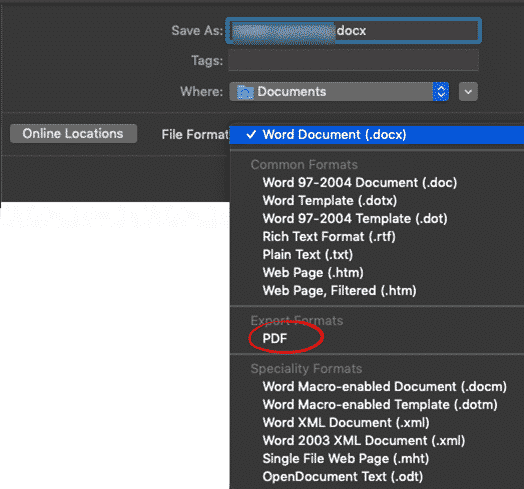
Word 365 for Mac is getting what’s called the ‘Edit PDF’ feature, already available in Word for Windows. Don’t get too excited, Word can’t really edit a PDF file and the results might not be what you want. The ‘editing PDF’ feature is now available to Office for Mac insiders (v 16.29 build 190830 and […]
Outlook Signatures to be synced – at last!
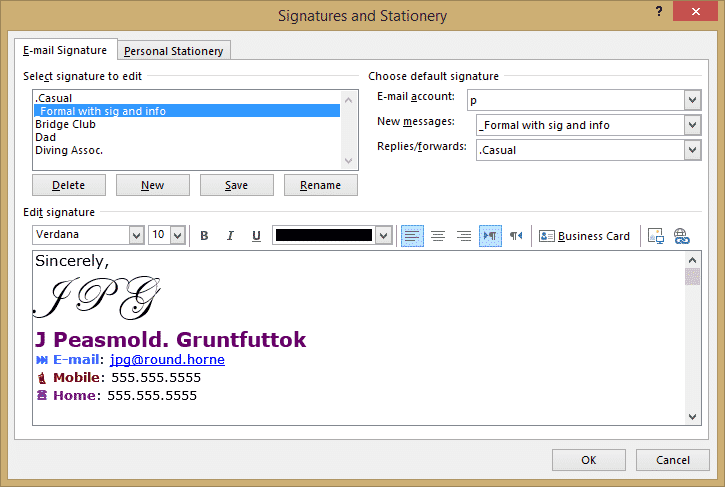
In long overdue news, Microsoft has finally agreed to synchronize email signatures between Outlook on different platforms. The news came in the form of a post on the Uservoice site: “We’re happy to report that we’re working on sync’ing signatures across devices. More details to come as we have them.” It’s not much. No timeline, […]
Moving PowerPoint eulogy at mother’s funeral
A funny story from satirical ‘The Chaser’ shows what could happen when corporate PowerPoint presentations are taken too far. LinkedIn executive presents moving PowerPoint eulogy at mother’s funeral “Before a packed congregation of relatives and friends, the senior executive paid tribute to his mother through a series of bullet points, graphic charts and bold-font mission […]
Revealed! Office install/update errors and fixes
Here’s a list of the known Office install/update error codes with possible fixes. All thanks to a diligent and long-suffering Office Watch reader. Ron S has compiled these lists from web sites and forums based on experiences of other people. Doesn’t Microsoft have all this? Yes, they probably do but not for public consumption. Microsoft […]
PowerPoint Notes Master for more handout control with slides
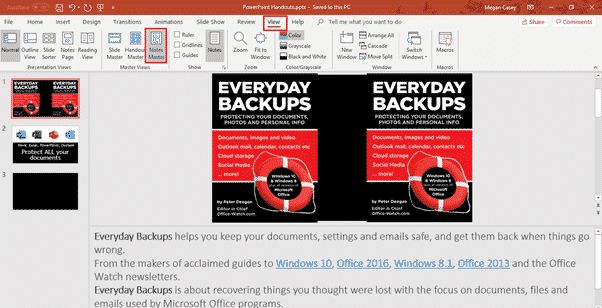
Just as there is a Handout Master to control how slide printouts look, there is also a Notes Master which has more control over how PowerPoint printed notes with slides will look. If you’ve used the Handouts Master, Notes Master will be warmly familiar to you. Notes Master is like a simplistic template with some […]









