All about Microsoft Office for Apple Mac. Word, Excel, PowerPoint, Outlook on macOS, Microsoft 365 for Mac, Office 2021 for Mac and earlier versions.
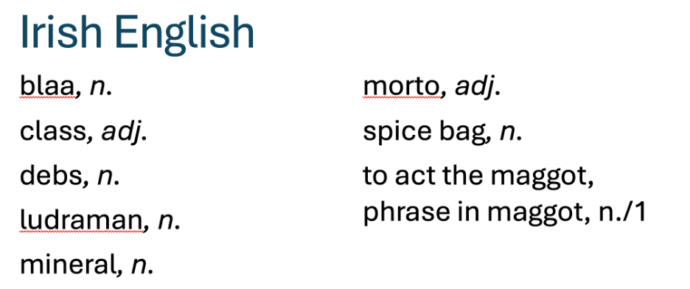
Does Microsoft Word understand new English words?
The Oxford English Dictionary has a list of new English words for 2025. We’ve checked to see if the Microsoft Word dictionary understands all these new terms. Some of the ‘new’ words are very familiar (‘load’, ‘class’ or ‘terror’) but with new meanings. Others are quite new (‘gigil’, ‘ludraman’ or ‘shweshwe’). We put them into […]

Copilot loses an AI writing competition
The Washington Post has done an interesting comparison of AI services and their email drafts for some difficult situation. Microsoft’s Copilot came last. Check out “We asked 5 AI helpers to write tough emails. One was a clear winner.” (login may be required) The headline is a little misleading. Copilot came last in this comparison, […]
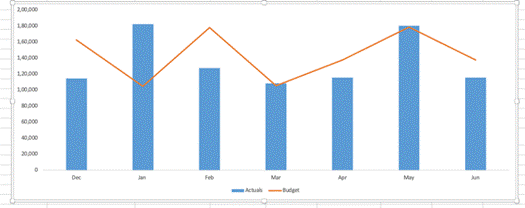
Create A Variance Chart in Excel
There are better ways to chart differences between matching values like budget vs actual than the simplistic one offered by Excel. A variance chart in Excel shows differences and trends at a glance and is easy to make. In Excel, a variance chart visually compares data sets, such as actual performance versus budget, last year […]

Confused About Your OneNote App? Discover the Quick and Easy Tricks to Identifying which one you have
There are a few ways to quickly tell which OneNote app you have on Windows. The OneNote that will continue development or the OneNote for Windows app which is gradually being allowed to die. Previously we’ve explained about the upcoming changes for OneNote, including how Microsoft have decided to keep the OneNote desktop program ongoing, […]
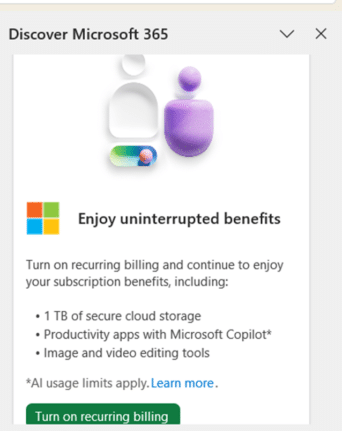
More Microsoft ads inside Office apps
Microsoft has no shame about dropping ads into paid Microsoft Office apps when there’s a way for the company to make even a little more money. We’ve received reports of the Word 365 or PowerPoint 365 side-pane opening to show this ad because the customer has turned off automatic renewal (aka recurring billing). It’s bad […]

Pie or Pi emoji and more in Microsoft Office
Three Pie emoji 🥧 🍕🍰 in Microsoft Office (Windows or Mac) plus some Stock Images, one for ‘Pi’ and a lot more for ‘Pie’. Just part of our tongue-in-cheek Pi 𝜋 Day and Pie series of articles. Pi 𝜋 emoji There is no emoji for 𝜋 because it’s a text symbol (Unicode U+1D70B) To insert 𝜋 […]
Microsoft treats its customers like fools
Sometimes it hard to know if Microsoft is suffering from ‘cognitive dissonance’ or deliberately treat their customers like fools that will accept anything the company says, no matter how nonsensical it is. Captain Worf has some words of wisdom … More that a few Office Watch readers asked about this conflicting message from Microsoft. First […]

Why Word prefers corporate speak and how to change it
The reason Microsoft Word prefers ‘corporate speak’, phrases and language but there is more than one way to change Word’s grammar and style suggestions to suit you. Quite often on social media there are complaints about Microsoft Word’s grammar and style suggestions like this one. “MS Word suddenly dislikes the phrase “in order to.” Who […]

Would you like some Ramen with your font?
Check out this headline ‘ramen’ font that looks great and has a clever name – Times New Ramen. Seine Kongruangkit made a font from photos of noodles, nifty use of Photoshop and an undying love of Ramen noodles <g>. Times New Ramen – you have to love it, just for the name alone! The photorealistic […]
Cheap phone calls now Skype is ending
With Skype ending what are the choices for making cheap phone calls, especially saving money on international calls? The ability to link computers and devices to regular phone numbers is something that Skype excelled at. You could call phone numbers from a device or setup a phone number that people could call for you to […]

Get two free months of Microsoft 365 Family or Personal
Get two extra months of Microsoft 365 Personal or Family for no charge. Microsoft can offer a ‘free’ extension to your plan if you try to do something the company doesn’t like. There are some parts of Microsoft 365 Personal or Family that make the plans very profitable for Microsoft. If you try to change […]

How to use Word’s Master Documents safely
Don’t be scared of Master Documents – just very, very careful. Master Documents is useful and sometimes essential but it’s not the most stable or reliable part of Microsoft Word. What is a Master Document? In Microsoft Word, a Master Document is a Word document which has links to other documents – called sub-documents. Each […]
Skype is dumped by Microsoft
Microsoft is dumping most of their Skype service in May 2025, ending a very useful option for people around the world, especially who use a regular phone for communication. Here’s the ending timeline, an important extension for Microsoft 365 customers and alternatives (official and others). Skype has been around since 2003 and was bought by […]

Better cloud security from Apple … will Microsoft follow?
Apple gives their iCloud storage full encryption, meaning only the user can access their backups, photos and other data. Microsoft 365 customers should be asking Microsoft to do the same (don’t hold your breath). Advanced Data Protection is an option that encrypts all the customers information and files on Apple’s servers. Only customers can access […]

Apple blocks their best security feature in the UK
Advanced Data Protection, the best security option for Apple iCloud is now blocked for UK customers. A real blow to individual privacy and citizens’ rights but there are options for our British friends to keep their files safe. Advanced Data Protection is Apple’s option to fully encrypt data saved on their iCloud storage. An option […]
Beware the hidden traps in Classic Microsoft 365 plans
Choosing the cheaper and Copilot/AI-free Microsoft 365 Classic plan might seem like a good idea but beware the hidden traps in that choice. Plenty of online ‘experts’ are urging Microsoft 365 Personal or Family customers to switch to the Microsoft Classic plans (Personal or Family) option because its: Before changing to Classic, consider the downsides […]









