All about Microsoft Office for Apple Mac. Word, Excel, PowerPoint, Outlook on macOS, Microsoft 365 for Mac, Office 2021 for Mac and earlier versions.
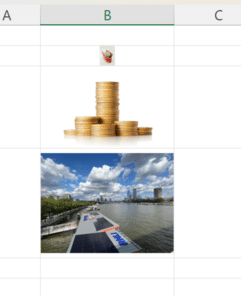
Images in Excel Cells – at long last
At long last, there’s a way to insert an image into a single Excel cell called Place in Cell. No problems with floating images etc, just a cell with a picture which resizes with the cell size. Adding images to Excel sheets has always been confusing because they weren’t directly related to a single cell. […]
How Big Can a Microsoft Word Document Really Be? Limits Explained
How large can a document in Microsoft Word actually get? While most users never hit the upper limits, Word does have technical size restrictions that can affect performance, file stability, images, and long reports. Here’s what you need to know about maximum Word document size, file limits, and how to avoid slowdowns or crashes when […]

Telephone receiver 📞 emoji in Word, Excel, PowerPoint and Outlook
Insert the Telephone receiver symbol 📞 into Microsoft Word, Excel, PowerPoint or Outlook. Both in Office for Windows and Office for Mac. Telephone receiver or handset 📞 symbol can be used on a letterhead or sign where a phone number is shown. There’s an emoji in the Unicode standard plus two Microsoft Office Icons. How […]

Find out more about fonts
A clever interactive from The New York Times explains the basics of fonts and how to choose the right font for your documents, slides and sheets. What’s your type? Try these tests to pick the perfect font for you starts with an option to read the whole article in different fonts. One of the fonts […]

A quicker, easier way to AI expand a graphic or photo
Stability.AI now has a quick and easy way to expand or extend an image. Using AI, it can take an existing image to make a larger version. Unlike other options like OpenAI’s Outpainting, ‘Uncrop’ is quite simple to use. Whatever you call it; Uncrop, Outpainting, extending etc, it’s a useful AI feature for reshaping images […]

What you’ll need to use Copilot with Microsoft Office
Microsoft has released some information about what you’ll need to get their AI tools (called Copilot) when they are eventually released. Copilot is Microsoft’s name for their upcoming AI tools integrated into Office apps (Word, Excel, PowerPoint and Outlook) plus other services like Teams. As with all Microsoft’s Copilot announcements, it’s a strange mix. The […]

Designer Erase is a picture edit opportunity for all Office users
Microsoft Designer now has an image editing tool that’s been missing from Microsoft Office. Erase in Designer lets you edit images in an important way that’s not possible in Word, Excel, PowerPoint or Outlook for Windows or Mac. Picture editing in Office has a lot of features but they mostly effect the whole image, there’s […]

Pushing Hands🫷 🫸in emoji in Word, PowerPoint and Office
Type the ‘pushing hands’ emoji, left 🫷 or right 🫸in Microsoft Word, PowerPoint and other Office apps. Officially the emoji are called Rightwards Pushing Hand 🫸 and Leftwards Pushing Hand 🫷 but can also be used as a ‘High Five’. These emoji can be used separately or together to great effect, here’s the hands as they […]

Designer gets a clever Erase feature
Microsoft Designer now has a nice Erase tool to remove unwanted parts of an image. Finding Erase is a little tricky, we’ll show you where it’s hiding and how to get the most from Erase. Erase lets you remove parts of an image. It’s not on the main image toolbar (with Replace, Remove Background etc.) […]

Lovely Wallpapers from Microsoft – old and new
Tucked away in a little known part of Microsoft’s web sites is a lovely collection of wallpapers (or PowerPoint backgrounds) with new and old, nostalgic designs. Including a 4k rendering of the famous Windows XP wallpaper . Go to https://wallpapers.microsoft.design/ to see all the wallpapers. At first some in full-page versions but scrolling past that […]

Search improvements in Word, Excel and PowerPoint
Microsoft is again changing the way Search works in Microsoft 365 and also (surprise!) Office 2021 to expand the results beyond the document or Office features. Now you can search for definitions, media and even web results from the top bar of Word, Excel and PowerPoint. The most recent announcement is about Office 365/2021 for […]
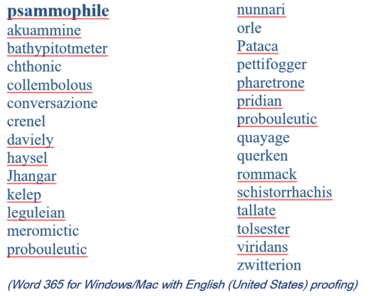
2023 Spelling Bee champs vs Microsoft Word
Our annual look at the words that challenged the Scripps Spelling Bee champs to see how many are recognized by the spell check in Microsoft Word. 2023 wasn’t a good year for Word with a disappointing score that would shame some 14 year olds. Here’s a selection of the last round words from the 2023 […]

Word, Excel and PowerPoint work in Apple’s VR headset
Microsoft is already boasting that Word, Excel, PowerPoint and Teams will work with the new Apple Vision Pro headset. Here’s a quick look at the new tech and a few features that caught our eye. Apple Vision Pro is the much anticipated virtual-reality headset due out in early 2024 for about US$3,500 (no, that’s not […]
Microsoft outages hurt lots of paying 365 customers
Microsoft Outlook and Teams had a horror Monday (and now into Tuesday) with cloud service outages affecting many paying and unhappy customers. The peak trouble was around 11am (US Eastern time) Monday 5th June. UPDATE: As we type this, there’s a new Exchange Online (Microsoft 365 hosting) outage. According to Microsoft “Users may be intermittently […]

Add Power symbols to Word, PowerPoint and Office
Insert the official Power on, off, sleep or standby symbols in Word, Excel, PowerPoint and other Microsoft Office apps. Either via a font or graphics. These power symbols are not directly supported in either Windows or Mac. That’s surprising because the symbols are commonly used on appliances and in software. They are international standards and […]

Excel formula: get percentage discount
Use Excel to figure out the percentage discount or increase, for example the difference between the original and sale prices. We’ll show you the Excel formula and some practical tricks beyond the official answer. Percentage discount formula The basic formula is: (Original – Sale) – to figure out the difference between old and new amount […]