All about Microsoft Office for Apple Mac. Word, Excel, PowerPoint, Outlook on macOS, Microsoft 365 for Mac, Office 2021 for Mac and earlier versions.

Excel meets esports in the Financial Modeling World Cup
Esports (online gaming) is getting serious. Tomorrow the Financial Modelling World Cup pits eight Excel experts against each other in an online tournament. Instead of fighting battles or virtual sports, this is a test of Excel skills. It’s being called the ‘888 Battle’ 8 Contestants from 8 Countries on 8th June. The contestants are from […]

Get more from Office 365’s Recommended Documents
Office for Windows can have an extra on the Home pane – Recommended Documents which tries to suggest documents you’re involved with. Here’s what’s possible with this feature including how to hide it away and leave more screen space for the things you want to see. Source: Microsoft Recent Documents has been in Office for […]
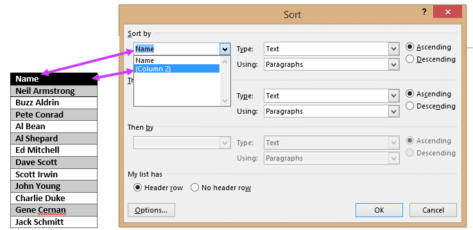
Sort by hidden column in Word
How to sort a list using a hidden or unseen column in a Microsoft Word table. Sometimes you want to sort a list in a way that isn’t apparent to the reader. To continue our Apollo theme, here’s a list of the twelve men who walked on the moon with the order they stepped onto […]

How to hide a column in Word
You can hide a table column in Word, all it takes is a little trickery and ignoring Microsoft’s advice! Sometimes you want to hide a table column in a Word document but according to Microsoft you can’t do it. Here’s how to do it anyway. It’s true that there’s no explicit ‘hide column’ option like […]
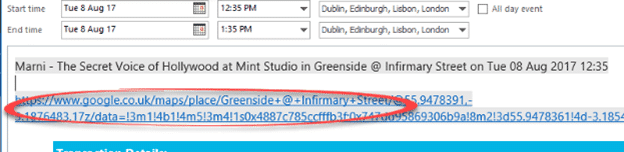
Make Google Maps work with Outlook appointments
Google Maps is invaluable for getting around, especially in an unknown city. Corporate rivalry means there’s no proper integration between Microsoft Outlook and Google Maps There’s not even a mapping button in the Outlook appointments view. Contacts have a ‘Map it’ button but not ‘Location’ in an appointment – for reasons passing understanding. Our workaround […]

Excel Map Charts are way overdue for fixes
A few annoying things in Excel 365 / 2019 / 2021 / LTSC Map charts that Microsoft should fix. We’ll explain the traps and some workarounds. Making our COVID-19 Vaccination workbook reminded us of some anomalies in Excel Map Charts. Always check the Map area options Whenever using the Map Chart feature, always go to […]

Easy face mask graphics for Word and PowerPoint
Join us in a hunt for face mask graphics and icons to use in Word documents and PowerPoint slides. Use fask mask icons in signs. See Social Distancing signs in Microsoft Word More ideas for social distancing signs Icons The obvious place for Office 365 customers to look is Microsoft’s Icon feature. This is a […]

More great Word tricks with Find
We’ve all seen the standard Find/Replace in Microsoft Word, either the ‘new’ pane or the older dialog box. Like so much else in Word, there’s a lot more available than the obvious features. Here’s a look at some of tricks. Press Ctrl + F to start a Find. In recent versions of Word, the Navigation […]

Add more accounts to your Teams
It’s possible to have multiple logins for one person with Microsoft Teams, here’s how and what to do when it all gets too confusing. Teams is becoming so popular that many organizations, groups and even families use it (see Teams for Home). That means you’ll need several different logins for various Teams sites. There’s a […]

Microsoft’s mistake sends Outlook messages to Junk Email
Microsoft’s Exchange Server system had another snafu late last week, for a few hours all Inbox messages were sent to Junk Email instead! The problem affected users of Microsoft 365 mail hosting. It was caused by a ‘change’ that was applied to Exchange Server hosted by Microsoft. As with other times, the update had unforeseen […]

Teams is now for families and ‘real’ people
Microsoft is expanding the reach of their Teams service with more personal and family related features available at no charge. Teams for Home is a repurposing existing Teams business features so they can bring together families and friends. All these features are free (there are some call limits). There are Teams apps for Windows, Mac, […]
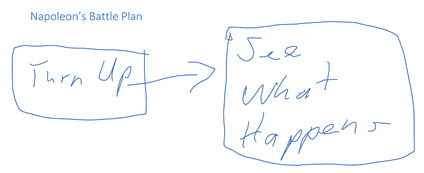
Drawing in all sorts of places Microsoft Office apps
Microsoft has been getting serious about drawing features in Office so we thought it was time to look at what’s available and possible across all the Office applications. Word, Excel, PowerPoint and some nice drawing stuff in OneNote Once upon a time, drawing onto a Word document or Excel worksheet was only possible with a […]
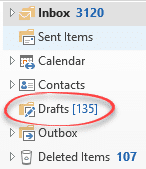
Share Draft Outlook emails on Apple, Android and desktop
Make a draft email on a phone or tablet (maybe some quick notes) to later revise and send from Outlook for Windows/Mac. Once that was a problem but not any more, as long as you’re using Outlook mobile apps. Syncronizing the Drafts folder is really useful. You can write a partial message or reply on […]
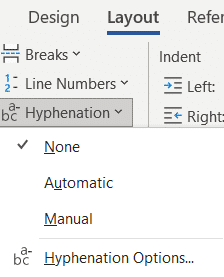
Hyphens and Hyphenation, all the options in Word
Hyphenating words in Word has many choices; manual, optional, compulsory (non-breaking) and fully automatic. Manual Hyphen The simple one we all know. Type the – on the keyboard (properly known as the Hypen-Minus) to hyphenate a word, e.g. choreo-animator. See Of hyphens, em-dash, en-dash and more Automatic hyphenation Word will hyphenate long words when they […]
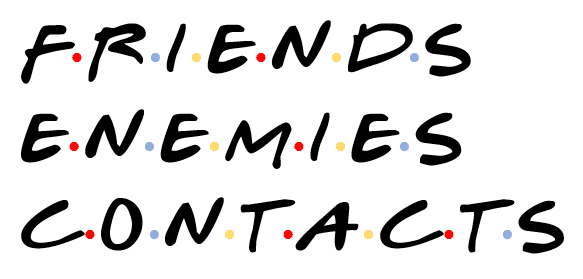
‘Friends’ logo or text complete in Word, PowerPoint and Office
Here’s how to add a taste of the logo or text from ‘Friends’ sitcom to a Word document, PowerPoint slide or other document. That includes the important dots between letters. All you need is available online plus a little Office trickery. Note for old-timers (like Peter, our Editor-in-Chief). ‘Friends’ was a televisual entertainment shown on […]

Ransomware protection in OneDrive isn’t everything Microsoft says
Microsoft promotes OneDrive as protection against ransomware however our tests show it’s not always as practical or complete as the company boasts. One recovery feature works fine but the other isn’t complete. While updating our book Everyday Backups, we tested the OneDrive ransomware protections, not taking Microsoft’s word about how it works. We found that […]









