All about Microsoft Office for Apple Mac. Word, Excel, PowerPoint, Outlook on macOS, Microsoft 365 for Mac, Office 2021 for Mac and earlier versions.

Special offer for Microsoft 365 Business Premium or an even cheaper option
If you’re thinking about getting Microsoft 365 email hosting with full Teams and SharePoint, Microsoft has a limited time offer this week only. However, before you jump into their deal, there’s another very similar option that’s even cheaper. Until 30 November 2020, Microsoft is offering 25% discount on their Business Premium service for small businesses. […]

The latest Office ‘Insiders’ names changes
Microsoft can’t help themselves when it comes to naming their ‘Insiders’, ‘Preview’ or beta test versions. The names change for no good reason and timing is different for each platform rather than all Office apps changing at the same time. The latest changes are for MacOS, iOS (iPhone/iPad) and Android devices. They’ve happened months after […]
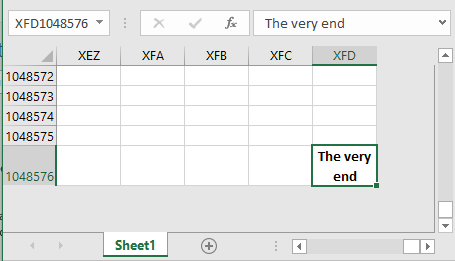
The slow way to the end of Excel
Some people have way too much time on their hands …. and this was pre-lockdown! Hunter Hobbs decided to find out how long it takes to scroll down to the very bottom row of Excel. That’s row 1,048,576. It only takes a moment and two keystrokes to get there, but Hunter decided to take ‘the […]
Reader’s suggestion for typing a tick in Office
A quick way to type a ü tick or check mark character in Word. Another great Autocorrect suggestion from Morris B. ” … the one that I have found the most useful is to replace ‘./’ with a tick (wingdings 252 – or wingdings 254) “ Using the fullstop/period is a clever Autocorrect prefix since […]

All you need to know about Microsoft Office and Big Sur MacOS
Apple is releasing a new version of MacOS, for all Mac computers, called ‘Big Sur’ or version 11. What does that mean for Microsoft Office compatibility and stability? Big Sur is the latest MacOS operating system (version 11) for Mac computers. It’s rolled out from 12 November but you can decide to switchover when you’re […]
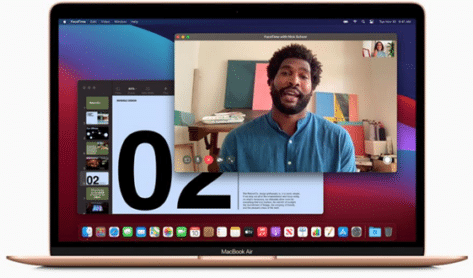
Is Microsoft Office ready for Apple Silicon Macs?
Apple’s new Macbook’s use a totally new type of chip, the M1 or Apple Silicon. What does that mean for Microsoft Office and other programs? We’ll explain what Apple Silicon Macs are and why they are better. Microsoft Office compatibility with the new machines (it’s messy at the moment) and whether to buy an Apple […]
New Apple emoji available now but be careful
The new Apple iOS 14.2 adds 117 new emoji to use but be careful now you use them because not even all iPhone and iPad can handle them, let alone non-Apple devices. We explain how they work, how the emoji appear on receiving devices and include a full list of the newcomers. The new emoji […]
How to get ‘Plus’ email addresses, the new feature in Microsoft 365 and Outlook.com
Plus + , disposable or instant alias email addresses are now available for Microsoft 365 hosted mailboxes and Outlook.com accounts. Here’s how to get this useful email trick for your mailbox. Outlook.com All Outlook.com accounts have plus addresses automatically. It was introduced to Hotmail (‘as was’) back in 2013. It’s such an ‘old’ feature, many […]
Get the most from Plus addresses in Outlook
Outlook for Windows/Mac has features that work well with email plus or disposable addresses. Plus addresses let you make sub-addresses that come to the same mailbox see What are email Plus addresses and how to use them for details. Outlook Rules with plus addresses Most Outlook Rules are based on the senders address but there […]

Make your own ‘Awards’ with Word and PowerPoint
Those ‘award’ logos with the laurel or fern on each side can be made in Word or PowerPoint. The ‘awards’ can be serious or joking. Here’s the thing we mean, you’ll often see them on theatre or movie posters. Format The standard wording for these logos is: Award organization (Academy Award, Pulitzer, Tony, BAFA) The […]

Copyright © tricks for Word, Excel, PowerPoint and Outlook
Tricks for typing the Copyright © into Microsoft Word, Excel, PowerPoint or Outlook. Both in Office for Windows and Office for Mac. Copyright © symbol isn’t on any keyboard but is so commonly used that there are special shortcuts available to type © Copyright © in Word and Outlook The Copyright © has an inbuilt […]
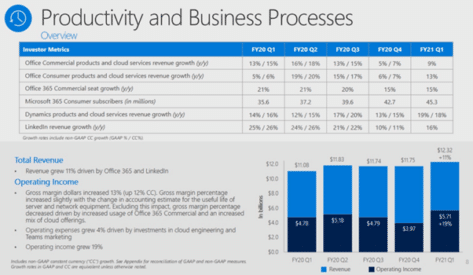
Office sales help another great financial result for Microsoft
Microsoft first quarter 2021 earnings received a big boost from the move to remote working and the COVID-19 crisis. Though the company was careful not to credit the global pandemic for their success. The headline results for the quarter to 30 September 2020, compared to the same period in 2019: Revenue was $37.2 billion and […]

Illustrations, new graphics in Microsoft 365 Windows and Mac
Illustrations are a new graphics option coming to Microsoft 365 that supplements the existing Icons with a wider range of visual aids for documents, emails, worksheets and slides. They’ve appeared, without any mention, in preview versions of Microsoft 365 for Windows (version 13415.20002) and Microsoft 365 for Mac (v16.43 20102102) On the same dialog box […]

Sound Recording Copyright ℗ symbol in Word, Excel, PowerPoint and Outlook
Put the Sound Recording Copyright ℗ or Circled P character into Microsoft Word, Excel, PowerPoint or Outlook. Both in Office for Windows and Office for Mac. Sound Recording Copyright ℗ symbol (aka Circled P ) is used to mark musical copyright. The ‘P’ stands for ‘Phonogram’ or the modern ‘Phonorecord’ (a broad term for any […]

Quickly add continent maps to your Office documents
Adding a continent map is easy in Word, Excel or Powerpoint, in fact there’s a few ways to get them for the Americas, Europe, Africa, Asia, Australia and Antarctica. It depends on the quality you need and version of Office. Continental Icons Among the many icons are silhouettes of all the continents – at least […]
Paste Icons or SVG from Office documents to other apps
Microsoft is expanding their support for SVG graphics by allowing these ‘Icons’ to be copied from Office documents into other third-party apps. Users can take an Office Icon or SVG and easily copy it to another app to use or change beyond Office’s in-built features. There’s no special menu item or feature, it’s part of […]









