All about Microsoft Office Word, Excel, PowerPoint and Outlook, Microsoft 365, Office 2021 and earlier versions.

Hidden picture info in your Office documents
The BBC has a ‘long read’ about hidden information inside almost all photos. Office Watch has talked about this problem many times before including how the extra image data hides in Microsoft Office documents, despite the ‘Document Inspector’. It’s too easy just to think of an image as just what you see on the screen […]

Quickly make Word Indexes with concordance or AutoMark
A more efficient way to mark index entries in Microsoft Word is with a concordance or AutoMark file. It’s a separate document with a table of words to be found in the document coupled with their index entries. See Simple Indexing in Microsoft Word for an intro to Word’s indexing features. Concordance or AutoMark? The […]

Deleting Microsoft accounts gets man two years jail
A man has been jailed for two years after sabotaging a company by deleting 80% of their Microsoft 365 accounts – email, calendars, contact lists, docs, the lot. What did he do and what organizations should do to prevent a similar catastrophe. Deepanshu Kher worked for an IT consultancy and was deployed to work at Carlsbad […]

Why WebView2 is being quietly installed into Windows
A new Windows component WebView2 is being quietly installed on Windows computers, mostly for Microsoft Office. Here’s what WebView2 is and that the acronym WVRT means. Most people won’t have noticed a new ‘optional’ feature added to their Windows 10 in the last week or so. Go to Settings | Apps and Features then search […]

The case of the missing file extension
You’ve received a document, but when you try to open it, the file stubbornly won’t appear! We explain how to fix it. Our editor-in-chief saw that problem in an Internet cafe‚ in Ketchikan, Alaska and was surprised when neither the manager of the store nor the cruise computer ‘expert’ knew the answer. As you probably know, […]

Black Right Pointing index ☛ symbol in Office
How to insert the Black Right Pointing index ☛ into Microsoft Word, Excel, PowerPoint or Outlook. Both in Office for Windows and Office for Mac. Black Right Pointing index ☛ symbol can be used for pointing a direction on a sign or as a different bullet symbol. There’s also a similar, lesser known symbol Black […]

Broken Vertical Bar ¦ symbol in Word, Excel, PowerPoint and Outlook
Type the Broken Vertical Bar ¦ in Microsoft Word, Excel, PowerPoint or Outlook. Both in Office for Windows and Office for Mac. Broken Vertical Bar ¦ symbol was sometimes used in computing. These days there’s no specific use for the broken vertical bar but it’s good to keep in mind as a design alternative to […]
Windows fixes for Office and printing problems
The March 2021 Windows patches have caused at least two major bugs (sorry ‘issues’) that can affect Office users or anyone trying to print. Here’s the fixes and workarounds. Printing bug This is a nasty bug caused by the Windows patch KB5000802 not being properly tested before release. An update to vaguely ‘improve security’ in […]

One mouse & keyboard with many machines – Mouse without Borders
Mouse without Borders is a little-known Microsoft Garage project, it’s worth keeping in mind if you’re trying to work with two or more Windows computers. All these situations can be handled easier with Mouse without Borders … Maybe you have a desktop and laptop computer side-by-side? Working with another computer temporarily as well as your […]
Excellent Excel for Web improvements
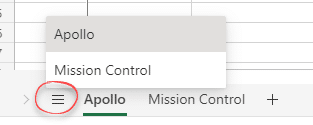
Excel in a web browser has some new improvements, many of them are familiar Excel desktop features moved online but one is unique to the browser-based version. Version history for collaboration, more zoom options for keyboard and screen, multiple range selections and changing regional settings are all now available online. Let’s start with the new […]

New defence against an old problem, Excel XLM Macros
Microsoft has added more protections against nasty Excel 4.0 macros aka XLM macros. XLM or Excel 4.0 macros are an older pre-VBA system that’s still available in modern Excel 365 for Windows and Mac. XML macros have been around since 1992 but gradually replaced by VBA which debuted only a year later. Excel 4 macros […]
Office docs to avoid at all costs, the old formats
There are types of Office documents that you should NOT open, even if they come from someone you trust. Here’s the full list of file extensions for the older Office document formats which are much more likely to be ‘malicious’ docs from hackers and criminals. We’ve talked about the risks of receiving hacked documents using […]
What Exchange Server ‘HAFNIUM’ attacks mean to you
Microsoft Exchange Server software has been comprehensively hacked over the last few months, focusing on US systems but spreading across the world. What happened, who needs to act now and what everyone should watch out for. Exchange Server is the mailbox technology used by many, many companies around the world. Most public and private organizations […]

The case of the disappearing Office 365 UserVoice
Without notice, the main forum for Office customers to tell Microsoft what they want has disappeared. No explanation of what’s happened and what, if anything, will replace it. For many years, Microsoft has boasted about their UserVoice pages such as https://office365.uservoice.com/ but it’s gone dark. All the years of suggestions and discussions have been deleted, […]

WhatsApp desktop now has voice and video calls
WhatsApp desktop extensions (Windows and Mac) can now make and receive voice or video calls. Until now the desktop apps where limited to texting and sending attachments. If you use WhatsApp (or Signal), the desktop extensions are really great. Instead of pecking away on a tiny screen, you can type messages on a real keyboard. […]

How Gmail Labels and Categories work with Outlook
Gmail has a very different way of organizing mail to the Outlook/Microsoft system of folders. Gmail’s Labels, Important and Categories have different or no meaning in Outlook for Windows. Labels Gmail has Labels which are tags that can be applied to messages. Outlook shows those labelled messages as if they are in separate folders which […]