All about Microsoft Office Word, Excel, PowerPoint and Outlook, Microsoft 365, Office 2021 and earlier versions.
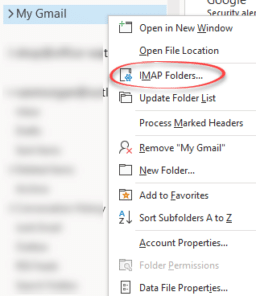
Even more Gmail settings in Outlook… select or Subscribe Folders
You can choose which mail folders are synchronized with Outlook but you won’t find this option with the rest of the Gmail account settings in Outlook. Instead go to the heading of the Gmail account in the folder pane, right-click and choose IMAP folders. Subscribed folders Let’s stop for a little IMAP terminology. Folders that […]

More changes for Word’s Spelling and Grammar
No need to right-click to see spelling and grammar suggestions in Word and Outlook 365. It’s changing so only a single left click will show the suggestions, corrections and more. On the downside, fewer options are initially displayed. Useful features are now multiple clicks away and hidden from view. It’s part of Microsoft unstated policy of […]

Word gets YouTube and other embedded content
Word online (in a web browser) can now embed live web content like videos from YouTube or a quiz from Forms Embedded content is fully interactive within the Word document. Play the video, fill in the form/quiz. No special command or ribbon button necessary. Just paste in the web link, Word will embed the content […]

A new way to convert a Word document to PowerPoint
Word online (web browser) is getting a way to convert a Word document into a PowerPoint presentation. For the moment it’s available as a preview feature in Word online. See if you have it at File | Transform. Transform document to presentation Start from File | Transform | Transform to PowerPoint presentation First, choose a […]
Not Equal ≠ symbol in Word, Excel, PowerPoint and Outlook
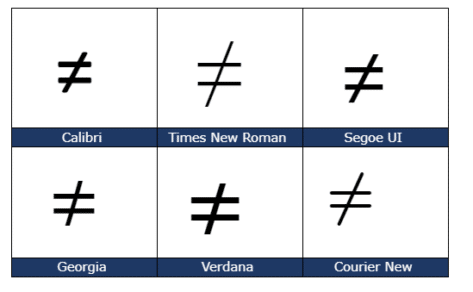
Type the Not Equal ≠ sign into Microsoft Word, Excel, PowerPoint or Outlook. Both in Office for Windows and Office for Mac. Not Equal ≠ symbol is used in equations, obviously but it’s also handy shorthand in a heading or slide. The official Unicode name is ‘Not Equal To’. How Not Equal ≠ looks in different fonts. Here’s some examples of how Not Equal ≠ looks in […]
Connect Outlook with Google’s Gmail
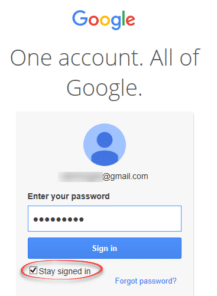
Outlook for Windows can connect to Google’s Gmail here’s the simple setup available in Outlook 365 and 2019. It’s just the start of a longer process that Microsoft doesn’t openly explain to customers, starting with an important limitation. Free Gmail – no calendar or contacts Outlook for Windows only synchronizes Gmail email for Gmail free […]

Two new Microsoft Office bundles coming in 2021
Microsoft has announced two ‘perpetual licence’ or non-subscription versions of Office that will be released later in 2021. Both continue Microsoft’s unstated but bleedingly obvious attempts to push customers to annual ‘subscription’ payments. Here’s what Microsoft has disclosed so far with an explanation of the continued reduction of value for perpetual licence purchasers. To replace […]

Office ‘all-in-one’ app, get it now for iPad
The Office ‘all in one’ app, already available for iPhone and Android, is starting its arrival on Apple iPad. The app combines Word, Excel, PowerPoint and other goodies into a single app. The ‘all in one’ app, officially called just ‘Microsoft Office’ has started a limited preview. We’ll explain how to get it now, either […]

‘Spy Pixels’ email epidemic, the good and the bad
‘Spy Pixels’ is the new name for a common tracking method used in commercial emails. We’ve written about them many times over the 20+ years of Office-Watch.com, the only new thing is the name. What are Spy Pixels? So called ‘Spy Pixels’ are tiny images (1 pixel only) linked in an email. They are invisible […]
Seven new languages for Word & Outlook Dictation
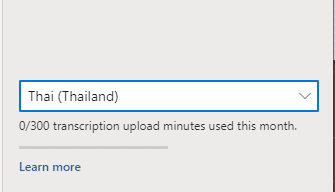
Microsoft has announced seven extra languages added to their ‘speech to text’ Dictation feature in Outlook and Word. The new languages announced are: Hindi Russian Polish Portuguese (Portugal) Korean Thai Chinese (Taiwan) Your milage will vary As a cloud service, the available languages will vary. It depends on the version of Microsoft 365, where you […]
Inside new Natural Language Search for Outlook
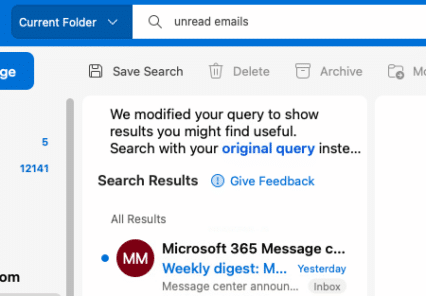
Microsoft is hyping natural language searches in Outlook for Windows and Mac, so we dug down to see how it works and for whom. There’s a lot of ‘gotchas’ overlooked in the boasting. According to Microsoft, Outlook now has better searches: “With Natural Language in search, you simply type the way you would ask a […]

Visio can now export to Word
Visio now has an option to export diagrams directly into Word. Export to Word has been in preview for about a year. It’s now available to all users on Visio Online Plan 2 The feature doesn’t just export the diagram images. Metadata is also exported in a table. Process | Export to Word opens a […]
Auto Fix coming to PowerPoint and not a moment too soon
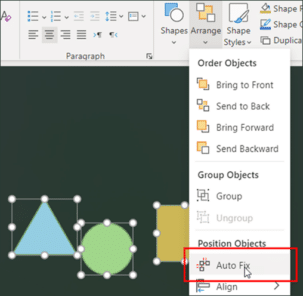
PowerPoint is getting a new feature ‘Auto Fix’ that Office users have wanted for many, many years. We hope it’s the start of deployment to Word and Excel across all platforms. Auto Fix is a way to automatically arrange a collection of shapes and other objects into neat rows and proper alignment. It does the […]
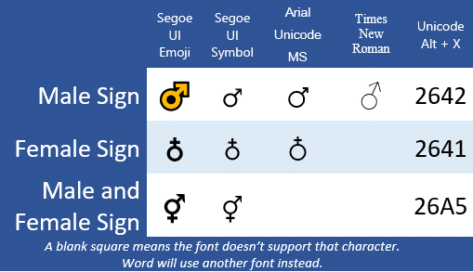
Male ♂, Female ♁ or ⚥ symbols in Word & PowerPoint
Should automatically redirects to Male ♂ Female ♁ both ⚥ symbols in Word and Office, if not, please click the link
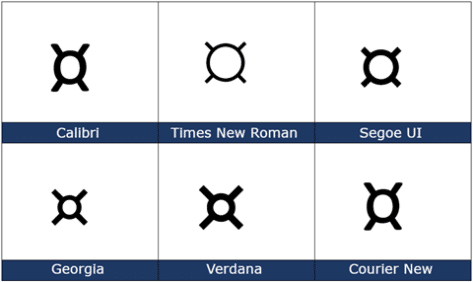
Currency ¤ Symbol in Word, Excel, PowerPoint and Outlook
How to insert the Currency ¤ or scarab symbol into Microsoft Word, Excel, PowerPoint or Outlook. Both in Office for Windows and Office for Mac. Currency ¤ symbol is used to denote an unspecified currency. It’s the generic sign you could use if the correct symbol isn’t available. It doesn’t seem to be used a […]

Table Form, the alternative table view in Excel
An Excel Table Form is a simple no-code way to view a single table row in an editable box. If a row of data is too wide, instead of scrolling left/right to find what you need, use a data form to add, edit, find, and delete rows. Table Form is an automatically generated data form […]