All about Microsoft Office Word, Excel, PowerPoint and Outlook, Microsoft 365, Office 2021 and earlier versions.

Easy and better lists with Excel 365’s Filter()
Filter is another Excel 365 dynamic array formula that’s really useful and far better than similar options in earlier versions of Excel. Just like SORT() and SORTBY(), FILTER() refreshes automatically whenever the source values change. The older pull-down filter and sort choices don’t update properly. Dynamic Arrays also give you the choice to show the […]

About Unicode, fonts and symbol codes
Confused about Unicode, code-points and other techie details about inserting symbols? Here’s how it works and can work for you in Word, Excel, PowerPoint and other apps. Like many things in modern computing, you mostly don’t have to know the details of how things work. But occasionally things don’t work the right way and then […]

April updates for Office 2016, Office 2013 and 2010
Here’s all the security and general bug fixes for April, aimed at Office 2016, Office 2013 and Office 2010 for Windows. Most customers will have their Office updated automatically unless you’re one of the cautious who wait a little while to see if there’s any bugs in the bug fixes. See Why updating Office is […]

Better live sorting in Excel 365
In late 2018, Excel 365 got an important new feature, Dynamic Arrays . Here’s a simple way to use the feature to make your workbooks sort better and automatically. It also fixes a long-standing problem in Excel. We’re going to focus on a very simple and useful part of dynamic array that anyone can use; […]

Double Vertical Bar ‖ in Word, Excel, PowerPoint and Outlook
How to insert the Double Vertical Bar ‖ into Microsoft Word, Excel, PowerPoint or Outlook. Both in Office for Windows and Office for Mac. Double Vertical Bar ‖ symbol is used to represent norms in mathematics, (for example ). It can also be used to signify parallel lines. It can be used as a visual […]
Who is suing Microsoft for millions over Office licencing?
Here’s an interesting switch, a UK company is suing Microsoft over their licencing rules for Office. Usually it’s Microsoft suing others about licences, not the other way around. ValueLicensing is claiming UK₤270 million (US$370m ) in damages from Microsoft for trying to squeeze out the second-hand licence market. Organizations that upgrade their software licences, are […]

Cross of Lorraine ☨ symbol in Word, Excel, PowerPoint and Outlook
Type the Cross of Lorraine ☨ into Microsoft Word, Excel, PowerPoint or Outlook. Both in Office for Windows and Office for Mac. Cross of Lorraine ☨ symbol was originally a heraldic cross. In more recent times it was used in the global distribution systems, Sabre, Apollo, and Wordspan, as a delimiter in a variety of input […]
Why don’t Outlook calendars and contacts show in Windows?
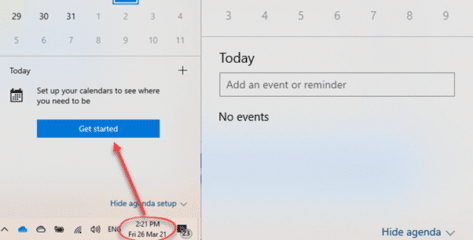
Windows has some nice features for quickly showing your appointments, calendar and contacts/people lists so why don’t they show that information that’s in Outlook for Windows on the same computer? In Windows 10, clicking on the date/time in the bottom right-corner (the taskbar) you’ll see the monthly calendar and either a ‘Get Started’ prompt or […]
Word’s =Rand() around the World
=Rand.old() is a Word trick which adds common sentences that use all, or most, of the letters in that language’s alphabet. Here’s what Word does in English, French, German, Danish, Polish and many other languages. It’s useful filler text for testing formatting or other Word features just like “Lorem Ipsum …”. The sentence changes for […]

Get more from Mark Index features in Microsoft Word
Behind the simple Mark Index feature in Word are some useful but almost hidden options. These give you many choices for making and formatting your document index. Getting started with indexes in Word? Check out our starter, Simple Indexing in Microsoft Word. Indexes are as much art and judgment as science so there’s always room […]

Easter Bunnies and more in Microsoft Word, PowerPoint etc.
Yes, there are bunnies and other secular Easter graphics waiting for you in Microsoft 365 and Office 2019. Icons and Illustrations (both types of SVG) have some Easter or at least bunny related graphics. Stock Images also have some choices. Religious choices are missing but there are Christian or Latin Crosses available in Office. Here’s […]

Hidden picture info in your Office documents
The BBC has a ‘long read’ about hidden information inside almost all photos. Office Watch has talked about this problem many times before including how the extra image data hides in Microsoft Office documents, despite the ‘Document Inspector’. It’s too easy just to think of an image as just what you see on the screen […]

Quickly make Word Indexes with concordance or AutoMark
A more efficient way to mark index entries in Microsoft Word is with a concordance or AutoMark file. It’s a separate document with a table of words to be found in the document coupled with their index entries. See Simple Indexing in Microsoft Word for an intro to Word’s indexing features. Concordance or AutoMark? The […]
Deleting Microsoft accounts gets man two years jail
A man has been jailed for two years after sabotaging a company by deleting 80% of their Microsoft 365 accounts – email, calendars, contact lists, docs, the lot. What did he do and what organizations should do to prevent a similar catastrophe. Deepanshu Kher worked for an IT consultancy and was deployed to work at Carlsbad […]

Why WebView2 is being quietly installed into Windows
A new Windows component WebView2 is being quietly installed on Windows computers, mostly for Microsoft Office. Here’s what WebView2 is and that the acronym WVRT means. Most people won’t have noticed a new ‘optional’ feature added to their Windows 10 in the last week or so. Go to Settings | Apps and Features then search […]

The case of the missing file extension
You’ve received a document, but when you try to open it, the file stubbornly won’t appear! We explain how to fix it. Our editor-in-chief saw that problem in an Internet cafe‚ in Ketchikan, Alaska and was surprised when neither the manager of the store nor the cruise computer ‘expert’ knew the answer. As you probably know, […]