All about Microsoft Office Word, Excel, PowerPoint and Outlook, Microsoft 365, Office 2021 and earlier versions.
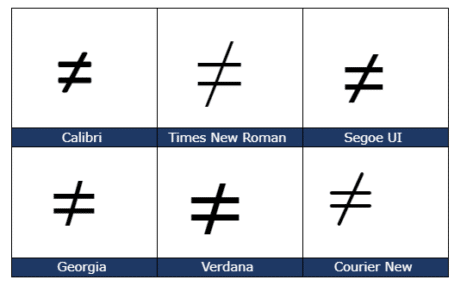
Not Equal ≠ symbol in Word, Excel, PowerPoint and Outlook
Type the Not Equal ≠ sign into Microsoft Word, Excel, PowerPoint or Outlook. Both in Office for Windows and Office for Mac. Not Equal ≠ symbol is used in equations, obviously but it’s also handy shorthand in a heading or slide. The official Unicode name is ‘Not Equal To’. How Not Equal ≠ looks in different fonts. Here’s some examples of how Not Equal ≠ looks in […]
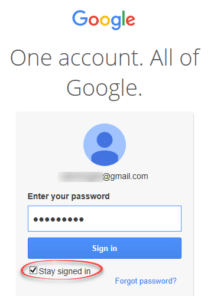
Connect Outlook with Google’s Gmail
Outlook for Windows can connect to Google’s Gmail here’s the simple setup available in Outlook 365 and 2019. It’s just the start of a longer process that Microsoft doesn’t openly explain to customers, starting with an important limitation. Free Gmail – no calendar or contacts Outlook for Windows only synchronizes Gmail email for Gmail free […]

Two new Microsoft Office bundles coming in 2021
Microsoft has announced two ‘perpetual licence’ or non-subscription versions of Office that will be released later in 2021. Both continue Microsoft’s unstated but bleedingly obvious attempts to push customers to annual ‘subscription’ payments. Here’s what Microsoft has disclosed so far with an explanation of the continued reduction of value for perpetual licence purchasers. To replace […]

Office ‘all-in-one’ app, get it now for iPad
The Office ‘all in one’ app, already available for iPhone and Android, is starting its arrival on Apple iPad. The app combines Word, Excel, PowerPoint and other goodies into a single app. The ‘all in one’ app, officially called just ‘Microsoft Office’ has started a limited preview. We’ll explain how to get it now, either […]

‘Spy Pixels’ email epidemic, the good and the bad
‘Spy Pixels’ is the new name for a common tracking method used in commercial emails. We’ve written about them many times over the 20+ years of Office-Watch.com, the only new thing is the name. What are Spy Pixels? So called ‘Spy Pixels’ are tiny images (1 pixel only) linked in an email. They are invisible […]
Seven new languages for Word & Outlook Dictation
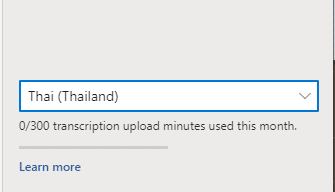
Microsoft has announced seven extra languages added to their ‘speech to text’ Dictation feature in Outlook and Word. The new languages announced are: Hindi Russian Polish Portuguese (Portugal) Korean Thai Chinese (Taiwan) Your milage will vary As a cloud service, the available languages will vary. It depends on the version of Microsoft 365, where you […]
Inside new Natural Language Search for Outlook
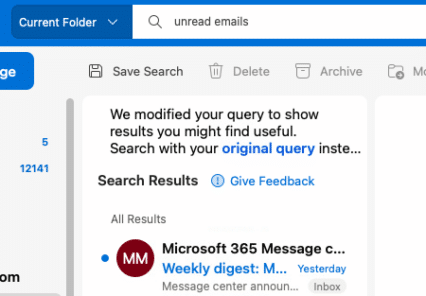
Microsoft is hyping natural language searches in Outlook for Windows and Mac, so we dug down to see how it works and for whom. There’s a lot of ‘gotchas’ overlooked in the boasting. According to Microsoft, Outlook now has better searches: “With Natural Language in search, you simply type the way you would ask a […]

Visio can now export to Word
Visio now has an option to export diagrams directly into Word. Export to Word has been in preview for about a year. It’s now available to all users on Visio Online Plan 2 The feature doesn’t just export the diagram images. Metadata is also exported in a table. Process | Export to Word opens a […]
Auto Fix coming to PowerPoint and not a moment too soon
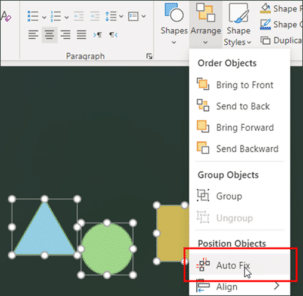
PowerPoint is getting a new feature ‘Auto Fix’ that Office users have wanted for many, many years. We hope it’s the start of deployment to Word and Excel across all platforms. Auto Fix is a way to automatically arrange a collection of shapes and other objects into neat rows and proper alignment. It does the […]
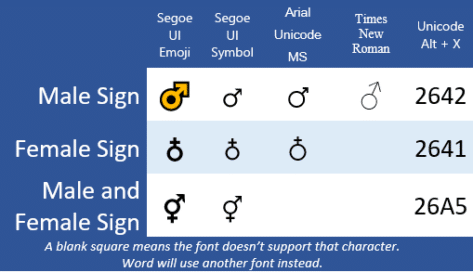
Male ♂, Female ♁ or ⚥ symbols in Word & PowerPoint
Should automatically redirects to Male ♂ Female ♁ both ⚥ symbols in Word and Office, if not, please click the link
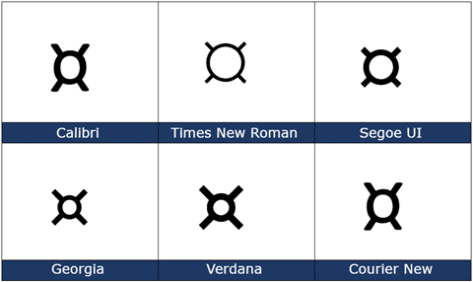
Currency ¤ Symbol in Word, Excel, PowerPoint and Outlook
How to insert the Currency ¤ or scarab symbol into Microsoft Word, Excel, PowerPoint or Outlook. Both in Office for Windows and Office for Mac. Currency ¤ symbol is used to denote an unspecified currency. It’s the generic sign you could use if the correct symbol isn’t available. It doesn’t seem to be used a […]

Table Form, the alternative table view in Excel
An Excel Table Form is a simple no-code way to view a single table row in an editable box. If a row of data is too wide, instead of scrolling left/right to find what you need, use a data form to add, edit, find, and delete rows. Table Form is an automatically generated data form […]

New dark mode in Microsoft Word
Word 365 for Windows now has an even darker dark mode option which changes the page area to black with white text. Until now ‘Dark Mode’ only applied to the ribbon and other interface areas, not the document area. The newly extended Dark mode only changes the look on the edit screen – what Microsoft […]

How new is the Microsoft Office interface really?
A fascinating article digs into the ‘new’ Windows 10 look to reveal that it’s not as new as Microsoft hype would have you believe. Some parts of Windows 10 are over 25 years old and it’s a similar story in Microsoft Office, despite the Ribbon. It’s the same in Microsoft Office, scratch the Ribbon and […]

Van Gogh masterpieces right into your PowerPoint slides
The full collection of Van Gogh masterpieces are available online, ready to be used in PowerPoint slides. Here’s how to get good quality images of the great man’s work and use them wisely in slides. Not interested in Van Gogh? These tips show how to fit any image into PowerPoint as a picture or slide […]
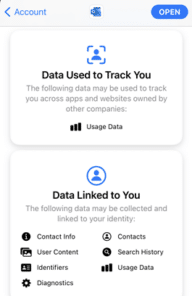
Apple Privacy tags don’t tell the whole story with Office
Apple’s new Privacy tags sound like a great idea but they rely on the honesty of app makers (Ha!) The simple labels can cover an enormous amount of privacy intrusion in Microsoft Office and Outlook mobile apps. The Washington Post is behind a paywall but the ‘general tenor of his spray’ is that each developer […]