All about Microsoft Office Word, Excel, PowerPoint and Outlook, Microsoft 365, Office 2021 and earlier versions.
Excel Agent for Microsoft 365: A Deep Dive into Excel’s New Assistant
Microsoft’s new Excel Agent brings powerful AI-driven automation to spreadsheet creation and data analysis. We’ve explored how Excel Agent helps you generate budgets, sample data, and insightful reports with simple text prompts, saving time while expanding what’s possible inside Excel. Discover where it shines (or falls short) in real-world tasks. Excel Agent is definitely a […]

How to Quickly Generate Fake Data Lists for Excel – Two Proven Methods
If you’re working in Microsoft Excel and need to test formulas, dashboards or data‐driven workflows, real data can often get in the way. Fortunately, you don’t have to wait for live data sets or scrub proprietary information—this article shows you two powerful techniques to create fake data lists quickly and reliably. Whether you’re a data […]

How to Use School-Bus Yellow in Word, PowerPoint & Microsoft Office”
If you’ve ever wondered how to replicate the distinctive “school bus yellow” shade in your documents or slides, you’ll find the answer here. It’s the standard hue for North American school buses, chosen for visibility and impact. You can apply this same shade in Microsoft Word, Microsoft PowerPoint or any other Microsoft Office document simply […]

Microsoft Word Waves Goodbye to “Send to Kindle”
Microsoft Word is officially retiring its “Send to Kindle” feature, ending the convenient way users could send documents straight from Word to their Kindle libraries. This marks the end of a short-lived integration but you can still put Word documents on a Kindle in other ways. Starting February 9, 2026, “Send to Kindle” feature will […]
Microsoft 365 Refunds: Australian Customers Offered Compensation After Court Action
Microsoft Australia is issuing refunds to some Microsoft 365 subscribers following court action over its marketing practices. While the refunds currently apply only to Australian customers, the case raises important questions about transparency and accountability for Microsoft 365 users worldwide. The move highlights growing scrutiny over how tech giants advertise subscription services and the rights […]

How to Remove Emoji from Word docs or Outlook emails
Word documents and Outlook emails can be cluttered with unnecessary emoji. Copilot AI loves adding emoji, like it or not. If you’re tired of seeing smiley faces in your reports or emails, here’s practical ways to clean them out. Learn step-by-step methods to find and remove emoji using font searches or wildcard sweeps so your […]

What the “Possible Word Choice” Error in Microsoft Word Really Means
If you’ve ever seen Microsoft Word underline a word with a cryptic “Possible Word Choice” warning, you’re not alone. This subtle feature of Microsoft Editor can confuse even seasoned users. It flags real words that might not fit the sentence’s context, often catching homophones or subtle mix-ups that spell-check misses. Here’s how this grammar alert […]

KWN – three letters that all Word users should know
Ever had a heading in Microsoft Word that seemed to wander off from its paragraph like a rebellious teenager? Or a bullet point that ghosted its follow-up text? Enter “Keep with Next” or KWN to its friends, Word’s low-key matchmaker that makes sure certain paragraphs stay together—forever (or at least until you change your formatting). […]

Microsoft Faces Legal Action in Australia Over Misleading Microsoft 365 Price Rise Claims
Microsoft’s subscription practices are under scrutiny in Australia as the country’s competition regulator takes the tech giant to court. The Australian Competition and Consumer Commission (ACCC) alleges that Microsoft misled approximately 2.7 million Microsoft 365 Personal and Family subscribers over how it communicated a major price increase and subscription change. This case could have wide-reaching […]
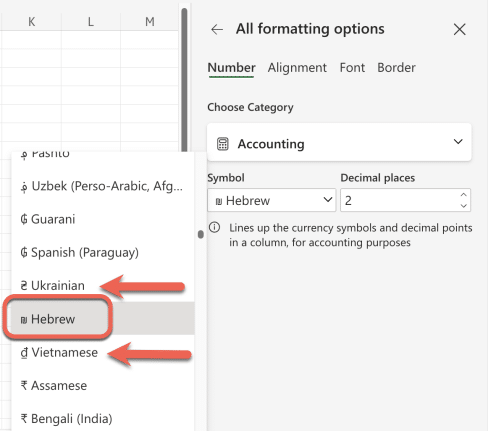
Excel’s “Hebrew Shekel” Label Sparks Unfounded Online Rage
A viral post recently accused Microsoft Excel of bias for labeling the shekel as “Hebrew” instead of “Israel.” However, there’s no conspiracy—Excel lists currencies by language, not country, using the same format for all entries. Thanks to Office Watcher, Gary B. from Portland for alerting us to this bit of ragebait on social media. It […]

Unlock Hidden Details: Add more to Word Headers and Footers
Most Word users stop at page numbers and dates in their headers and footers, but Microsoft Word can do much more. From inserting document titles, authors, and file paths to using advanced field codes like StyleRef or NumPages, you can make your headers dynamic, informative, and even interactive. Discover the powerful, lesser-known elements you can […]

Mastering Headers and Footers in Microsoft Word: Simple Steps for a Professional Look
Creating polished, consistent headers and footers in Microsoft Word is easier than you think. This guide walks you through every step—from adding page numbers and section-specific layouts to using “Different First Page” for cleaner title pages. Whether you’re preparing reports, articles, or academic papers, these techniques will help your documents look professional, organized, and reader-friendly […]

How to Change Word Field Code Colors or Formatting Based on Number Values
Did you know you can make Microsoft Word automatically change text color or formatting depending on whether a number is positive, negative, or zero? With field codes like {SEQ} or {MERGEFIELD}, it’s easy to apply different font styles, colors, or highlights directly in your document—no macros required. This simple formatting trick lets you visually distinguish […]

How to Add Prefix and Suffix Text in Microsoft Word Styles (Workarounds Included)
Microsoft Word lacks native support for adding prefix and suffix text through styles—but clever workarounds can make it possible. This guide from Office Watch shows how to simulate prefixing and suffixing paragraphs or character styles, just like CSS’s :before and :after elements. Learn how to format consistent labels, product codes, or custom paragraph markers using […]
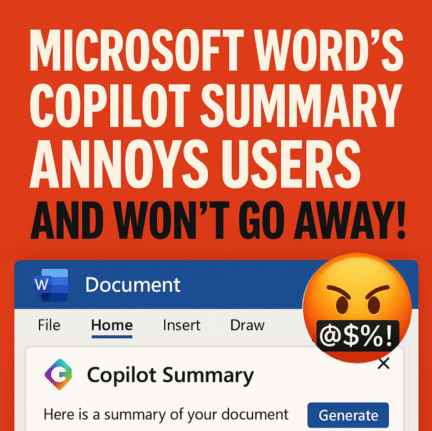
Microsoft Word’s Copilot Summary Annoys Users and won’t %£@$% go away!
Microsoft Word 365 users are frustrated by the Copilot Summary feature that refuses to disappear. Copilot Summary automatically appears above documents and can’t be fully hidden or disabled. While designed to help summarize content, its lack of control options and buggy behavior have made it more of an annoyance than an aid, typical of Microsoft’s […]
Copilot is not as popular as Microsoft says, Customers Aren’t Buying the hype
Microsoft’s Copilot is NOT the wildly popular, world class AI product that Microsoft says it is. That’s not just an opinion; there are hard facts to back it up. The recent sharp price drop and ignored user frustration suggest otherwise. From intrusive integration to privacy concerns, Copilot’s rollout has backfired. Of course, nothing could be […]