What the “Possible Word Choice” Error in Microsoft Word Really Means
If you’ve ever seen Microsoft Word underline a word with a cryptic “Possible Word Choice” warning, you’re not alone. This subtle feature of Microsoft Editor can confuse even seasoned users. It flags real words that might not fit the sentence’s context, often catching homophones or subtle mix-ups that spell-check misses. Here’s how this grammar alert works, why it appears, why it’s different and what you can do about it.
“Possible Word Choice” means “this word is valid but MAYBE the wrong one for that sentence..”
It’s a contextual grammar refinement under the Grammar / Vocabulary umbrella of Microsoft Editor, designed to catch homophones, mis-used forms, and subtle lexical mix-ups that ordinary spell-checking misses.
The most common “Possible Word Choice Error” is when Word detects a homophone. Homophones are words that sound the same but are spelled and have different meaning like to/too/two, no/know, air/heir among many.
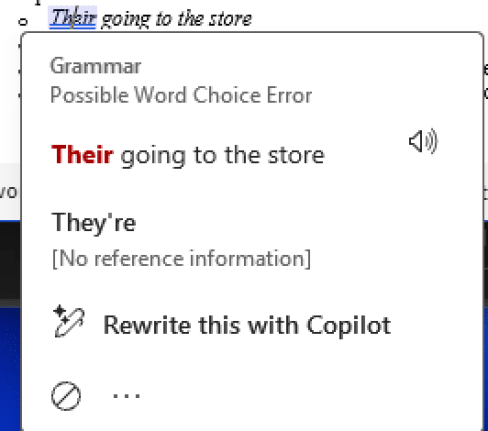
The “Possible Word Choice” alert identifies situations where you’ve used a real word that doesn’t quite fit the sentence meaning or collocation. It’s the modern version of the older “Confused Words” grammar check.
Word raises this flag when:
- The word you typed exists in the dictionary, so spell-check doesn’t complain.
- Contextual analysis suggests a different, more typical or precise term.
- Examples:
- Their going to the store → “Possible word choice” (should be They’re).
- He is air to the throne → “Possible word choice” (should be heir)
- The principle of the school → “Possible word choice” (should be principal).
- This might instead appear as “Some words are similar but used differently”.
No Specific Setting
“Possible Word Choice” is one of the Word Grammar/Style settings that cannot be turned off directly. Here are all the options under the blue underline. There’s an Ignore Once option (the ⊘ icon) only, the usual “Stop checking for this” and “Editor Settings” are missing.
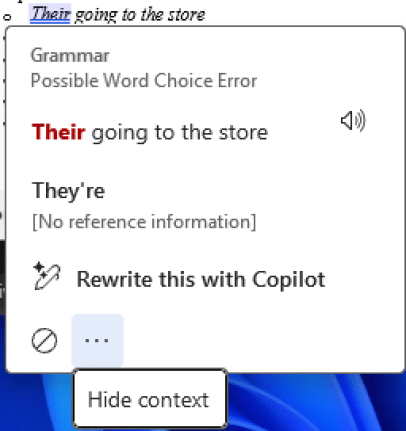
That’s because there’s no single choice for the “Possible Word Choice” instead it’s part of various wider choices at File | Options | Proofing | Settings … (under Writing Style: Grammar & Refinements):
| Broader setting | Description | Includes “Possible Word Choice”? |
| Grammar | Core grammar and word-form issues | Yes |
| Clarity and Conciseness (or “Clarity” / “Conciseness” in older builds) | Stylistic improvements | Partially (for context-driven wording) |
| Vocabulary | Alternative or stronger word suggestions | Often the parent category in newer Editor versions |
Possible Word Choice is an internal rule within the “Grammar | Confused Words / Word Choice” cluster, so you can’t disable only that one warning.
How it decides
Microsoft Editor’s natural-language model evaluates:
- The preceding and following words (called bigram or trigram context).
- Common collocations and typical verb/object patterns.
- Semantic similarity — e.g., homophones (principle / principal) and near-synonyms used in the wrong domain.
Because it’s Machine Learning based, the specific cases can vary between builds or even differ slightly between Word, Outlook, and Editor for Edge. Sometimes we wonder if luck or our horoscope is also a factor <sigh> because we can’t replicate some examples we’ve had reported to us even using the same version, language and dialect.
In other words everyone’s “milage may vary”.
Limitations and quirks
- It can mis-fire on proper names, domain-specific jargon or some unknown reason.
- Use the ‘Ignore” ⊘ icon, to stop the blue underline for that word only.
- Some checks (e.g., “affected / effected”) are handled server-side and may not trigger when offline.
- Turning off the broader “Grammar” or “Vocabulary” categories will stop the alerts, but you can’t isolate just this rule.