All about Microsoft Office Word, Excel, PowerPoint and Outlook, Microsoft 365, Office 2021 and earlier versions.

Stop copying of your signature as a picture
There’s no way to stop someone copying a picture of your signature (or any image) but there are some tricks to stop the image being misused. Thanks to Office Watch reader, Tim P. for the excellent question: “I liked your article on inserting signatures. In relation to inserting a picture of my signature, I was […]

Insert a signature picture into a Word document
There are some nifty tricks to inserting a picture of your signature into a Word or other document. Tips that make the result look realistic and professional. We’ve already explained the many ways to get a picture of your ink signature into Office. Now you have a picture of your signature, it’s ready to be […]

All the ways to sign a digital document in Word and more
Adding your signature or signing a document digitally is possible in different ways using Microsoft Word or other Office programs. Before we start, let’s clarify some terminology because ‘signing a document’ can mean several things in the computer world: Adding a signature to a document. Inserting a copy of a human written signature into an […]
15-Month Microsoft 365 Subscription: Smart Deal or Marketing Gimmick?
Microsoft’s 15-month Microsoft 365 offer looks like a bargain at first glance, promising extra value compared to standard annual plans. But when you break down the pricing, renewal terms, and fine print, this “bonus” subscription may not deliver the savings many users expect. Here’s what you need to know before buying an extended Microsoft 365 […]

Stock images or premium content in Microsoft 365
Word, Excel, Outlook and PowerPoint in Microsoft 365 have image and icon libraries plus stock images or ‘premium creative content’. Despite the ‘Stock Images’ name there are four types of extra content; Images, Cutout People, Icons and Stickers. We’re told there are ‘over 8,000’ images and icons with ‘more to come’. Insert Pictures The Insert […]
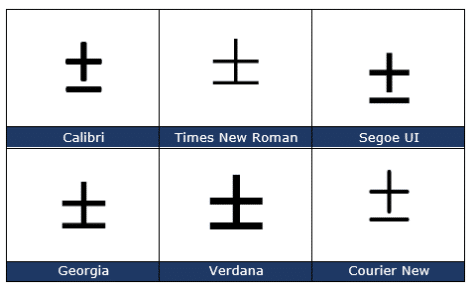
Plus or Minus sign ± in Word, Excel, PowerPoint and Outlook
Type the ‘Plus or Minus sign’ ± into Microsoft Word, Excel, PowerPoint or Outlook. Both in Office for Windows and Office for Mac. Plus-Minus ± symbol isn’t just used for equations, it’s also used as a shortcut for ‘plus or minus’. In statistics you’ll often see results given as being “ ± 3% ”. How […]
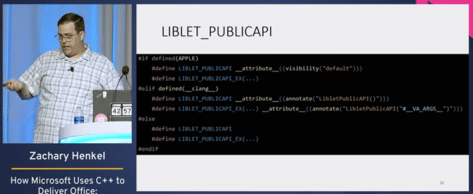
Peek inside the code that makes Microsoft Office
Here’s a rare peek inside the C++ programming code that makes Microsoft Office possible. Zachary Henkel gave a speech at CppCon 2022 titled “Microsoft Uses C++ to Deliver Office – Huge Size, Small Components” which is now available on YouTube. Mr Henkel speaks from experience, he’s worked at Microsoft for the last eight years and […]

Where is Excel’s Show Changes?
Back in August we told you about the interesting ‘Show Changes’ feature in Excel which tracks not only edits made to a workbook but who made them. Since then eager Excel users have wondered when it’ll appear in Excel 365 for Windows or Mac … and so are we. According to Microsoft’s own documentation, Show […]

Google Workspace gets 1TB storage – at last
Google Workspace Individual plan is finally getting more cloud storage than the measly allowance available so far. Up to 1TB of Google One online. Currently, the Workspace Individual plan has only 15GB of Google One cloud storage which is pitifully little. It’s actually no more than the free cloud storage for anyone with a Google […]

Two checkmark or tick ✓ choices in Word, Excel, PowerPoint and Outlook
Check mark or tick has two options, normal ✓ or heavy ✔ to insert into Microsoft Word, Excel, PowerPoint or Outlook. Both in Office for Windows and Office for Mac. Checkmark ✓ symbol is used for bullet or check lists and other indicators. There’s also Heavy Check Mark ✔ which looks different, heavier, than the […]

Four X cross ✗ choices in Word, Excel, PowerPoint and Outlook
Type one of the four diagonal cross Mark ✗, multiplication or ballot symbols into Microsoft Word, Excel, PowerPoint or Outlook. Both in Office for Windows and Office for Mac. The X or Cross Mark ✗ symbol is used for bullet or check lists and other indicators. It’s the opposite of the tick or Checkmark. There […]
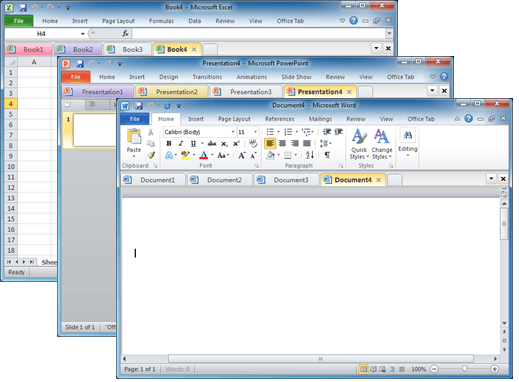
Documents in tabs option for Microsoft Office
There’s a useful and long-standing Office add-on for people who have many documents open at once and prefer them to appear in tabs (like web pages) instead of separate windows. Office Tab switches Microsoft Office for Windows from the usual ‘one document per windows’ view to ‘many documents in a single window’. This can be […]

The full story on Dictate with Office 2013 & Office 2016
Microsoft released an interesting new tool for Office 2013/2016 which promised to be a major improvement on current ‘speech to text’ options. Most media have just reported Microsoft’s hype, we actually tested Dictate and here’s what we’ve found. What made Dictate different is the use of Cortana voice recognition technology. It uses the same cloud […]

Save Office images or slides to SVG format
Microsoft Office 365 and Office 2021 let you save images to SVG format from either images/graphics, charts or whole slides from PowerPoint. Originally ‘Save As SVG’ was only in PowerPoint 365 Windows but it’s quietly spread to Word 365, Excel 365 and Outlook 365 as well as the Office 2021 apps. SVG is a scalable […]

Microsoft 365/Oreo massive price hike
As we predicted last week, the “Microsoft 365 Oreo Expansion Pack” have appeared on Ebay and at a massive markup over the original price. The ‘special’ offer had a Microsoft 365 “Expansion Pack” of Oreo’s (apparently no waistline joke intended) plus a little plastic tong called a “Clippy Dippy”. Only 2,800 packs were sold for […]

Printing tricks for Microsoft Word and Office
There’s a lot more printing and money saving options available if you know where to look or use a little cunning to get what you want. Microsoft Word documents with rescaling paper size, saving money in ink or toner, double-sided printing, two pages to a sheet, poster sizes and booklets. There are ways to save […]