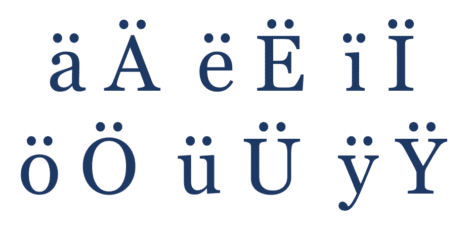
All about Diaeresis or Umlaut in Microsoft Word
How to typing words with a diaeresis or umlaut in Word for Windows, Mac, Apple or Android plus the shortcuts on Mac computers. They aren’t normally needed in English except some organizations that require diaeresis for words like: naïve coöperate reëlectBrontëNoëlNoël Coward Or you might be typing in another language where the umlaut makes a difference to […]

Ignore or Mute emails in Outlook
How to get rid of an email conversation or thread in Outlook – it’s called Ignore or Mute. Sometimes you get emails on a topic that doesn’t matter to you and is cluttering up your Inbox. Outlook for Windows has a fairly simple solution – the Ignore button. Ignore tells Outlook to move all existing and […]

Outlook navigation changes in Microsoft 365
All Outlook 365 for Windows users are getting left-side menu changes rolled out to them. Here’s what’s changing and the customizations available with the new look. We’ve had a LOT of concerned messages about this change. Don’t Worry. Microsoft loves to over hype interface innovations with labels like “New Outlook”. Too much fabricated ‘excitement’ can […]
Save fast replies & common text for Outlook emails
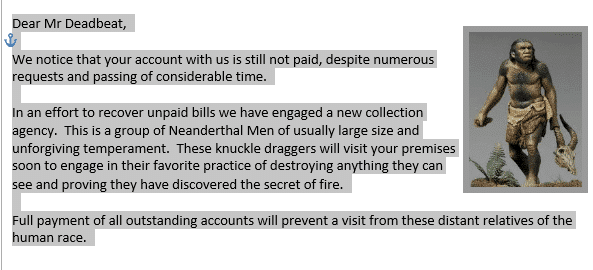
In many situations, there’s common text or even whole messages that you want to reuse in emails. Here’s an option to save and add that text with a single click. It’s a lot faster, more consistent and already in Microsoft Outlook. Outlook has a feature that’s good for recycling text for emails. Strictly speaking, Word […]

Apple command ⌘ symbol in Word, Excel, PowerPoint and Outlook
The Apple command ⌘ symbol can be typed into Microsoft Word, Excel, PowerPoint or Outlook. Both in Office for Windows and Office for Mac. Apple command ⌘ symbol appears on Mac and iPad keyboards but only as a command option, not as a symbol to type. The ⌘ symbol predates Apple computers. It’s a ‘PLACE […]
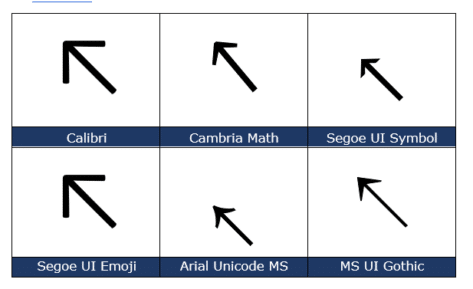
North West/Top Left Arrow ↖ in Word, Excel, PowerPoint and Outlook
Insert the North West or Top Left Arrow ↖ into Microsoft Word, Excel, PowerPoint or Outlook. Both in Office for Windows and Office for Mac. North West Arrow ↖ or “Top Left Arrow” can be used for directions on a map (naturally) or pointing to ‘top left’ in a Word / PowerPoint table or Excel […]
Sentence spacing in Word – one, two or don’t bother?
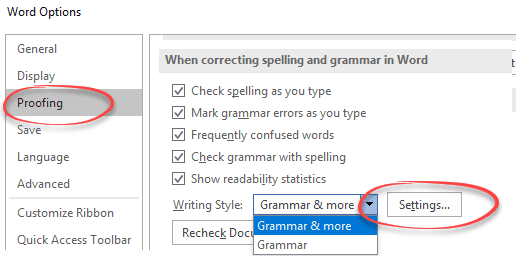
Is there one space or two between sentences? Word lets you check the sentence spacing or ignore it completely. It’s a useful option for those of us who learnt on manual typewriters where double sentence spacing was standard. Switching to single spacing is hard for your fingers to remember. One Space or Two People can […]

‘Punctuation required with quotes’ in Microsoft Word
‘Punctuation required with quotes’ is the most commonly changed Microsoft Word grammar and style setting. It checks is for the location of commas etc. when used with a quotation. Here’s two similar sentences to demonstrate: In US usage, the sentence punctuation mark go inside the quotation marks. In standard British /Commonwealth usage, the comma is outside […]

Why Word’s Alphabetical order is different from a dictionary
Which version of alphabetical order does Microsoft Word use? I thought that alphabetical order was, well, alphabetical order. That’s what I was taught at school and apparently I was taught wrong. There are at least three ways, two used by dictionaries, another by Microsoft and that’s for English alone! Reading Sue Butler’s delightful book ‘The Aitch […]
Sharing Outlook appointments – the right way
There’s a right way and wrong way to send invitations from Outlook. ” I tried your tip about sending calendar appointments to other people but it doesn’t work. I write an email invitation then add a calendar item. The receiver doesn’t see the Accept, Decline etc buttons above the message, instead they have to save […]
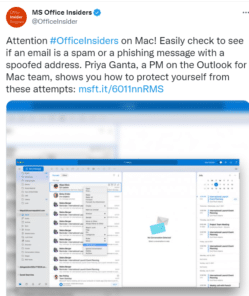
Outlook for Mac gets ‘View Source’ plus a big dose of humbug
Sometimes Microsoft gets over-enthusiastic about some ‘new’ feature. Other times they treat their customers like fools. Redmond chose the latter approach to promote a mere ‘catch up’ feature in Outlook for Mac. We were intrigued by this boast on an official Microsoft Twitter account about a new Outlook for Mac feature. “ Easily check to […]

Handwrite into docs on Office apps for iPad
Handwrite direct into Office apps for iPad, converting your writing into text right away, courtesy of the iOS Scribble feature. What you’ll need, how to setup and the new thing to look for on the Draw tab of the Word, Excel and PowerPoint apps. Microsoft has integrated the Scribble feature into some Office for iPad […]

Deceptive ads now in Outlook mobile apps
Microsoft is now showing deceptive, disguised ads into Outlook Mobile apps for Apple and Android. There are ways to, partly, get rid of the ads. The ads appear for people using the free Outlook mobile apps, not Microsoft 365 subscribers like this: The ads appear in the Inbox or the ‘Other’ messages if using the […]

Make transparent images in Office for Windows
Microsoft 365 and Office 2021 for Windows can make images transparent in Word, Excel, PowerPoint and Outlook. Text or other graphics can show through the picture. Pictures can be made transparent to reveal what’s behind in lower layers of the document, slide or worksheet. For any image go to Picture | Format | Adjust | […]

Get the Game of Thrones look in Word and PowerPoint
Here’s how to get the Game of Thrones or House of the Dragon look in Word documents and PowerPoint slides. Plenty of people have borrowed the Game of Thrones or GoT look, including a certain US President. All these uses are contrary to various trademarks by HBO. Despite legal complaints there are many ‘tip of […]
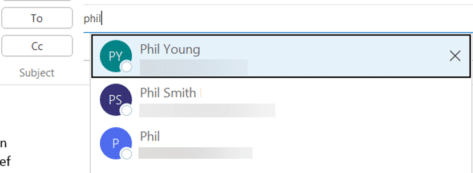
Why do old addresses remain in Outlook?
Old email addresses or people have an annoying habit of appearing in Outlook, even after you’ve deleted the address or person from the Contacts list. Here’s why obsolete emails keep appearing and how to remove these unwanted and dangerous strays. Here’s an example of Outlook’s problem with ‘sticky’ and unwanted addresses or names. Make a […]









