
How to REALLY delete Outlook information
So now we know that an Outlook item is not ‘permanently deleted’ even if Microsoft says so. How can you truly delete an Outlook message, appointment etc. You might want to truly delete when you’ve received something in error (as in the Aussie case) or simply want to prevent sensitive information being grabbed from your […]

Broken link in Outlook 2013
There’s a vital but broken web page link in Outlook 2013 that stops people adding to one of it’s most promoted features. Outlook 2013 comes with some ‘Social Connectors’ to link contacts to Facebook and Sharepoint. For others you click a link ‘Connect to another social network’ (In Outlook Contacts, go to the View tab, […]

Speed up IMAP in Outlook
Here’s a simple way to speed up Outlook when connected to accounts via IMAP. In short, make Outlook work offline at all times except when connecting to send/receive messages. Go to Send / Receive and click Work Offline On the Outlook status bar it’ll show ‘Working Offline’. Then go to Send/Receive | Send/Receive Groups. For […]
G20 leaders passport info might still be leaked
Office Watch dug into Outlook after yesterday’s story about passport details of the G20 Leaders being leaked accidentally. It’s quite possible that there’s a copy of the G20 leaders passport info still on a computer in the Asian Cup Local Organising Committee’s offices, based on the information provided in the Immigration Departments report. The organization […]
Email Security fail releases prisoner
An amazing story of failed email security in the UK, not sure if it’s funny or tragic. We are sure it’s another example of failed email security and how Microsoft, among many, could prevent it. A prisoner managed to get a smartphone into his cell. He then created a fake domain, similar to the UK […]

Hyper-V causes Windows Indexing fail
Recently we mentioned a report about consistent failures of Windows Indexing that was finally solved by disabling Hyper-V. We’re now confident that there’s a conflict, because we’ve had two more reports from readers of the same problem and solution. ” Thanks for the coverage of Windows indexing problems. I spent a lot of time on […]

Delve goes public for businesses
After a preview period, Microsoft Delve has gone public for Office 365 Business users. More links into Delve have also been announced. Delve is a new form of search tool which bring in relevant data from a selection of sources. Some are private like a Sharepoint site, corporate address book , OneDrive for business etc. […]

Fixing Outlook indexing problems
More than a few people have problems with the Outlook ‘instant’ search feature. It’s great when it works but too often you get the dreaded “Search results may be incomplete because items are still being indexed”. Sometimes all you need to do is wait until indexing is complete. Depending on the size of your hard […]
Code: close all open Outlook email messages without saving
Here is a procedure that will close all open Outlook email messages without saving – very handy if you have just created hundreds of emails testing email creation with the Emailing Order Lists to Customers database: Public Function CloseAllEmailMessages() On Error GoTo ErrorHandler Dim appOutlook As Outlook.Application Dim ins As Outlook.Inspector […]

When is an Outlook Deleted Item not deleted?
Managing your Deleted Items folder You might think that when you delete something in Outlook, it’s gone. Nope, Outlook has a safety net, just like Windows does for files. In fact Outlook can have multiple safety nets to let you recover accidentally deleted files. That’s a good thing because sometimes we accidently delete an item […]
Who does Hilary Clinton trust her private emails to?
The big political story in the USA is that Hilary Clinton used a private email service while Secretary of State instead of the State Departments own email system. We don’t care much about politics, as Office geeks we’re interested in what Hilary Clinton’s staff used for her email hosting. She used Microsoft! Specifically Microsoft Exchange […]
VoIPstudio’s Softphone Integration With Outlook
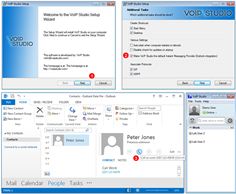
Press Release: 4 March 2015 VoIPstudio is releasing a Softphone that integrates with Microsoft’s Outlook email client. This new service can be used as a direct replacement for Microsoft’s Lync client and allows users to integrate contacts and make calls straight from the Outlook interface. Due to the high demand for easier and more specialised […]
Office 365: keep email forever
Microsoft has changed their Exchange Server hosting (under the Office 365 banner) to allow for longer holding of Deleted Items up to ‘forever’. Until now, Office 365 hosting had a fixed 30 days for Deleted Items retention. Any item in the Deleted Items folder older than 30 days was automatically removed and wasn’t directly visible […]

Outlook apps – a closer look
We’ve been looking closely at the Outlook app for iOS and Android as well as online reviews and the many comments from Office-Watch.com readers. We’ve come to the conclusion that there are two different apps. The preview versions that the public are trying and there’s other, quite different, apps which are being given to journalists. […]
Outlook apps: Security concerns and Microsoft apathy
Rene Winkelmeyer was the first to detail the worrying and undocumented way the Outlook apps store your email account logins. Normal programs and apps keep your login details (server, name, password etc) encrypted on the computer or device. When needed the name/password is sent direct to the mail host to make a connection, send/receive data. […]

New edition: Organizing Outlook Email for Outlook 2013 and more
A substantially improved and upgraded Organizing Outlook Email ebook is available right now. The 3rd edition goes deep into Outlook 2013/2010 & 2007 with new ways to get the most out of your email. The Third Edition is totally updated and revised to cover Outlook 2013/2010 & 2007 email management in detail. There are all sorts of features in Outlook to […]









