
Get the right Barbie color for Word, PowerPoint and Office
Barbie (the doll, not the Aussie BBQ) is everywhere at the moment so we’ll explain how to select Barbie Pink in your Word documents, Excel sheets and PowerPoint slides. There’s no one Barbie Pink but a selection to choose from. We looked around various official sources for the toys and movie trying to find the […]

More Word Find / Search tricks
Some more Microsoft Word Find tricks. Select and Find, finding blank lines, search for special characters/emoji, find a certain font or formatting plus wildcard options. This article follows on from our introduction Find pane search secrets in Word Select and Find If you select some text in a document then use the Ctrl + F […]

Moai 🗿 or stone statue emoji, 3D model and more in Word, Excel, PowerPoint and Outlook
Add the Easter Island stone statue (Moai/Moyai) 🗿 symbol, 3D model or photo into Microsoft Word, Excel, PowerPoint or Outlook. Both in Office for Windows and Office for Mac. Moai 🗿 symbol represents the famous stone statues of Easter Island. It can be used to show a deadpan, ‘straight face’ or ‘stone face’ (literally) expression. […]
Why there’s three font locations in Windows 11 and 10
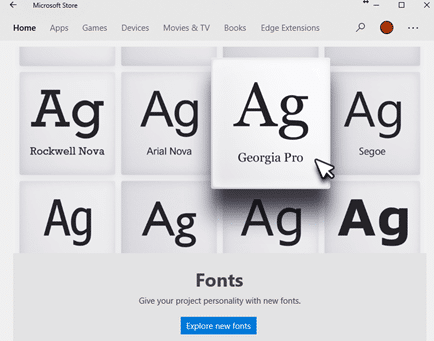
With the sale of fonts via the Microsoft Store and cloud fonts there’s now a complication in the familiar way fonts are managed in Windows 11/Windows 10 and how Office for Windows handles new fonts. There are now three different locations that fonts can be saved. For as long as anyone can remember, all Windows […]

Telephone receiver 📞 emoji in Word, Excel, PowerPoint and Outlook
Insert the Telephone receiver symbol 📞 into Microsoft Word, Excel, PowerPoint or Outlook. Both in Office for Windows and Office for Mac. Telephone receiver or handset 📞 symbol can be used on a letterhead or sign where a phone number is shown. There’s an emoji in the Unicode standard plus two Microsoft Office Icons. How […]

Find out more about fonts
A clever interactive from The New York Times explains the basics of fonts and how to choose the right font for your documents, slides and sheets. What’s your type? Try these tests to pick the perfect font for you starts with an option to read the whole article in different fonts. One of the fonts […]

A quicker, easier way to AI expand a graphic or photo
Stability.AI now has a quick and easy way to expand or extend an image. Using AI, it can take an existing image to make a larger version. Unlike other options like OpenAI’s Outpainting, ‘Uncrop’ is quite simple to use. Whatever you call it; Uncrop, Outpainting, extending etc, it’s a useful AI feature for reshaping images […]

What you’ll need to use Copilot with Microsoft Office
Microsoft has released some information about what you’ll need to get their AI tools (called Copilot) when they are eventually released. Copilot is Microsoft’s name for their upcoming AI tools integrated into Office apps (Word, Excel, PowerPoint and Outlook) plus other services like Teams. As with all Microsoft’s Copilot announcements, it’s a strange mix. The […]

Designer Erase is a picture edit opportunity for all Office users
Microsoft Designer now has an image editing tool that’s been missing from Microsoft Office. Erase in Designer lets you edit images in an important way that’s not possible in Word, Excel, PowerPoint or Outlook for Windows or Mac. Picture editing in Office has a lot of features but they mostly effect the whole image, there’s […]

Pushing Hands🫷 🫸in emoji in Word, PowerPoint and Office
Type the ‘pushing hands’ emoji, left 🫷 or right 🫸in Microsoft Word, PowerPoint and other Office apps. Officially the emoji are called Rightwards Pushing Hand 🫸 and Leftwards Pushing Hand 🫷 but can also be used as a ‘High Five’. These emoji can be used separately or together to great effect, here’s the hands as they […]

Lovely Wallpapers from Microsoft – old and new
Tucked away in a little known part of Microsoft’s web sites is a lovely collection of wallpapers (or PowerPoint backgrounds) with new and old, nostalgic designs. Including a 4k rendering of the famous Windows XP wallpaper . Go to https://wallpapers.microsoft.design/ to see all the wallpapers. At first some in full-page versions but scrolling past that […]

Search improvements in Word, Excel and PowerPoint
Microsoft is again changing the way Search works in Microsoft 365 and also (surprise!) Office 2021 to expand the results beyond the document or Office features. Now you can search for definitions, media and even web results from the top bar of Word, Excel and PowerPoint. The most recent announcement is about Office 365/2021 for […]
Right arrow → symbol in Word, Excel, PowerPoint and Outlook
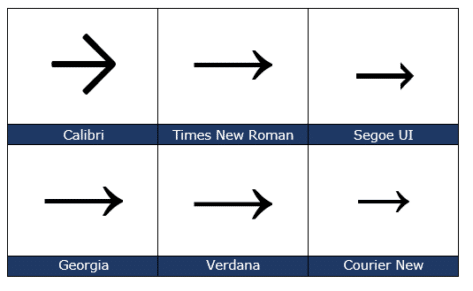
Insert the Right arrow → into Microsoft Word, Excel, PowerPoint or Outlook. Both in Office for Windows and Office for Mac. The official Unicode name is ‘Rightward Arrow” → but it can be called ‘Right pointing’ ‘Right facing’ or just ‘Right Arrow’. Want more arrows or pointers? Check out all 200+ Arrow or Hand pointing […]

All the right pointing hand symbols in Word and Office
Word and Office have several right “pointing hand” symbols available in some fonts. Here’s the Unicode options, index, backhand, sideways in white or black, all explained and shown. Want more arrows or pointers? Check out all 200+ Arrow or Hand pointing symbols and more in a searchable list. Index, Backhand or Sideways? The Unicode system […]

Three ways to run an Office macro direct, from the ribbon or toolbar
There are three main ways to run a macro in Microsoft Office (Word, Excel, PowerPoint or Outlook). From the Macros list, from a button on a ribbon or from the Quick Access toolbar. We previously spoke about how to install an Office VBA macro, here’s how a macro can appear on the ribbon or Quick […]

Make the Office ribbon more useful, add your choice of buttons
Any Office ribbon tab can be more useful for you. By trimming some of the buttons you don’t need, making room for the buttons you want. We’ll show you how to remove some of the less needed ribbon sections (likely from the Developer tab) to make more room for your own buttons. Previously we’ve explained […]









