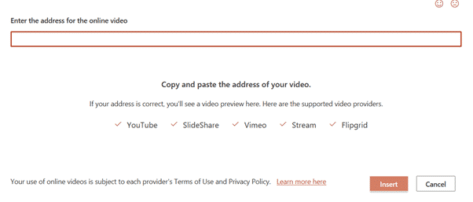
Flipgrid now supported in PowerPoint
Flipgrid now joins YouTube, Vimeo, Stream and SlideShare as supported services for PowerPoint online videos. Microsoft’s Flipgrid is an education service for teachers to record videos to share with a class. Students can respond with their own recorded video segments. Drawing, text, emoji and other rich media are available for the videos. Go to Insert […]

Locking Objects on a slide coming to PowerPoint
A much-wanted feature is coming to PowerPoint, the ability to lock an object into position so it can’t accidently be moved out of place. Objects in a slide can too easily move out of place with an accidental tap of a mouse or finger. The problem is even worse with collaborative presentations with many people […]

File open bug in Word & Office for iPad! Try this
The latest releases of Office for iPad are crashing when opening documents. Here’s what to do while Microsoft fixes the bug. The problem appears to happen when trying to open documents from OneDrive, which is the vast majority of documents because Microsoft encourages use of OneDrive. The bug is reported in the latest releases of […]

What’s so special about the Bahnschrift font?
Bahnschrift is a Windows font which is a little special and not fully compatible within Office. We’ll explain why it’s special, the extra care needed and the workaround. While it’s listed as an Office Cloud Font, Bahnschrift was originally included with the 2017 ‘Creators’ update of Windows 10. So, it might already be installed for […]

Star Wars in the Office dictionary
Since we’re talking about Star Wars, how does Microsoft Office 2016 for Windows handle the words and names from the famous films? A mixed bag. Most of the common names are in the MS Office dictionary but some surprising omissions. The evil Emperor isn’t included. Planet Tatooine has a major part in the movies but […]

Have your say on Word’s new default font
Microsoft has decided that Calibri is getting a little tired, so it’s asking customers to vote on which font will replace it. Calibri has been the default font since Office 2007. It’s familiar to most people whether they realise it or not because it appears in many Word documents. The two fonts, Calibri (body text) […]
Office 2019 for Windows – all the facts, prices and warnings
Here’s all about Office 2019 for Windows – the facts, prices and shortcomings. There’s a matching page about Office 2019 for Mac. Before you get too excited Do NOT buy Office 2019 if you have Microsoft 365 like Microsoft 365 Family (formerly Home), Microsoft 365 Personal or an enterprise plan. In other words, you pay for […]
Office 2019 for Mac – all the facts, prices and warnings
All about Office 2019 for Mac the facts, prices and warnings. There’s a matching page about Office 2019 for Windows. Before you get too excited Do NOT buy Office 2019 if you have Microsoft 365 plan like Microsoft 365 Family (formerly Home), Microsoft 365 Personal or an enterprise plan. In other words, you pay for […]
Office 2021 for Mac, your preview first look
Your first look at Office 2021 for Mac with Word, Excel, PowerPoint and Outlook, which is now out in public preview, showing off some of the new features. There’s only a Mac Office 2021 preview, no Office 2021 for Windows preview. Perhaps because there’s a few more innovations in a comparison of Office 2019 to […]

Office LTSC public preview now available
A public preview of the next perpetual licence Microsoft Office is now available. Called Office LTSC (Long Term Servicing Channel) it’s for volume customers only. Here are the options and how to get the preview. Office LTSC is the clumsily named non-subscription version of Office for organizations with volume licence agreement. See Office LTSC, first […]

Office LTSC, first look images
Here’s a first peek at Office LTSC for Word, Excel, PowerPoint, Outlook, Access, Publisher and OneNote which is now out in public preview showing off some of the new features. Office LTSC in it’s current preview is underwhelming, to put it mildly. But that’s what Microsoft is aiming for. Office LTSC (Long Term Servicing Channel) for […]

About Unicode, fonts and symbol codes
Confused about Unicode, code-points and other techie details about inserting symbols? Here’s how it works and can work for you in Word, Excel, PowerPoint and other apps. Like many things in modern computing, you mostly don’t have to know the details of how things work. But occasionally things don’t work the right way and then […]

Double Vertical Bar ‖ in Word, Excel, PowerPoint and Outlook
How to insert the Double Vertical Bar ‖ into Microsoft Word, Excel, PowerPoint or Outlook. Both in Office for Windows and Office for Mac. Double Vertical Bar ‖ symbol is used to represent norms in mathematics, (for example ). It can also be used to signify parallel lines. It can be used as a visual […]

Cross of Lorraine ☨ symbol in Word, Excel, PowerPoint and Outlook
Type the Cross of Lorraine ☨ into Microsoft Word, Excel, PowerPoint or Outlook. Both in Office for Windows and Office for Mac. Cross of Lorraine ☨ symbol was originally a heraldic cross. In more recent times it was used in the global distribution systems, Sabre, Apollo, and Wordspan, as a delimiter in a variety of input […]

Get your presentation directly into a Teams call or meeting
PowerPoint for Windows is getting a ‘Present in Teams’ button to drop your presentation into a Teams call or meeting. PowerPoint Live in Teams sounds great, but there are very specific requirements to make it work. Fire up the Teams desktop app and make sure it’s up to date. Open the presentation in PowerPoint 365 […]

Easter Bunnies and more in Microsoft Word, PowerPoint etc.
Yes, there are bunnies and other secular Easter graphics waiting for you in Microsoft 365 and Office 2019. Icons and Illustrations (both types of SVG) have some Easter or at least bunny related graphics. Stock Images also have some choices. Religious choices are missing but there are Christian or Latin Crosses available in Office. Here’s […]









