Microsoft and others listen to Skype calls … and what else?
Microsoft and some contractors listen to Skype calls but that shouldn’t be a surprise to anyone. And Microsoft’s response was quite typical – they refuse to stop. Microsoft can and does let it’s ‘associates’ listen and read from Office documents and voice data. Word, PowerPoint and Outlook users are also likely spied upon. The choice […]

New PowerPoint handout feature isn’t new at all
A supposedly ‘new’ feature in PowerPoint 365 for Windows is already in regular PowerPoint? The latest Insiders version of Office 365 for Windows has no truly new features. The only ‘new’ feature is something that’s already in Office 365. As we looked down the list of changes in version 1909 build 16.0.12013.20000 it was all […]
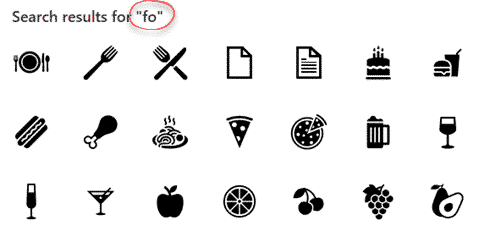
Search for Microsoft Office Icons
The desperately needed feature is coming to Microsoft Office … the ability to search for Icons. Microsoft added Icons to Office 365 and even more a few months ago … 300 more icons in Office, but which ones and where? The problem has always been finding the right icons from the long list. There are […]

Sensitivity settings add security for Office documents
Office now has sensitivity options to label Word, Excel, PowerPoint docs plus emails. Not ‘touch-feely’ sensitivity like ‘loving’ or ‘compassionate’ but instead corporate, privacy labels. It’s a new feature for Office 365 corporate hosted E3 or E5 accounts and the admins have enabled Sensitivity options. Sensitivity appears on the Home tab in Word, Excel, PowerPoint […]
Office 2016/2013 bug fixes and updates for August 2019
Here’s this months list of bug fixes and updates for Office 2016 and Office 2013. These apply only to the older ‘MSI’ Windows installs not the modern ‘Click to Run’ Office including all Office 365. For most people, these patches will be installed automatically via Microsoft/Windows Update. PowerPoint 2016 – KB4464577 Morph now gives you […]
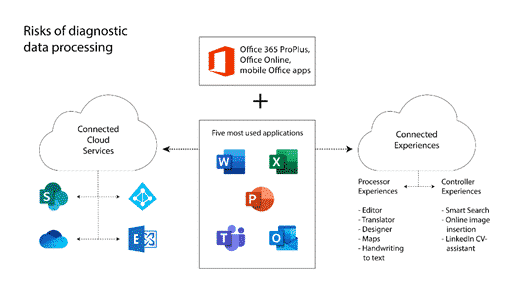
Dutch report warns about privacy leaks in Office Online and apps.
A report commissioned by the Dutch Ministry of Justice and Security warns government departments NOT to use Microsoft Office Online or the apps for Apple or Android. The Privacy Company report was made public with the Ministry’s permission via two blog posts short and long. Many governments and organizations have legitimate concerns about the amount […]

Inserting or linking other files into Word documents
Word allows you to insert other files with data and functionality from another document or program directly into your Word document. Microsoft calls these additions ‘Objects’ which makes it sound overly technical and difficult but it’s not. Don’t get fazed by all the nerd talk about ‘objects’, that’s programmer speak that’s leaked out into the […]
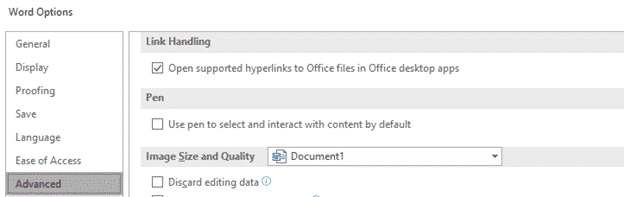
Opening Office file hyperlinks in Office desktop apps not browser
A new option in Office 365 for Windows is the ability to choose how hyperlinked Office files are opened. Inside Word, Excel or PowerPoint or in the default browser. The new option is at File | Options | Advanced | Link Handling Open supported hyperlinks to Office files in Office desktop apps. An Office document […]
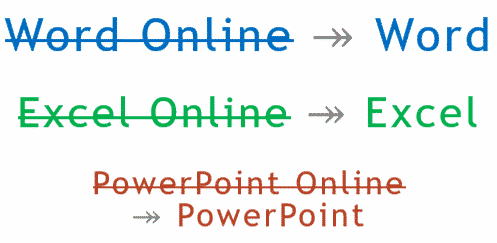
Office Online becomes ‘Office’, just to confuse everyone
Microsoft says we should stop calling the browser-based version of their apps ‘Office Online’. It’s now just ‘Office’. ‘Word Online’ is now just ‘Word’. ‘Excel Online’ is ‘Excel’, ‘PowerPoint Online’ is merely ‘PowerPoint’. Make sense? No, we don’t understand either. Microsoft’s explanation of the name change doesn’t help. According to Microsoft they are doing this: […]
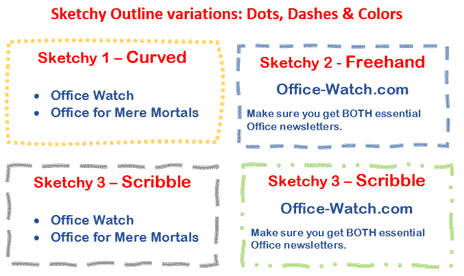
Now … Sketchy Shapes the video!
Sketchy Shapes, the new line option in Office 365 now has a little video to go with it. Sketchy line option in Office for Windows and Mac Sketchy or wriggly lines in Icons and SVG graphics Source: Microsoft

Much better Ink replay animation coming to PowerPoint
PowerPoint for Windows and Mac getting much better ink replay and animation support as shown in a new build for Office Insiders. Up to now, digital ink drawings could be replayed as a simple animation. That’s been available for about three years starting with OneNote Mobile. That was OK but, as we noted back in […]

Why Venice invented italics … you can use that trick in Microsoft Word.
Back in the 16th Century, italic fonts were invented and that trick can still be used today in Microsoft Word. Italics let you fit more text into the same space. An innovative Venetian publisher, Manutius, needed to make small and affordable books. Paper was expensive so anything that put more text on the page was […]

Lame Icons in Office 365 isn’t helped by adding 300 more
Microsoft is hyping the addition of 300 more icons to Office 365 perhaps hoping to distract customers from the many problems finding and using the Insert | Icons feature in Office 365. We like the addition of SVG graphics (Icons) into Office because it opens up a much wider range of scalable graphics. Office lacked […]

300 more Icons in Office, but which ones and where?
Microsoft is boasting that the Office 365 ‘Icons’ collection now has 300 more graphics but no information on what they are and no help finding them. The release of more Icons just emphasizes the problems with this cloud feature. Icons is a cloud service that delivers SVG graphics to Word, Excel, PowerPoint and Outlook for […]

Office 365 for Windows: Straight Talk
We’re delighted to announce a new ebook from Office Watch — all about Office 365 for Windows: Straight Talk. In-depth with Word, Excel, PowerPoint and Outlook 365 plus buying and configuration. For anyone with Office for Windows on an Office 365 subscription. It’s a truly independent guide to Office 365 for Windows. We take the […]
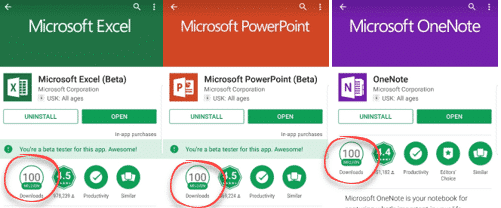
Office for Android stops support for older devices
Microsoft has announced that the Office apps for Android won’t update for older versions of Android. These are the Word, Excel, PowerPoint and Outlook apps for Android. Quietly, the system requirements were changed to cover only the last four major versions of Android. Misleading news alert Despite what you may have read, the Office apps […]