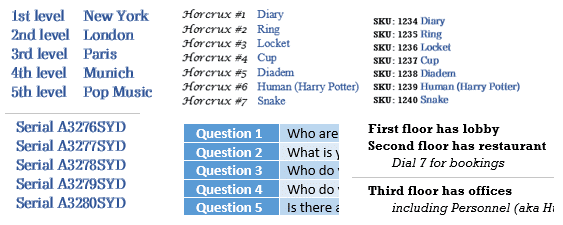
Word Numbered List tricks
Word numbered lists can do a lot more than simple 1, 2, 3 so here we’ll show you some better (1st, 2nd) and maybe unusual options (First Level, Second Place etc). All these and more are possible with Microsoft Word’s numbering plus a little knowledge and cunning. Numbering controls are spread across several different dialog […]

Format Painter with Shapes and gradients
Format Painter in Office will work to copy formatting between shapes which is very useful for complex Gradients. But they don’t always format copy in the way you’d expect. We’re obliged to Office-Watch.com reader, Lorelei, for pointing out that Format Painter can copy gradient fills in most but not all situations. To copy the formatting […]

Six shortcuts for horizontal lines in Word and stopping them!
Word has six shortcuts to make horizontal lines, here’s how they work, change them, color the lines and how to stop lines when they get out of control. All six line shortcuts There are six horizontal line shortcuts. For each one type the same character three times at the start of a new line then […]

Microsoft revises Clippy history
Microsoft tries to rewrite history on Clippy. It wasn’t their fault, it was us customers! According to this fiction, there was nothing wrong with Clippy but it was ‘ahead of it’s time’ and customers didn’t understand. That’s complete nonsense. Anyone who used Office 97 knows that. Business Insider reports on comments by Microsoft on Clippy […]
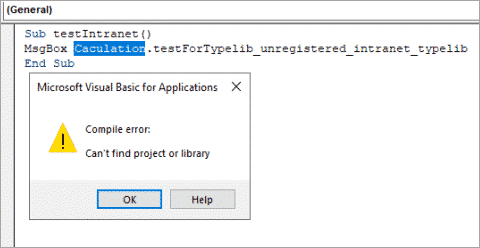
April 2020 updates for Office come with a warning
The April 2020 security fixes for Microsoft Office come with a warning that some VBA code will stop working. There are workarounds to let some references through. The KB4557055 security fix blocks VBA references that link to Internet or intranet sources or have been downloaded from the Internet. That will effect some Office/VBA code which […]
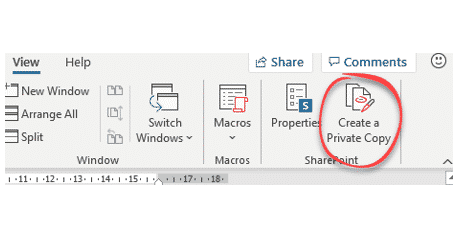
Private Annotations in Word is Save As under a fancy name
Microsoft is adding what it’s calling ‘Private Annotations’ to Word 365 with OneDrive or Sharepoint, We’re not sure what all the fuss is about because anyone with any version of Word can do the same thing now. Microsoft is trying a ‘quick fix’ for a common user request. Private Annotations doesn’t do what the name […]

Make coloring in pictures using Office to make an outline
Modern Microsoft Word (Office) has some picture tools which can convert an image into an outline that kids can use for coloring in. We’ll be the first to admit, the image to outline options aren’t great but they are serviceable, quick and easily done with tools you have in Microsoft Word. Print the outline version […]
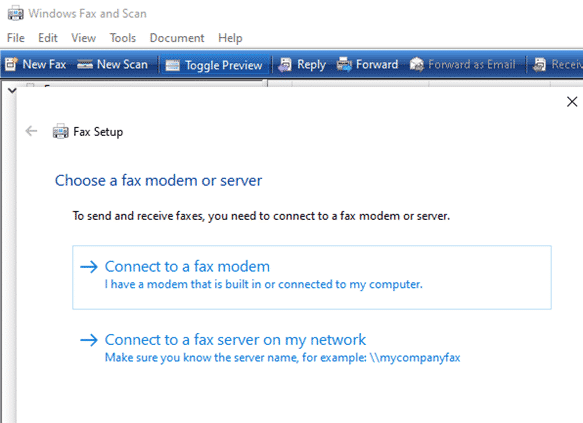
Sending and Receiving faxes without a fax machine
It is possible to send and receive faxes without a fax machine. At least you can send a fax from your computer without a fax machine because there are online services to do that for you. We’ve noticed some press reports were overwhelmed offices have reverted to faxes because their web systems have broken down. […]

Add the Indian Flag into Word, Excel or PowerPoint
Find and add the Indian flag into Office documents, Word, Excel or PowerPoint, then use some Office picture tools to enhance the image. The same help applies for any other national flag, just look for a different source. Get the Indian Flag Image There are many, many copies of the Indian flag available. We’ve opted for the Wikipedia site because it […]

Gradient and Rainbow Picture Borders in Word and PowerPoint
Word and PowerPoint allow you to not only put a colored border around a picture, instead try a pretty gradient effect for single color or multi-colored rainbow effects. Like most of the fancier border effects, you can access gradient border settings in the Format Picture pane, by going to Picture Format | Picture Border | […]

Free sign to keep in touch with customers while in lockdown
Many café, restaurants and other businesses are closed due to the pandemic but still missing an opportunity to keep in touch with customers. Here’s a sign and tips to help recover when restrictions are lifted. There’s a lovely café near us which has closed for the duration. It would be nice to know when it […]

Hospital Go Bag – a checklist
Continuing our look at what to put in a bag ready for an emergency trip to hospital. A checklist to ‘Prepare for the worst’. In part 1 Get ready for hospital – have a ‘go bag’ ready we looked at the devices to take, what to put on them and setup. Now we’ll list some […]

Making AutoText or AutoCorrect entries in Word
If you have words or longer sections of text that you type frequently and don’t want to have to type in full each time, Word allows you to set your own shortcuts to automatically enter this text in a few keystrokes either AutoCorrect or AutoText. There are two ways to do this. For shorter pieces […]

Microsoft 365 is NOT a big change
A lot of misleading talk about the Microsoft 365 change makes it seem a lot bigger and more of an upheaval than it really is. Time for a reality break … breath regular everyone. Headlines like these are all ‘bollocks’ as the British say, nonsense: Office 365 major shakeup Replacing Office 365 Converting Office 365 […]
Microsoft 365 summary that’s readable!
Here’s a readable and searchable version of the Microsoft 365 summary table that came with Microsoft’s announcement of the rebranding from Office 365 to Microsoft 365. It shows the differences between ‘free’ Office (with a Microsoft account), Microsoft 365 Personal (formerly Office 365 Personal) and Microsoft 365 Family (formerly Office 365 Home). Important limitations on […]
Unpacking a big day for Office 365 / Microsoft 365
Microsoft has dumped a lot of news in a single day. As a result there’s a lot of misunderstanding and, sorry to say, misreporting. Journos not accustomed to Microsoft’s PR tricks have fallen for them. We’ll try to ‘unpack’ what’s been announced into what’s happening now, in the known future or just sometime in the […]









