Microsoft has previewed new Office features targeted at students and teaches, however many are good for the wider public too. For example, Dictation is coming to Word for Windows, Word Online, PowerPoint for Windows, Outlook Desktop, OneNote Windows 10, and OneNote Online with support for at least nine languages. Source:
Microsoft has released Office apps that work on Chromebooks, the low cost laptops using Google’s Word, Excel, PowerPoint and OneNote apps are now available for most, if not all, Chrome OS users. There seems to be some teething troubles with the Office apps and the Google Play store. Redmond hasn’t
Ever since Microsoft added shared, collaborative documents via OneDrive, they’ve had problems with saving and sign-in. Here’s how to deal with some of those persistent bugs. These bugs can happen in Word, Excel, PowerPoint or OneNote. Most commonly with documents saved to OneDrive but also Dropbox or other cloud storage.
The Microsoft Pix app has been updated to include more automatic ways to fix photos. Photos of documents magically look like they were scanned in. It’s a ‘Garage’ project, supposedly for trial software and technologies. These days ‘Garage’ projects are presented in a more professional manner and promoted a lot
Microsoft has released another version of Office 2016 for Windows to be tested by insiders. This one is bought and installed from the Windows 10 Store. Naturally Office-Watch.com dived in to check it out. At the moment, only some Windows Insiders and users of Windows 10S can get Office in
The Office 365 version of Word 2016 for Windows has some nice improvements to LatTex support. LaTeX is the maths boffins preferred way of writing formula in computer code for conversion into the symbols that confuse us mere humans. In Word 2016 (Windows, Office 365 users only), you can see
Microsoft Office can read aloud, talk or speak the text of documents to you. It’s possible in Word, Excel, PowerPoint, Outlook and OneNote. Computer speaking text is mainly suggested for various disabled users under the ‘Accessibility’ name. But ‘Speak’ is also useful if you’re just tired of reading the screen
Microsoft’s annual giveaway of ebooks is on again. Thousands of free downloads, including Office related ebooks. The full list is on the Microsoft blog. We’ve copied the Microsoft Office related titles into a easily searchable list below. Most are in PDF format with a few in MOBI (Kindle), EPUB
Microsoft proudly added accessibility features to Office 2016 for Windows, in particular ‘Alt Text’. Pity it’s not been refined and fixed once the hype died down. Earlier this year, Microsoft added an ‘Alt Text’ feature to Office which tries to automatically suggest alternative text for visually impaired readers. Right click
Images inserted into your Word documents are being automatically uploaded to Microsoft for the accessibility ‘Alt Text’ feature. Even if the image and document are saved on your computer, not cloud storage. It’s a hidden ‘feature’ in Office 2016 for Windows desktop (Office 365 subscribers). Earlier this year, Microsoft added
Get Microsoft Office for no money, nil, ziltch, nada, bugger all. It’s legal, easy and this article explains the many options available. We’ve not talking about ‘Office wannabes’ but Word, Excel, PowerPoint or OneNote from Microsoft itself. They won’t have all the features of Office 2016 for Windows desktop. There’s
It’s expected that today (15 June 2017), Microsoft will release ‘Office in the Windows Store’ as a new way to buy Office. Understand the differences between it and ‘Office 2016 for Windows’ or the Windows 10 / Modern apps for Word, Excel, PowerPoint and OneNote. The new release is not
Microsoft’s promotion of a new OneNote for Windows 10 feature is, to put it politely, misleading. The updated app doesn’t do what the hype promises. You can’t insert a meeting from ‘Outlook’ and not ‘Outlook 2016’ as Microsoft alleges. Hype vs Reality is something all Microsoft customers are familiar with,
Coming soon is a new version of Windows, the Windows 10S. What does it mean for Microsoft Office users? The 10S is a stripped down and limited version of Windows 10. Some advanced features aren’t available while others are set to Microsoft’s preferences automatically. To buy 10S is cheaper than
After the recent docs.com scare we’ve had a few readers asking the basic questions: What is docs.com? What’s the difference between docs.com and OneDrive? In short, use OneDrive for all your cloud storage needs. Consider Docs.com, if you have a document that you’d like to share with the public or
One of the colors in the Crayola box is being dropped. Never fear, the color Dandelion can be part of your Office documents as can any other Crayola color. It’s not the same as the smell and feel of a Crayola crayon but it’s better than losing the color entirely.
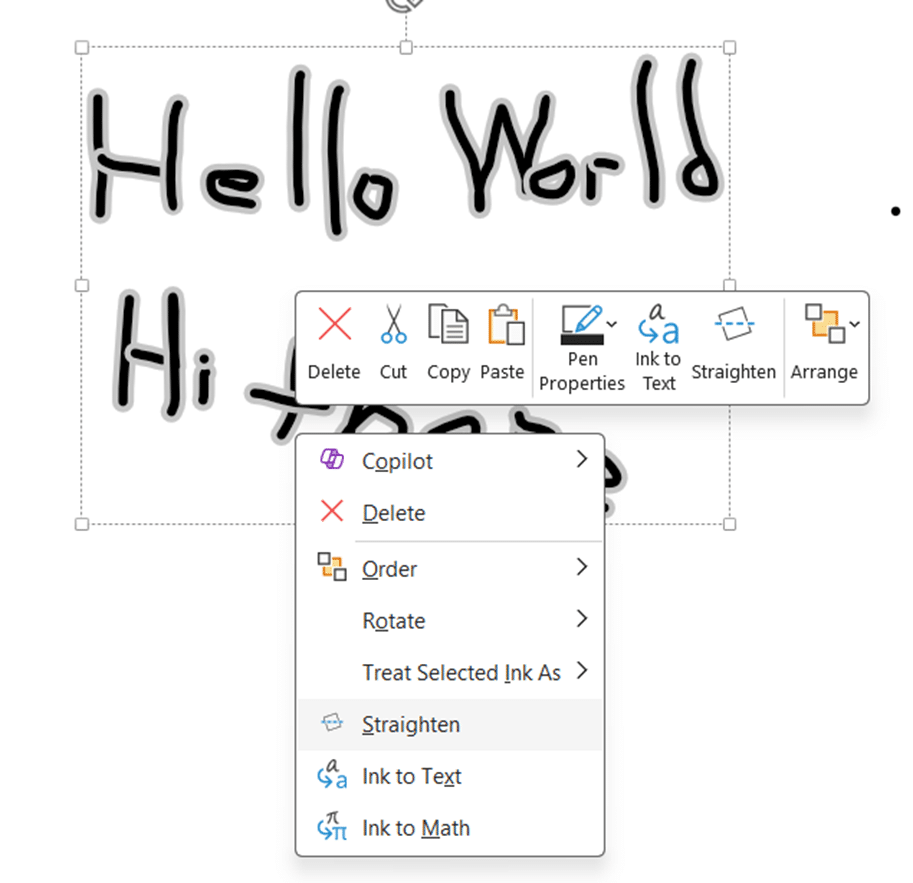
The OneNote app for Windows 10 now has a graphing feature in addition to the existing ‘Ink to Math’. As usual, there’s a catch or two. For a little time, you’ve been able to draw an equation then have it converted into text. This works fairly well, though, as you’ll
Here’s the complete list of non-security updates for Office 2016 for Windows and Office 2013 plus our notes on some bug fixes that caught our eye. As usual, these updates will be pushed to most Office computers automatically. No action is necessary. Unexpected Issues Microsoft is always using different words
Office Lens, a way to convert pictures of documents or whiteboards into text is finally available for Apple iPads. Back in 2015 Office-Watch.com demonstrated some of the clever crop and rotation tricks in Office Lens, plus the ‘convert to text’ option shameless stolen from OneNote. Source: Microsoft Images can be
A style is a collection of formatting choices combined under a single name. Any word or even a single letter has a collection of formatting settings as well. Font: size, color, bold/italic/underline/strikethrough/subscript/superscript, highlighting and more. Position: Left, Center, Right, Justified. List: bullet, numbering. Line Spacing, Borders, Background color and a
Microsoft is gradually adding to Office some interesting new Ink related features; Replay and Math. Rewind and Replay Until now drawings or ‘ink’ in Office documents has been static and fixed, much like real ink. OneNote Mobile for Windows 10 is the first Office app to make ink additions animated.
Microsoft has released an Android version of their Office Lens app. What is Office Lens? Office Lens main feature is an image to text conversion. You can take a photo of a document, receipt etc and it’ll convert into plain text (OCR) for use in OneNote, Word etc. It comes
Yet one more for the list of things you’d never thought you’d see from Microsoft. They now have a deal with major Android phone and tablet makers to include Office software in some of their products. That’s right, Microsoft is paying companies to put their software on non-Windows devices. At
It might seem strange for a long-standing Microsoft Office web site to say, but we’re not OneNote’s biggest fan. We liked version 1 a lot, the development team was very enthusiastic and responsive. But OneNote suffers from offering too much and being originally designed for the desktop. Containers can get