If you’ve ever wondered how to replicate the distinctive “school bus yellow” shade in your documents or slides, you’ll find the answer here. It’s the standard hue for North American school buses, chosen for visibility and impact. You can apply this same shade in Microsoft Word, Microsoft PowerPoint or any
Ever had a heading in Microsoft Word that seemed to wander off from its paragraph like a rebellious teenager? Or a bullet point that ghosted its follow-up text? Enter “Keep with Next” or KWN to its friends, Word’s low-key matchmaker that makes sure certain paragraphs stay together—forever (or at least
Creating polished, consistent headers and footers in Microsoft Word is easier than you think. This guide walks you through every step—from adding page numbers and section-specific layouts to using “Different First Page” for cleaner title pages. Whether you’re preparing reports, articles, or academic papers, these techniques will help your documents
Microsoft Word lacks native support for adding prefix and suffix text through styles—but clever workarounds can make it possible. This guide from Office Watch shows how to simulate prefixing and suffixing paragraphs or character styles, just like CSS’s :before and :after elements. Learn how to format consistent labels, product codes,
Microsoft Word’s grammar checker might help with commas and verb tenses, but it misses one subtle yet frequent English mistake, putting numbers, amounts, times, or dates in the wrong order. After our article on adjective order in English , Aussie Office Watch reader “MJ” pointed out something that Word doesn’t
Your trusty Office 2016 or 2019 has lost official Microsoft support. There’s a smart, affordable way to keep your ‘vintage’ Office software secure and running smoothly after October 2025. Zero-day micropatching can protect you from new security threats, extend the life of your software and help you avoid costly upgrades.
Did you know Windows quietly swaps out Helvetica font for Arial every time you open certain documents? This subtle substitution affects how text looks in Word, browsers, and more. Learn why Helvetica isn’t included in Windows, how Microsoft handles font replacements behind the scenes, and what you can do to
Microsoft’s default font family, Aptos, isn’t limited to Microsoft 365 or Office 2024. Anyone can download and install the complete Aptos font set directly from Microsoft to use across any app or platform. Whether you’re running Office 2021, older Office versions, or non-Microsoft software like LibreOffice, this quick download ensures
Want to show only the year, month, or day from an Excel date? We explain how to use the TEXT(), YEAR(), MONTH(), and DAY() functions or cell formatting to display or calculate date details efficiently. Learn when to use each method, which is fastest, and how your choice affects Excel
Need an attention-grabbing border for safety notices or urgent messages? Creating a striped border in Microsoft Word isn’t as simple as it seems—but with the right technique, you can design professional-looking emergency or warning signs in minutes. This step-by-step guide from Office Watch shows how to use Word’s background picture
Want to make your Microsoft Word pages or signs stand out? Skip the frustrating page background tool and try this smarter way to add diagonally striped borders. Get full control over stripe position, color, and layout — perfect for eye-catching warning signs, notices, or creative designs that look sharp on
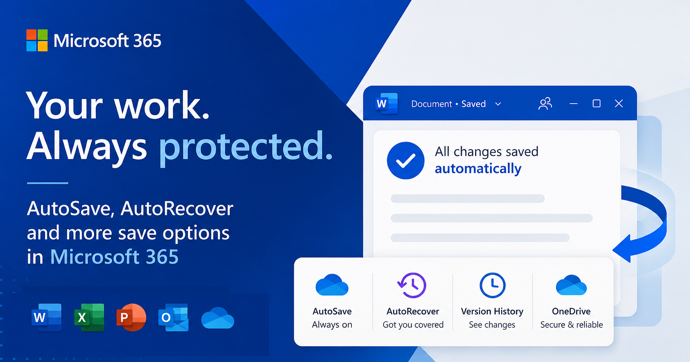
Microsoft Office and Microsoft 365 have several save features, AutoSave, AutoRecover, background saves, and backup copies. Our guide explains the differences, limitations, and best practices so you can avoid losing important work in Word, Excel, PowerPoint, and other Office apps. Maybe you’ve seen these two options in Word Options |
Why you can’t insert national flag emoji (among many) in Microsoft Office and Windows but can in Office for Mac, macOS, iPhone and iPad. We’ll explain the workaround necessary to insert national flags in Windows and Office for Windows. Apple devices (macOS, iPhone and iPad) show flag emoji properly like
Make sure your Microsoft Word documents look the same everywhere by embedding fonts, just in case the right fonts aren’t installed on recipients’ systems. How to embed fonts in Word on both Windows and Mac plus the options and alternatives for font embedding. Allow anyone opening the document to see
Take control of automatic formatting in Microsoft Word, the AutoFormat and AutoCorrect features. Whether you’re frustrated by Word turning your asterisks into bullet points or want to customize how your documents handle quotes, lists, and spelling corrections, this guide explores every option available. Discover how to manage, disable, and fine-tune
Hiding and protecting an Excel worksheet is NOT the same as full encryption. Protected workbooks can be encrypted and not available without the right password. Worksheets protected or hidden with a password are absurdly easy to view whether you have the password or not. Excel has long had the ability
Calculating the ‘Standard Error of the mean’ or SEM is simple using Excel’s in-built functions. Understanding ‘Standard Error of the mean’ isn’t hard either. We’ll explain the formula and what it all means. To calculate standard error of the mean get the Standard Deviation of a sample (STDEV.S() or STDEV())
Understanding Standard Deviation isn’t hard, especially with Excel’s help. This quick guide shows the difference between sample and population functions so you can choose the right one and get accurate, informative results every time. Standard Deviation in Excel The standard deviation measures the variation from the average or mean of a
In Excel there are various ways to either protect sheets or cells from access, make a them read-only or totally encrypt the workbook with a strong password. It’s important to understand the difference in Excel between Protect and the stronger Encrypt feature. Excel’s password protection is more complicated than in
How did we make a Word table with a picture background for a recent article – asks an Office Watch friend? She meant this table of Zoom shortcuts for toggling audio and video . There’s a similar table for Teams shortcuts. The quick answer is … we cheated! Word can’t
Miss the classic WordArt from Word’s glory days — the arched text, the rainbow slopes, the wavy headlines that screamed “1990s”? Those old gallery styles are still alive inside every modern version of Word, including Word 365 and Word 2024. They’re just well hidden. Here’s the simple compatibility mode trick
Everyone knows that Word checks your spelling with red underlines but do you know everything that’s possible in the spell check menus. Simply click the underlined word to view suggested corrections. Choose the right option, and Word will replace it instantly. So far, so easy. More choices below the suggestions
The BBC has published a good history of the famous “Keep Calm and Carry On” poster from World War 2 but missed what, to us, is the most important 21st Century innovation. When “Keep Calm and Carry On” first became popular, we saw the opportunity to showcase what Word and
If you’re wondering why a contacts address change in Outlook doesn’t stick, you’re not alone—many Outlook users face this frustrating issue. There are three possible reasons starting with a little known quirk in how Outlook saves email addresses. An Office Watch reader asks why Outlook keeps remembering an old email