Google Drive links to Office for Windows
We were excited to see headlines about Google Drive being available within Microsoft Office. There were comparisons with Dropbox and Box, both also have links into Office. Alas, things aren’t quite what they seem.
We don’t rely on press releases to write Office-Watch.com articles. Wherever possible, we actually test software ourselves before reporting to our readers. It’s a quaint, somewhat old-fashioned habit <g>.
Here’s what we found when we tried the Google Drive plugin for Microsoft Office.
One thing is not like the others
Firstly, Google Drive’s link into Office isn’t like what we’ve seen with Dropbox or Box. Those services have some contract or arrangement with Microsoft so their online storage appears on Open and Save menus in a variety of Office products.
Google has made a separate plug-in that you download and install. This plugin works with Office for Windows only. No Office for Mac, Apple devices, Android etc.
The plug-in only works with Office 2007, 2010 and 2013. Strangely, Office 2016 for Windows (now in wide preview) isn’t supported even though the changes in ‘2016’ aren’t great enough to trouble developers.
Install
Go to https://tools.google.com/dlpage/driveforoffice and download the plug-in. It’s a small download and quick install.
Close then reopen Word, Excel or PowerPoint to enable the plug in. There’s a prompt for login to your Google Drive account with some permissions to grant.

The plug-in only supports one Google Drive account. If you have multiple accounts (one for home, another for work) then you have to logout of one account and into the other.
Google Drive in Office
The Google Drive plug-in appears in three places. The Open and Save As panes plus a new tab on the ribbon.
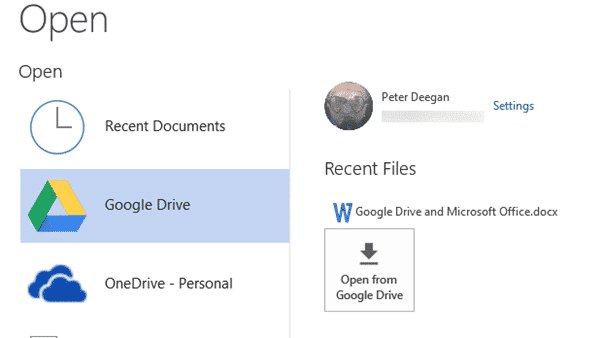
Note the Recent Files list and Setting link at top right.
There’s more document management on the ribbon:

Document Compatibility
Google Docs (their online office suite) has it’s own document format that’s not supported in Microsoft Office. By default, these documents show up in the Google Drive Open dialog even though they can’t be opened by Office!
Look for the non-Office document icons.

If you select one of these incompatible documents, a browser windows will open to view/edit the document.
Microsoft Office documents have obvious ‘letter’ icons:
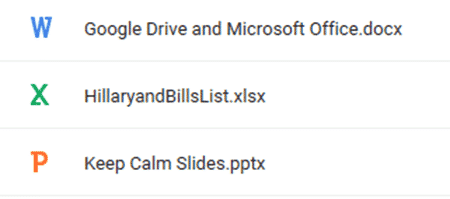
If you select a mismatched document (e.g. an Excel worksheet when in Word), Google Drive will open the correct program for the selected document. A nifty shortcut to keep in mind.
You can change what’s displayed in the dialogs from Settings. Show MS Office documents only, MS Office and Google Docs or all files.

Speed
Like all direct connections to cloud storage, there’s a noticeable delay when opening or saving documents.
Unfortunately, the Google Drive plug-in makes that delay more noticeable and annoying by having a save or ‘Uploading’ dialog box appear over your document.

Despite appearances, that ‘uploading’ message doesn’t stop you working on the document. Just drag the box out of the way and continuing working on the document. A less obtrusive message would have been nice.
Alternative
The alternative to this plug-in is to use the Google Drive program for Windows. That will sync your Google Drive with your local hard drive. Open and Save your documents to the local folders and let the Google program handle the sync to the cloud separately.
Why Google Drive?
Google gives each account 15GB of free storage that is used across their services; Gmail. Google Photos or Google Drive.
Even if you don’t use Google Drive for your main online storage, it’s useful to have as an alternative or to share documents with people who prefer Google Drive.
Many people have a Gmail mail account, either as their main or alternative email service. If you have Gmail, you also have Google Drive.