Microsoft 365 – the subscription / annual fee plan for Microsoft Office on Windows, Mac, iPhone, iPad and Android.
Includes Word 365, Excel 365, PowerPoint 365, Outlook 365 and many other ‘365’ programs, apps and services.

Seven free Halloween fonts for Word, PowerPoint and Office
There are plenty of creepy Halloween themed fonts available for free to work on Windows or Mac with Word, PowerPoint or other Office apps. Here’s seven that caught our eye plus one that you probably already have. All of these work in both Windows and Mac, mostly TrueType fonts. They are licensed for personal use, […]
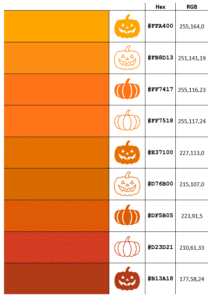
14 perfect pumpkin colors and more in Microsoft Office
Our exclusive Pumpkin Color Charts have the perfect ‘pumpkin’ colors you can use in Halloween documents, slides and graphics with their Microsoft Office compatible color codes including the five Pantone colors called ‘Pumpkin’. There are many Halloween ‘pumpkin’ colors to choose from depending on the variety and ripeness of virtual vegetable you want. See more […]

Add Skeleton and Skull to Word, PowerPoint and Office
Office has various options for graphics or images of skeletons or skulls – perfect for Halloween or other gory, scary uses in Word docs, PowerPoint slides or Outlook emails. We can’t offer a 12-foot skeleton, complete with creepy glowing eyes. For this 3.56 meter monster you have to hunt through Home Depot stores in the […]

Make your own Halloween costume pack image
Create your own fun, satirical ‘Halloween costume’ pack in the style of a popular meme using just Microsoft Word or PowerPoint. Use this article as a year-round example of how to overlay one image over another plus adding text to a picture. Take a blank Halloween costume image, add an image and some text. Something […]

PowerQuery mystery solved – how to Remove Duplicates, keeping most recent record
Excel 365’s PowerQuery has many wonderful features but occasionally there are common needs that it can’t easily handle. One of those surprising complexities is removing older duplicates but retaining most recent row for each. We’ll explain the simplest solution then why it works. Here’s some sample data on the left and the most recent purchase […]
PowerPoint Cameo puts your video selfie into a slide
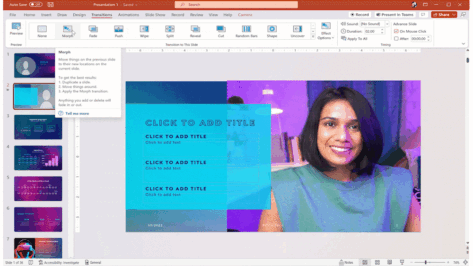
Microsoft PowerPoint’s Cameo lets you put a live camera feed into your slides. The camera feed can be moved, resized, cropped, and styled just like any other image. Designer in PowerPoint can also be used to add flair to slides that use cameo. Cameo is already in Windows and Mac and now also in Powerpoint […]

New Outlook is getting VERY limited offline support
Microsoft is boasting about the coming ‘offline support’ for the new Outlook but a look at the detail shows its very limited offline access. The current Outlook desktop apps for Windows and Mac have excellent offline support, meaning you can work on your mail, calendar, contacts even when there’s slow or no Internet access. The […]
Xlookup is truly a great Excel function
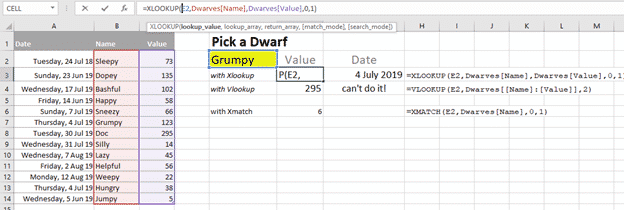
One of the most commonly used and confusing Excel functions is much better in Excel 365 and Excel 2021. Vlookup() has a new, better and easier replacement Xlookup(). It’s a truly good and useful addition to Excel, some might call it a godsend. Xlookup is available in Excel 365 for Windows/Mac/Apple/Android plus Excel 2021 for […]
Anesthetists discover how NOT to use Excel
A British medical office has made a right mess of selecting trainee anesthetists by the misuse of Excel. Let’s look at what happened and some ways you can avoid similar mistakes. As told in The Register, the UK Anesthetic National Recruitment Office (ANRO) had the job of selecting candidates from across seven regions to get […]
All about Safe mode in Microsoft Office
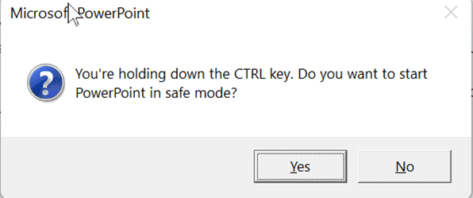
Safe Mode is a special way for Office apps to run when things aren’t working properly. Here’s how to use Safe Mode, if Office doesn’t offer it automatically, and what Safe Mode does differently. Safe Mode is useful in situations where you cannot open files in normal mode because the app is crashing, or you […]

OneNote gets CoPilot in next month
OneNote desktop will start getting AI tools, CoPilot, from November 2023. According to a Microsoft Roadmap entry, ‘general availability*’ of CoPilot in OneNote will start next month. Not ‘1st November’ as some are reporting but starting during November. Copilot in OneNote will be able to make lists, create a plan or summarize text like this: […]

It’s about time – easy checkboxes coming to Excel
Excel 365 is getting a simple way to add checkboxes into cells to easily set True/False, Yes/No, On/Off binary settings. You can hear the cries of “About bloody time” across the Excel world <g>. It’s long been possible to add a checkbox into an Excel worksheet but it’s a clumsy setup, to put it mildly. […]
Fixed: Outlook bug showing restore items dialog
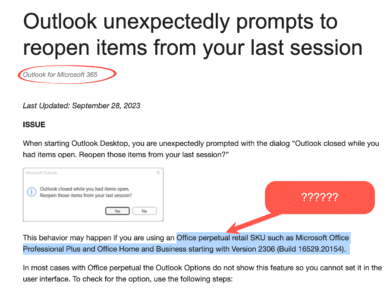
Microsoft has fixed a bug in Outlook for Windows which wrongly popped up the notice “Outlook closed while you had items open. Reopen those items from your last session?” When Outlook closes with items open (email, appointment etc.), it should offer to reopen those items when Outlook next starts. The message looks like this: Outlook […]
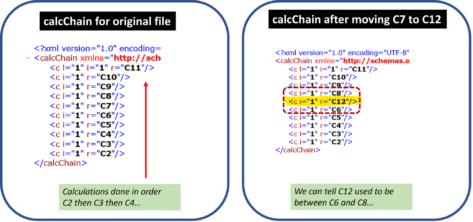
How Excel’s hidden CalcChain can catch data cheats
There’s a hidden part of Excel which can be used to catch ‘data cheats’ or people who tweak workbooks to get the results they want. There’s a news story about research into honesty, the academic is being accused, ironically, of dishonesty in their findings. The Professor is suspected of tampering with source data to change […]

OneDrive Personal Vault, deep inside and tricks
OneDrive Personal Vault is available to Microsoft 365 users across the globe. It’s an extra security level for your most important and private files. Here’s how to setup, use it and work with Office documents in the Vault folder. OneDrive Personal Vault is a more secure extension to standard OneDrive. It’s now available to all Microsoft […]
Microsoft 365 Basic finally gets all the security features
The low-cost Microsoft 365 Basic plan is now getting all the security features that were promised back in January when the plan was released. Microsoft 365 Basic’s main features are 100GB of OneDrive storage and a 50GB Outlook.com mailbox for US$20 a year. In January 2023 the plan was announced with vague promises of advanced […]