Microsoft 365 – the subscription / annual fee plan for Microsoft Office on Windows, Mac, iPhone, iPad and Android.
Includes Word 365, Excel 365, PowerPoint 365, Outlook 365 and many other ‘365’ programs, apps and services.

Get started with Word’s Draw features watching this video
Microsoft has a good explainer about the ‘digital ink’ features in Word 365 – Drawing Tools, Highlighter, Action Pen, Ink to Shape and Ink to Math. Most Microsoft videos are self-congratulatory, heavy on graphics and buzzwords but light on useful information. This one is freshingly different. It’s a straight-forward tour of the Draw tab with […]

Explaining Microsoft’s “Conditional Formatting” Excel video
Microsoft has released a quick ‘TikTok style’ video which is strange and not that helpful at showing some good Excel and Office features. We’ll explain what the video is trying to show off (Excel Conditional Formatting) and some more Office tricks too! We found it in one of Microsoft 365’s latest tweets called ‘Impressing your […]
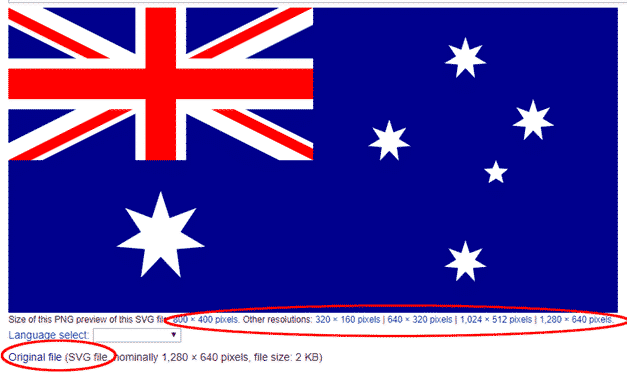
Australian flag and more into Word, Excel or PowerPoint docs
Find and add the Australian National flag, Aboriginal flag and other Aussie ensigns (Boxing Kangaroo or Eureka flags) into Office documents, Word, Excel or PowerPoint, then use some Office picture tools to enhance the image. The same help can be used for any other national flag, just look for a different source. Get the Australian […]

Prescription Take Rx ℞ symbol in Word, Excel, PowerPoint and Outlook
Type the Prescription Take Rx ℞ into Microsoft Word, Excel, PowerPoint or Outlook. Both in Office for Windows and Office for Mac. Prescription Take Rx ℞ symbol is for a medical prescription. It is commonly seen on doctor’s prescription pads and in pharmacies. How Prescription Take Rx ℞ looks Here’s some examples of how Prescription […]

Make a ‘Stop’ 🚫 circle / diagonal symbol in Word, Excel & PowerPoint
Here’s the best and most flexible way to make the common ‘Stop’ circle 🚫 with diagonal line symbol in Word, Excel and PowerPoint. Microsoft Office calls it the Not Allowed symbol. It has many, many names; interdictory circle, prohibited symbol, don’t do it symbol, universal no, banned, no entry, nay, no symbol, ‘do not’ sign or circle-backslash symbol. And that’s […]

Yet more ways to insert the Stop circle and line symbol in Office
Aside from the stop/prohibited shape in Office, there are other options for entering the common sign symbol in Word, Excel, PowerPoint or Outlook. Use Icons in Microsoft 365, Office 2021, Office 2019 or Emoji symbols from the Unicode list. See Make a ‘Stop’ circle / diagonal symbol in Word, Excel & PowerPoint for a better […]

All about Column Breaks in Microsoft Word
Manual column breaks let you control exactly where Microsoft Word wraps text to the next column, instead of letting Word do it automatically. Here’s how to insert a column break, find one and delete it. To put your text into columns, highlight the text and go to Layout | Page Setup | Columns and choose […]

Secret shortcut for fast sorting or reordering in Word
Don’t bother using cut / paste to manually sorting or adjusting a list. There’s a faster shortcut for moving a line or paragraph around a Word document which isn’t in the usual lists of Word keyboard shortcuts. Word has a simple shortcut to that move the current line or paragraph up or down without selecting […]

More than five Christian ✝ Cross choices in Word, Excel, PPT and emails
There are at least five different options inserting a Christian or Latin ✝ Cross symbol into Office documents like Word, Excel, PowerPoint or emails. There are some cross symbols available in the Windows / Office symbol fonts and there’s plenty of nice cross options available online in the flexible SVG format. Office itself is surprisingly secular […]

Two ⸘ Interrobang symbols ‽ in Word, Outlook, Excel and PowerPoint
What is an interrobang ‽ and how to use it in Microsoft Word, Excel, Outlook and PowerPoint. Also the Inverted Interrobang ⸘ that can be used with ‽ Interrobang or interabang ‽ is a non-standard punctuation mark – a combination of a question mark and exclamation mark in a single character (glyph). It can be […]
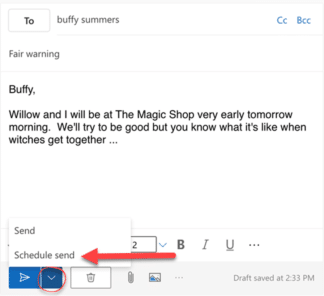
Send scheduled emails more reliably than Outlook
Schedule or delay sending an email more reliably than using Outlook desktop apps. Even better, it’s incredibly simple to do in Gmail, Outlook.com or any Exchange Server mailbox including Microsoft 365 hosted mail. We’ve explained how to use “Delayed Delivery” in Outlook desktop apps and also the many problems with that feature. There are various […]
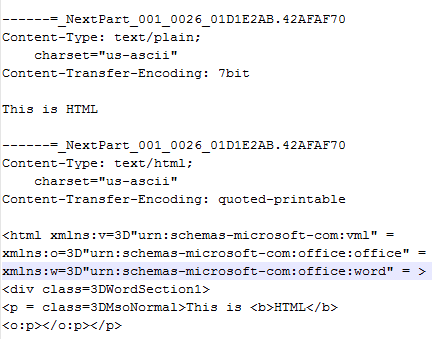
See the whole ‘raw’ email message in Outlook
“ I need to see the entire message that was sent to me, headers, MIME parts, the lot. How can I do that in Outlook?” – Gary G, Taupo NZ. The short answer is, you can’t, with a possible exception. That’s not the answer you’ll see elsewhere on the Internet but it’s the sad truth. […]

Delayed Sending in Outlook has problems and bugs
You can delay sending an email in Outlook. It’s a handy trick that can help make sure your message is read. Here’s how to schedule send an email plus the many traps, complications and a long-standing Outlook bug. A Washington Post article headed The one simple trick to make sure your email gets noticed caught […]
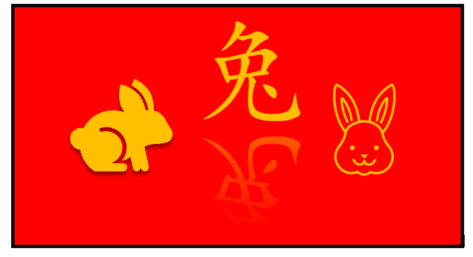
Year of the Rabbit images and more in Microsoft Office
2023 is the Year of the Rabbit in the Chinese calendar. There’s plenty of rabbit, bunny and other New Year related images, icons and Chinese character 兔 in Microsoft Office plus advice on the right colors to use for Chinese New Year graphics. Chinese New Year is on 22 January 2023, an excuse for fireworks, […]
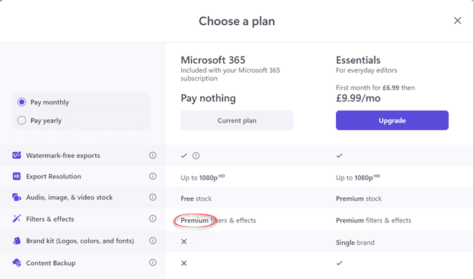
Microsoft 365 customers get more from Clipchamp
Microsoft has quietly added a few extras to their Clipchamp video editor for Microsoft 365 customers. We’ll show which premium filters and effects for free, now available just for having a Microsoft 365 consumer plan. When we say Microsoft “quietly” added these extras, we mean it. There’s been no announcement, let alone the standard Redmond […]
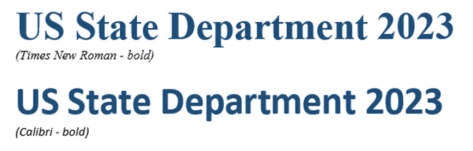
Why the US government is switching to Calibri font
The US State Department is changing from Times New Roman font for documents to Calibri. There are good reasons for the change though, as usual, there are objections and a little Microsoft Mystery. Calibri is the current default font in Microsoft Word and other Office apps. It’s been the default since Office 2007, though users […]









