Microsoft 365 – the subscription / annual fee plan for Microsoft Office on Windows, Mac, iPhone, iPad and Android.
Includes Word 365, Excel 365, PowerPoint 365, Outlook 365 and many other ‘365’ programs, apps and services.
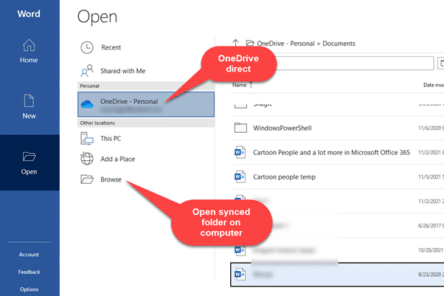
Two ways to open a OneDrive document in Microsoft Office
There are two different ways to access a Microsoft Office document that’s saved on OneDrive. We’ll explain both and why it’s sometimes important. Microsoft’s OneDrive stores documents on servers. Programs (like Office) can open those files directly from the cloud service. Or the OneDrive app can copy (synchronize) files from the cloud to your “local” […]
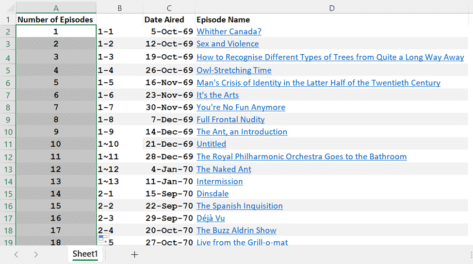
Six ways to number lists in Excel
Excel doesn’t automatically number lists but there are at least six ways to add numbering depending on your needs and how the list appears. Numbering is important but can be annoying when you’ve got a large dataset. If it’s small, it’s easy to number it manually or by an auto-filling sequence. But if it’s inconsistent […]

Duck 🦆 emoji in Word, Excel, PowerPoint and Outlook
Add the Duck 🦆 emoji into Word, Excel, PowerPoint or Outlook. Both in Office for Windows and Office for Mac. Duck 🦆 emoji represents the quacky bird with webbed feet. The emoji is usually depicted as a Mallard. Sometimes used as a substitute for the f-word, because of iPhone’s tendency to autocorrect to the obvious […]

What can you put in your email address?
A simple question – what characters can you put in an email address? Like many things to do with the Internet the answer isn’t as simple or direct as you might think. We’ll look at what makes a valid email address, both in theory and in practice. A simple question – what characters can you […]

Three new performance boosts for Excel 365
Excel 365 for Windows is getting three performance boosts that you might not notice but speed up your work on less powerful computers. All these Excel 365 for Windows tweaks are designed for what Microsoft politely calls “resource-constrained devices”. That means: CPUs with two cores or less 8GB of RAM or less That’s about the […]

Real words for really big numbers in Microsoft Word
What are the real words for really big numbers, waaay over a trillion? Does Microsoft Word’s dictionary recognize them? (Answer: most but not all and there’s even a spelling mistake in Word!). How many is a billion anyway? We’ve looked at the informal words for vague large numbers such as zillion, gazillion etc. There are […]

Read Aloud from locked screens on iPhone and Android
A small but important change is coming to Word mobile app for iPhone, iPad or Android. You’re able to continue listening to a ‘Read Aloud’ document from the lock screen. At the moment, Word will stop reading a document to you if the lock screen is enabled (usually because there’s been no screen taps for […]
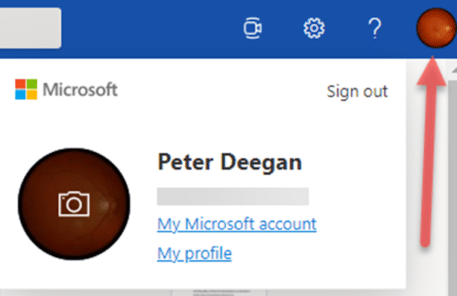
Fast account switching now in Office on the web
Office apps in a browser have caught up with an important feature in Office 365 for Windows – quick account switching is now available. Almost three years ago, Microsoft added quick account switching to Office 365 for Windows. You can save logins to several Microsoft 365 accounts; work, school, home etc and switch between them […]
Clever picture borders in Excel and PowerPoint
Like Word, PowerPoint and Excel also have options to add borders to pictures to add that extra oomph to your work. Users can choose between fairly simple borders or add some further complex, fancy styles to their images. If all this seems very familiar, it’s because the same picture tools are available in the main […]

Grinning Cat with Smiling Eyes 😸 emoji in Word, Excel, PowerPoint and Outlook
Type the Grinning Cat with Smiling Eyes 😸 emoji into Microsoft Word, Excel, PowerPoint or Outlook. Both in Office for Windows and Office for Mac. Grinning Cat with Smiling Eyes 😸 emoji is a variant of the grinning face emoji or the cat face emoji, which is yellow on most platforms. How Grinning Cat with […]

All the email preview options in Outlook
There are a couple of email preview options in Outlook. These include the Message Preview and using the Reading Pane (once called the Preview Pane). We’ll explain them in detail including how to turn these features on and off plus viewing attachments in the Reading Pane. Message Preview Message Preview is an auto preview that […]
Microsoft Office 365 ‘Lifetime’ plans are a lie
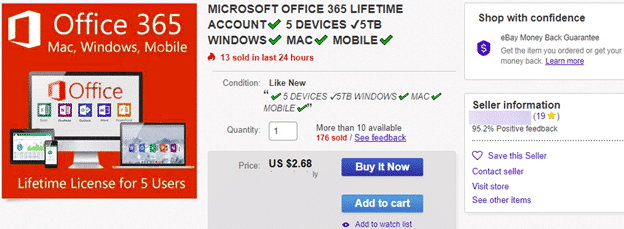
We’ve seen many cheap Microsoft Office 365 Family, Personal and other plans sold as ‘lifetime’, ‘perpetual’ or ‘never-ending’. It’s all lies. Some deals are obviously scams, like this one for just US$3 but others have more plausible prices. They are priced just under the regular street price to seem like a good, legitimate offer. All […]
Why is Pi 𝜋 missing from Windows 11 and Windows 10?
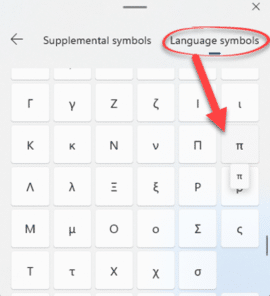
The Windows Emoji Panel has its problems which are amply demonstrated by a common symbol that’s hiding in the long symbol lists – the Pi symbol 𝜋 . We’ll explain where it’s hiding and generally grumble about this part of Windows 11 and 10. The Emoji Panel is in Windows 11 and 10, access it […]
Why new Office features don’t appear
Microsoft has changed the way they rollout new features in Microsoft Office 365 which can lead to confusion and frustration, especially among the Insiders who try out new stuff before it reaches the public. In olden days (say 2018) getting new or changed features was simply a question of having the right version of Office. […]

Copying/Moving Footnotes or Endnotes in Word
There’s a small but important point about Microsoft Word with Footnotes and Endnotes. It’s so important we’ve made this separate little article about copying or moving. The footnote or endnote is stored in that little superscript character in the document text. Copy, move or delete that superscript character and the entire note goes as well. […]
Fast Microsoft 365 repair from the command prompt
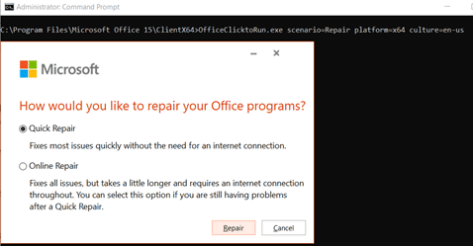
If Microsoft 365 (Word, Excel, PowerPoint, Outlook) is misbehaving, try the Repair option. If that’s also causing trouble, there’s a hidden command prompt option. For any ‘Click to Run’ installations of Office for Windows (mostly Microsoft 365, Office 2019) there are Repair options available to fix common problems. Among these troubles are an Office program […]