
How to add notes inside Excel formulas
Here are three ways to add an explanation or note within an Excel formula itself, instead of separate notes. The ‘Achilles Heel’ of Excel or any spreadsheet program has always been explaining or commenting of cell formulas. Adding comments is an important part of any code including Excel’s VBA but it’s MIA from formulas themselves. […]
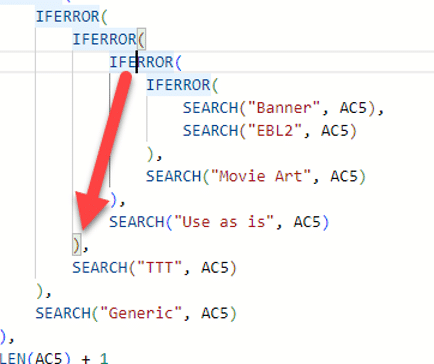
A better way to view formulas in Excel
Here’s a far better way to view and edit formulas in Excel than the small formula bar. It’s a free add-in from Microsoft’s Excel Labs called Advanced Formula Environment (AFE) Understanding Excel formulas can be difficult, even ones you’ve written yourself. Imagine trying to work with a monster formula like this: Happily, there’s an easier […]

Pantone’s 2024 color ‘Peach Fuzz’ in Word, Excel and PowerPoint
Pantone’s color of the year for 2024 is “Peach Fuzz”. You can use that exact color in Word, Excel, PowerPoint, Outlook and Designer using the Hex/RGB color code. And we’ll look at the flowery prose that’s become a hallmark of this annual promotion. The color of 2024 is … Peach Fuzz As usual what’s more […]

Excel on the web has easier ways to insert functions
Excel’s web version now has some better ways to insert functions direct from the function search window. Also easily see the open/close bracket pairs. Insert Function ‘wizard’ Insert Function has expanded into a little ‘wizard’ (remember those?) after finding the function, a second pane lets you insert parameters with some guidance. Go to Insert | […]

Croissant 🥐 emoji in Word, Excel, PowerPoint and Outlook
Add the Croissant 🥐 emoji into Microsoft Word, Excel, PowerPoint or Outlook. Both in Office for Windows and Office for Mac. I have to declare a personal interest in this article because the Croissant 🥐 is an essential part of my breakfast. No morning is complete without the “Three C’s” – Coffee, Computer and Croissant […]
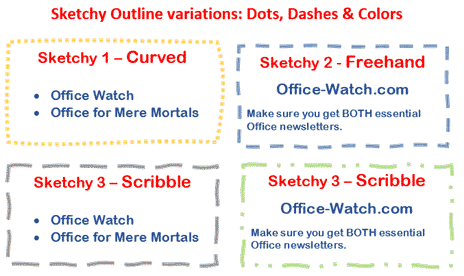
Sketchy line option in Office for Windows and Mac
Office for Windows and Mac has three special outline styles for the borders of shapes and text boxes. Called ‘Sketched’ or ‘Sketchy‘ because they have a hand-drawn line look. It’s a nice little addition to Word, Excel, Powerpoint and Outlook. Let’s see how it works plus some details and limitations that Microsoft hasn’t mentioned. All […]
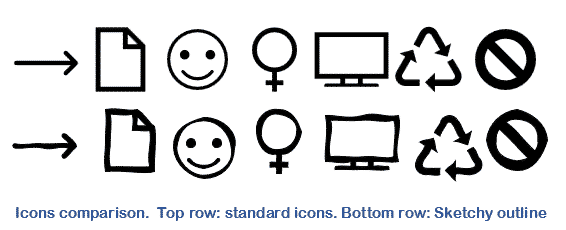
Sketchy or wriggly lines in Icons and SVG graphics
Microsoft Office Icons and other SVG graphics can be improved a lot simply with Sketchy or Sketched lines. They turn an icon or graphic from something formal into a hand-drawn and casual look. Sketchy lines is the ‘hand-drawn’ line option available in Microsoft 365 for Windows or Mac plus Office 2021. It lets you change […]

Better Icon, illustration or SVG editing trick in Office
Get more from Microsoft Office Icons, Illustrations, Cartoon People and other SVG graphics by turning them into Office Shapes which opens up many more options for editing and recoloring the graphic. That includes ‘splitting’ a single graphic into parts that can be changed separately. Microsoft 365, Office 2021, 2019 and 2016 for Windows/Mac have an […]

How hackers trick you to open infected documents
Here’s how to avoid the tricks hackers use to infect your computer via Office documents. Microsoft has added features to Office that should make it harder to infect your computer via a Word, Excel or PowerPoint document. Hackers have found ways to trick people into bypassing those warnings and enable the viruses in the document. […]

Office Application Guard is on the way out
Microsoft Application Guard for Office is being ‘deprecated’ (phased out) in Windows 11 and Windows 10 after only a few years. No official reason has been given and the excuses don’t make sense. Back in 2019 Microsoft announced Application Guard as a new way to isolate macro enabled documents from unknown sources. Suspect documents are […]

Telephone location ✆ emoji in Word, Excel, PowerPoint and Outlook
Insert the Telephone location ✆ symbol into Microsoft Word, Excel, PowerPoint or Outlook. Both in Office for Windows and Office for Mac. Telephone location ✆ symbol is supposed to be used as a sign for a phone box or booth but can be used for any ‘phone’ purpose. See also: Telephone Receiver 📞 Emoji In Word, Excel, […]

Essential keyboard shortcuts for the Office Selection Pane
Use these essential keyboard shortcuts to make best use of the Selection pane in Microsoft Office. Alt + F10 Open Selection Pane F6 Move the keyboard focus through the major regions until reaches the Selection Pane Tab Navigate by keyboard through the buttons in the pane and then into the list Up arrow, down arrow […]

See more with Selection Pane in Excel, PowerPoint and Word
Selection Pane is essential in Word, Powerpoint and Excel to hide or display the objects or to change the order, rename objects, group / ungroup, and delete objects. If you’re using images, graphics, Text Boxes, charts, SmartArt or other objects, the Selection Pane is a must. So, let’s start with some basic details of how […]

How to use Excel’s Business Assist – Forecast
Business Assist – Forecast is a new Excel add-in from Microsoft which forecasts future volumes based on past data. How to use the add-in, if you can and understand its limitations. From the promotion, Business Assist – Forecast sounds like a useful tool but it’s a different story when we tried the add-in for ourselves. […]
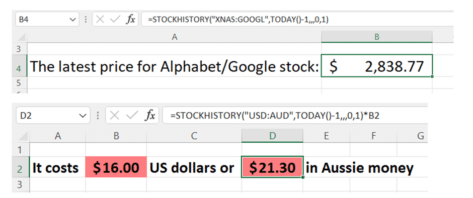
Excel trick uses a single cell to get the latest stock or exchange rate
Here’s the Excel trick to grab a recent stock price or currency exchange rate using a single cell. It bypasses the multiple steps needed for the Stock/Currency data type and the annoying lack of configuration in the standard stock/currency data type. The single cell trick makes for more compact and workbook plus letting you select […]
Great guide to harnessing Python in Excel
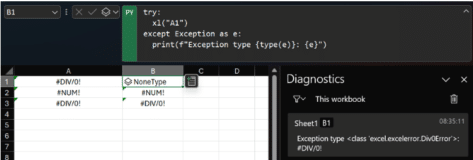
In a great development for data analysts and coding enthusiasts, John Lam’s new guide that expertly explains Python programming with Excel from the start to a practical example. Book of Python in Excel goes through the basics like using the XL() function in Python to grab data from an Excel workbook, importing external data and […]









