
Patch Tuesday – Two November 2023 highlights
Here’s just a few of the security breaches that caught our eye from a total of 63 security flaws patched in this months dump of fixes from Microsoft. Including five ‘zero-day’ bugs plus another 20 Edge browser security bugs fixed earlier in November. We’ve included links to more detail and specific patches for each version […]

Eiffel Tower 🗼 emoji in Word, Excel, PowerPoint and Outlook
Insert the Tower 🗼 (Eiffel Tower, Tokyo Tower) emoji, symbol or stock photo into Microsoft Word, Excel, PowerPoint or Outlook. Both in Office for Windows and Office for Mac. The emoji is commonly called ‘Eiffel Tower’ in the west but it was originally intended to show the Tokyo Tower. That’s why some emoji are colored […]
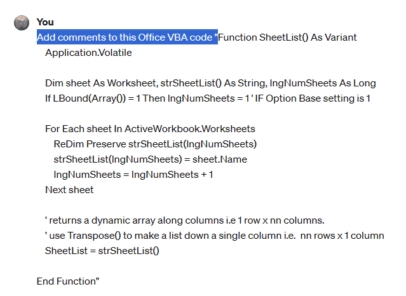
Add comments/help to your Office VBA code
ChatGPT is a powerful tool that can enhance your Office VBA code with comments and help. It or Copilot can analyze your code and generate explanations, tips, and examples to make it easier to read and debug One of the modern AI tricks is to help write and understand programming code. We’ve already looked at […]
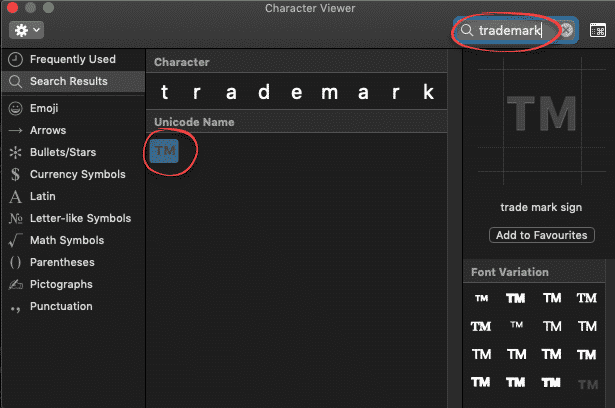
Trademark ™ symbol in Word, Excel, PowerPoint and Outlook
Type the Trademark ™ TM symbol as text and icon into Microsoft Word Excel PowerPoint or Outlook. Both in Office for Windows and Office for Mac. Trademark ™ TM symbol is, strictly speaking, called the Unregistered Trademark symbol. Its counterpart is the Registered Trademark ® Trademark in Word and Outlook The Trademark ™ sign has an […]
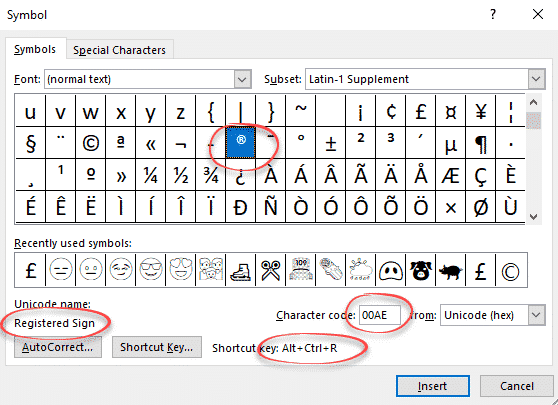
Registered Trade Mark ® symbol in Word and Office
How to insert the Registered Trade Mark ® symbol as text or icon into Microsoft Word, Excel, PowerPoint or Outlook. Both in Office for Windows and Office for Mac. Registered Trade Mark ® not to be confused with the Unregistered Trade Mark ™ symbol. Registered Trade Mark ® in Word and Outlook The Registered Trade Mark […]
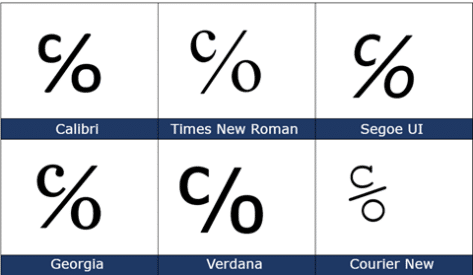
Care of ℅ symbol in Word, Excel, PowerPoint and Outlook
The Care of ℅ symbol can be typed into Microsoft Word, Excel, PowerPoint or Outlook. Both in Office for Windows and Office for Mac. Care of ℅ symbol is one of those useful symbols you’ll never see on a keyboard and have to go hunting for. ℅ is used on envelopes and addresses, it refers to […]

Microsoft Office photo editing with Apollo 8’s Earthrise
As a quick example of what’s possible, here’s a quick look at some photo editing options in Microsoft Office, Word, Excel, PowerPoint or Outlook emails. Since it’s Christmas, we’ll use one of the famous Apollo 8 Earthrise images. We’ve already talked about how Apollo 8’s Earthrise, as we know it, is a cropped, rotated and […]

Fast umlaut ä ë ï ö ü in Microsoft Word and Office
Once you know the ‘secret’ shortcuts, it’s easy to type the umlaut vowels ä ë ï ö ü Ä Ë Ï Ö Ü in Word and Outlook but, alas, it’s not the same in Excel or PowerPoint. There are alternatives in Windows and Mac if you’re not using Word. There’s also a stand-alone ¨ umlaut […]
Satellite Antenna 📡 emoji in Word, Excel, PowerPoint and Outlook
Type the Satellite Antenna 📡 symbol/emoji into Microsoft Word, Excel, PowerPoint or Outlook. Both in Office for Windows and Office for Mac. Satellite Antenna or Dish 📡 symbol can be used for modern television, radio, GPS or wireless broadcasting generally. Can be used with the Satellite 🛰 emoji or icon. How Satellite Antenna 📡 looks […]

How to quickly switch between Word and Office windows
Often you need to switch between windows of the same program, so there should be a quick keyboard shortcut to do that. Here are your options in Windows or Mac. Whether you’re moving between Word documents, Excel workbooks or PowerPoint decks or Outlook emails, the need is the same. You want to quickly move between […]

Satellite 🛰 emoji in Word, Excel, PowerPoint and Outlook
Insert the Satellite 🛰 emoji or icon into Microsoft Word, Excel, PowerPoint or Outlook. Both in Office for Windows and Office for Mac. How Satellite 🛰 looks in different fonts. In Windows fonts only Segoe UI Emoji and Segoe UI Symbol have the Satellite emoji. As usual the Apple version (Apple Color Emoji font) looks […]
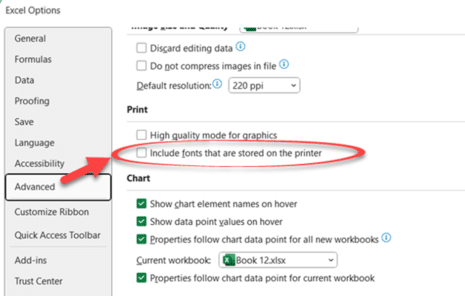
Check an Excel option for little performance boost
There’s an obscure little Excel option that’s worth checking to give you a little performance boost. The choice is File | Option | Advanced | Print | “Include fonts that are stored on the printer” An obscure option that most people never bother with. “Printer fonts” are fonts in the printer itself which Windows can […]

Monospace font makes a difference to Excel formulas
Excel 365 for Windows and web have a different font for the formula bar. The monospace font should be easier to read and understand. For as long as there’s been Excel, formulas have been shown in a proportional font. Probably to fit as much text into the available screen space. Now screens are larger and […]
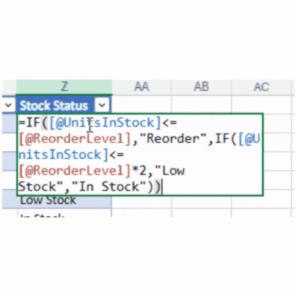
Value Preview is coming to Excel formulas
Excel 365 for Windows and Web is getting a great new feature called Value Preview. You’ll be able to see the current value of any formula part just by hovering over it. It’s simple and most people won’t even notice it except by accident. Just hover the mouse over part of a formula to see […]
Office 2019 & 2016 lose an important part of their support
Microsoft has stopped supporting connections from Office 2019 and Office 2016 to their Microsoft 365 online services. It’s another ‘passive aggressive’ move to get customers off older versions of Office and onto Microsoft 365. Both Office 2019 and Office 2016 will continue to be supported with bug and security fixes until late 2025 however Microsoft […]
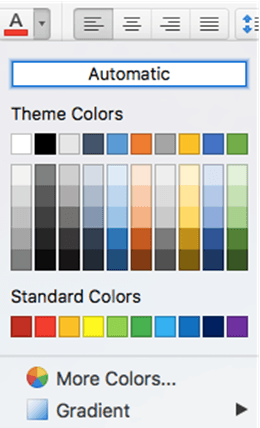
Color selection in Office for Mac, complete
Office for Mac has quite different and extensible color selection options for text, shapes, pages etc. that are the envy of Office for Windows. We’ll explain them all, eyedropper, swatch, color wheel or sliders, palettes and even pencils. Choose from the same range of colors as Windows, but in many different ways and more. All […]









