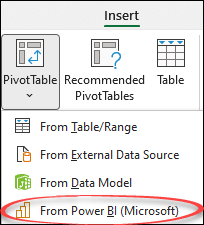
Make a PivotTable direct from PowerBI data
It’s now possible to make an Excel PivotTable directly from PowerBI data in Excel 365 for Windows and Excel on the web. Microsoft PowerBI is a cloud-based data accumulation then reporting and visualization (dashboards etc). BI stands for “Business Intelligence”. PowerBI is a separately licensed product for businesses so it’s only available if your organization […]

Otter 🦦 emoji in Word, Excel, PowerPoint and Outlook
Type the fun Otter 🦦 emoji into Microsoft Word, Excel, PowerPoint or Outlook. Both in Office for Windows and Office for Mac. Otter 🦦 emoji represents a light-brown otter (a member of the weasel family) on its back with its paws held together. But the emoji can just be used for a bit of fun. […]
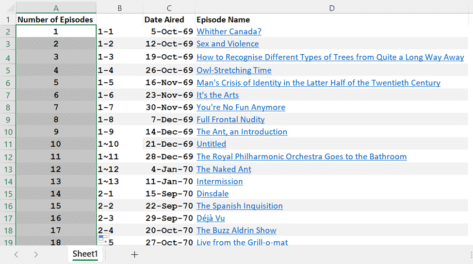
Six ways to number lists in Excel
Excel doesn’t automatically number lists but there are at least six ways to add numbering depending on your needs and how the list appears. Numbering is important but can be annoying when you’ve got a large dataset. If it’s small, it’s easy to number it manually or by an auto-filling sequence. But if it’s inconsistent […]

Duck 🦆 emoji in Word, Excel, PowerPoint and Outlook
Add the Duck 🦆 emoji into Word, Excel, PowerPoint or Outlook. Both in Office for Windows and Office for Mac. Duck 🦆 emoji represents the quacky bird with webbed feet. The emoji is usually depicted as a Mallard. Sometimes used as a substitute for the f-word, because of iPhone’s tendency to autocorrect to the obvious […]

Three new performance boosts for Excel 365
Excel 365 for Windows is getting three performance boosts that you might not notice but speed up your work on less powerful computers. All these Excel 365 for Windows tweaks are designed for what Microsoft politely calls “resource-constrained devices”. That means: CPUs with two cores or less 8GB of RAM or less That’s about the […]
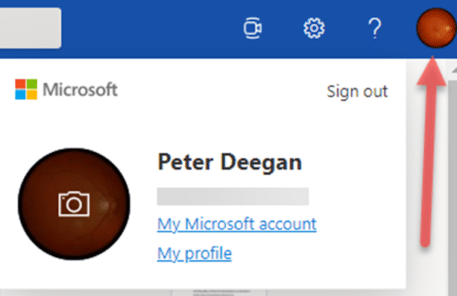
Fast account switching now in Office on the web
Office apps in a browser have caught up with an important feature in Office 365 for Windows – quick account switching is now available. Almost three years ago, Microsoft added quick account switching to Office 365 for Windows. You can save logins to several Microsoft 365 accounts; work, school, home etc and switch between them […]
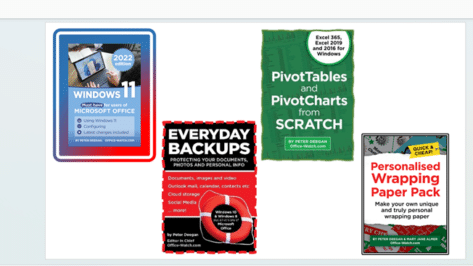
Clever picture borders in Excel and PowerPoint
Like Word, PowerPoint and Excel also have options to add borders to pictures to add that extra oomph to your work. Users can choose between fairly simple borders or add some further complex, fancy styles to their images. If all this seems very familiar, it’s because the same picture tools are available in the main […]

Grinning Cat with Smiling Eyes 😸 emoji in Word, Excel, PowerPoint and Outlook
Type the Grinning Cat with Smiling Eyes 😸 emoji into Microsoft Word, Excel, PowerPoint or Outlook. Both in Office for Windows and Office for Mac. Grinning Cat with Smiling Eyes 😸 emoji is a variant of the grinning face emoji or the cat face emoji, which is yellow on most platforms. How Grinning Cat with […]
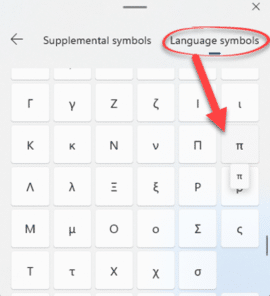
Why is Pi 𝜋 missing from Windows 11 and Windows 10?
The Windows Emoji Panel has its problems which are amply demonstrated by a common symbol that’s hiding in the long symbol lists – the Pi symbol 𝜋 . We’ll explain where it’s hiding and generally grumble about this part of Windows 11 and 10. The Emoji Panel is in Windows 11 and 10, access it […]
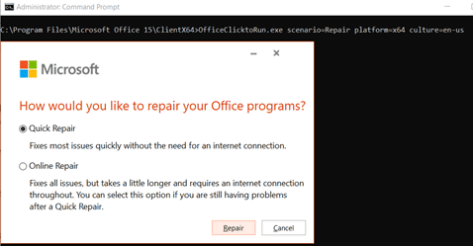
Fast Microsoft 365 repair from the command prompt
If Microsoft 365 (Word, Excel, PowerPoint, Outlook) is misbehaving, try the Repair option. If that’s also causing trouble, there’s a hidden command prompt option. For any ‘Click to Run’ installations of Office for Windows (mostly Microsoft 365, Office 2019) there are Repair options available to fix common problems. Among these troubles are an Office program […]
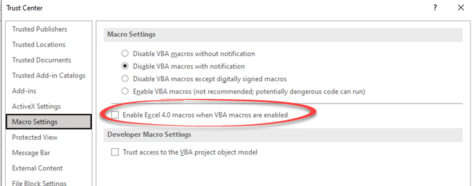
Excel 4 macros are now blocked and about time too
At long last, Excel v4 macros are being blocked from running in Excel 365 by default. A move that greatly reduces the security risk from infected attachments in Excel 365 and Excel 2021. Excel v4 macros are a very old form of programming, literally 30 years old. It allowed macros to be embedded into cells. […]

Rainbow 🌈 emoji in Word, Excel, PowerPoint, and Outlook
How to insert the Rainbow 🌈 into Microsoft Word, Excel, PowerPoint, or Outlook. Both in Office for Windows and Office for Mac. Rainbow 🌈 emoji depicts a colorful arc of a rainbow, usually used to express positivity, hope, good fortune. The rainbow flag was designed and has been adopted by the LGBT community, there SVG […]

Five ways to divide numbers in Excel
If you thought dividing one number by another was simple, think again. Excel has five different ways to divide numbers and we’ll explain them all. Basic Division Obviously, there is the basic concept of division in Excel using / in a formula. Like in Excel we can use the formula =[@[Total Sales]/@[Number of Tickets Sold]]. […]

OK Hand sign 👌 emoji in Word, Excel, PowerPoint, and Outlook
Type the OK Hand sign 👌 into Microsoft Word, Excel, PowerPoint, or Outlook. Both in Office for Windows and Office for Mac. OK Hand sign 👌 emoji is mostly used to symbolize approval, agreement, all that is well but there are other meanings. Scuba Divers use 👌 hand sign to confirm they are ‘OK’ and […]

Excel Sheet View solves a collaboration problem
Excel Sheet View is Microsoft’s fix for a problem when sharing an Excel list or table among many people. We’ll explain how it works and what’s happening behind the scenes. A shared Excel list can be sorted or filtered in many different ways. It’s quite possible that two people can look at the same worksheet […]

LucidChart in Microsoft Office
LucidChart is a very nice diagramming and flowchart tool which is integrated with Microsoft Office for Windows or Mac. Office has diagram tools via Insert | Shapes but they aren’t very elegant. They serve for simple uses but not a lot more. LucidChart is better than the inbuilt Office diagram tools and not as expensive […]









