
Cat Face 🐱 emoji in Word, Excel, PowerPoint and Outlook
How to insert the Cat Face 🐱 into Microsoft Word, Excel, PowerPoint or Outlook. Both in Office for Windows and Office for Mac. Cat Face 🐱 emoji is a variant of the grinning face emoji, usually depicted as yellow on all platforms. How Cat Face 🐱 looks in different fonts. Here’s some examples of how […]

Fast screen shot or clipping in Office
There’s a simple way to copy a screen image into Word, PowerPoint, Excel, Outlook or OneNote. Word, PowerPoint and other Office apps for Windows (Office 2010 and later) has a Screenshot option to paste an image from any open program window into a document or email. Go to the Insert tab of the programs, there’s a Screenshot […]
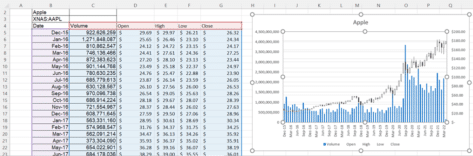
Fast stock charting with Excel and StockHistory()
Excel 365 makes it incredibly easy to get past price and volume info for stock, fund and currency exchange data, then convert that into a professional-looking chart. Some may remember the days when stock prices were added manually from a newspaper. Now a single Excel cell formula can grab the history of thousands of traded […]

Dog Face 🐶 emoji in Word, Excel, PowerPoint and Outlook
How to insert the Dog Face 🐶 emoji into Microsoft Word, Excel, PowerPoint or Outlook. Both in Office for Windows and Office for Mac. Aside from the obvious the Dog Face 🐶 emoji can used as a variant of the Grinning smiley face emoji. How Dog Face 🐶 looks in different fonts. Here’s some examples […]
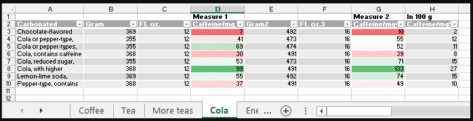
Caffeine level easy comparison in Excel
How to compare caffeine levels in coffee, tea, soda and other drinks from an Excel spreadsheet. The Guardian’s Datablog has interesting analysis of caffeine levels in different foods. Sounds boring until you read that: reduced sugar colas have almost double the caffeine of a regular, sugared, cola. 1 cup of coffee can have as much […]

Change Picture from clipboard in Word and Office
Replacing images in Word, PowerPoint, Excel and Outlook is a lot easier using the ‘Change Picture’ option, especially now you can change to insert an image on your clipboard. We’ll show you a step by step on how to do it. There might not be one simple keyboard shortcut, but it is a lot better […]

Quick stock price analysis and charts with Excel StockHistory()
StockHistory() is an Excel function that can add historical stock price info, as well as currency exchange rates at monthly, weekly or daily intervals. Date and Closing Price plus optionally Open, High, Low and Volume. All ready to make a chart for stock price analysis. Excel 365 has Stock and Currency data types but they […]
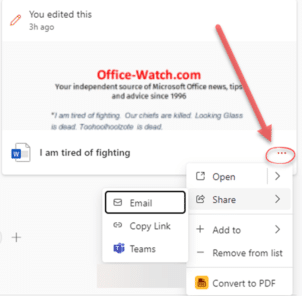
Useful tricks hide in the new look Office.com
The main Office.com page has an updated look for Business and Enterprise customers. There’s a Create pane, My Content section and Quick Access buttons plus some more useful features hiding away under obscure buttons that are easy to overlook. This is the overall Home https://office.com look if you’re logged into a non-consumer Microsoft account. Choose […]

White Chess King ♔ symbol in Word, Excel, PowerPoint and Outlook
Type the White or outline Chess King ♔ into Microsoft Word, Excel, PowerPoint or Outlook. Both in Office for Windows and Office for Mac. White Chess King ♔ symbol is useful for users that want to represent the chess piece as a symbol, rather than an image. There’s also a Black Chess King ♚ symbol […]

Four ways to split date into day month year in Excel
If you’ve ever needed to split dates in Excel into separate day, month, and year, there are several options to choose from. Excel has different functions, Text to Columns or Flash Fill which can do the job. Here’s a quick guide on several methods: Using the DAY, MONTH and YEAR functions Using Text to Columns […]

Eye of Horus 𓂀 symbol in Word, Excel, PowerPoint, and Outlook
Insert the Eye of Horus 𓂀 into Microsoft Word, Excel, PowerPoint or Outlook. Both in Office for Windows and Office for Mac. Eye of Horus 𓂀 is an Egyptian Hieroglyph symbolizing protection. According to Egyptian myth, Horus lost his left eye during his struggle with Seth, and it was restored by Hathor, symbolizing the process […]
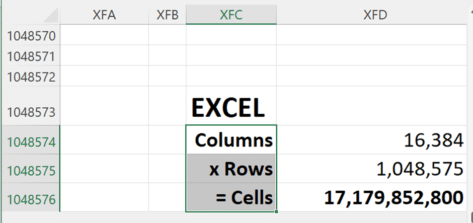
Google Sheets gets 10 million cells, not enough to beat Excel
Google has just doubled the cells available in their Sheets spreadsheet, taking it to 10 million cells. Still well short of Excel’s 17 million cells. Sheets can now stretch to 18,278 columns (column ZZZ) for all Google Workspace customers, as well as legacy G Suite Basic and Business customers. Excel has 17 million cells Since Excel […]

Free color selector in your browser
Google has a color selector among the many features in their home page. It’s free, works in any browser and it’s easy to copy color codes into Office. Search for ‘Color picker’ or https://www.google.com/?q=color+picker then move the two circles to choose the exact color and shade you want. The HEX and RGB color codes are […]
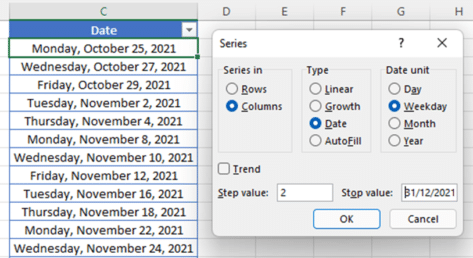
Better ways to add date lists in Excel
Excel has ways to add a list of dates by day, weekday, month or year either by the fill handle or the Series command. Date Series with Fill Handle You probably know about the Fill handle tool to fill the remaining cells. Once highlighted, just hover your mouse in the bottom right corner and a […]

Fancy gridlines to make Excel look great or at least different.
Gridlines are on every spreadsheet in Microsoft Excel workbooks. Did you know those grey lines can be colored to make them fancy, more obvious or more discreet? Let’s look at two ways you can make colored gridlines in Excel. Here’s what it looks like with the pink, black and red in comparison to the default […]
Free and secure conversion of .doc .xls or .ppt to the newer Office formats
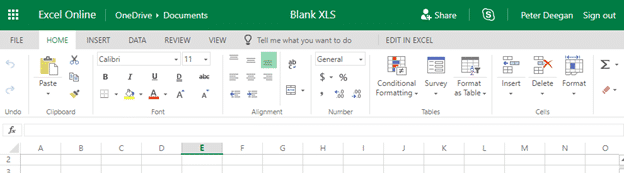
Here’s how to convert an older .doc .xls or .ppt into a safer and smaller .docx .xlsx .pptx even if you don’t have Microsoft Office. Any smart computer user is wary of documents received in the old .doc .xls .ppt formats because they are regularly used to transmit viruses. The new document formats are much […]









