
Microsoft announces ‘new’ Office feature that’s been available for six months
Microsoft’s PR department must be laughing themselves silly this week. A press release for an existing Excel feature is getting wide coverage even though there’s nothing new and the feature is at least six months old. The blog posting on 5 June 2019 announces Microsoft is working with “Nasdaq and Refinitiv to pull current financial […]
Excel image to worksheet comes to iPhone and iPad
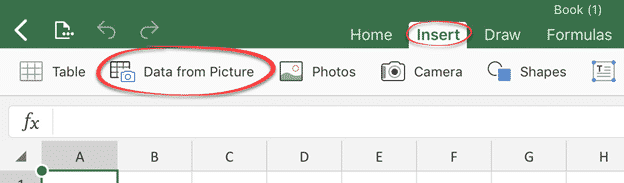
Excel 365’s new ‘Data from Picture’ feature is now available for iPhone and iPad. It converts a photo into a spreadsheet grid you can work from. We told you about ‘Data from Picture’ back in March when it became available in Excel for Android. Data from Picture is on the Insert tab between Table and […]
Excel Data from Picture, making it work in the real world
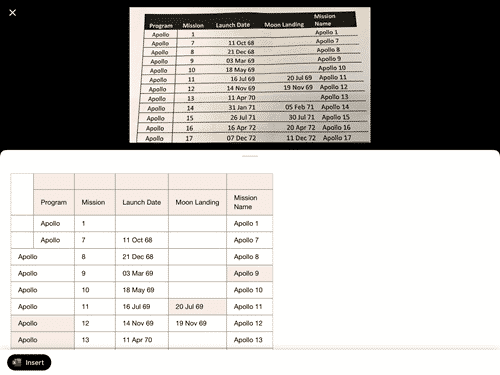
How does Excel 365’s Data from Picture work outside the carefully selected demos shown by Microsoft? Data from Picture converts a photo of a document or table into an Excel worksheet. It does that by sending the image to Microsoft’s cloud servers for interpretation. The converted table comes back to your device for review and […]
Office for Android stops support for older devices
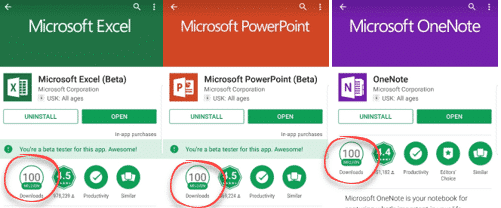
Microsoft has announced that the Office apps for Android won’t update for older versions of Android. These are the Word, Excel, PowerPoint and Outlook apps for Android. Quietly, the system requirements were changed to cover only the last four major versions of Android. Misleading news alert Despite what you may have read, the Office apps […]

Microsoft’s Japanese Imperial Era updates and new feature
Microsoft has released a series of pages describing their support for the new Japanese era in Windows, Office and .NET. Plus a new Windows feature to support a nicety of Japanese date formatting. Japan’s traditional dating system works around the Emperor’s reign. The abdication of the last Emperor and enthronement of Emperor Naruhito meant a […]
Japanese Gannen and Ichinen date support in Excel, Office and Windows
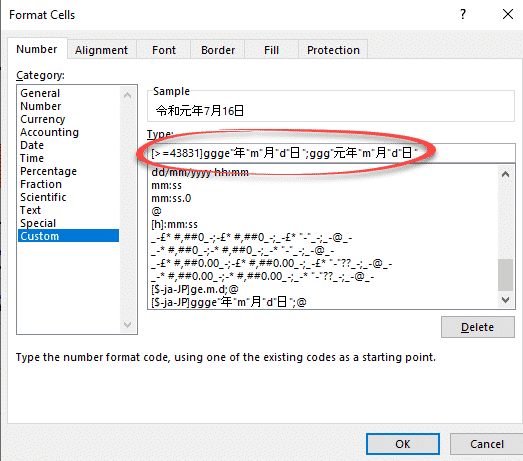
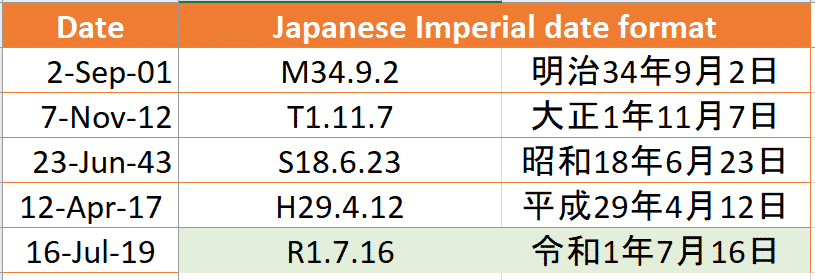
As part of Microsoft’s support for the new Japanese Imperial era, they’ve added support for traditional Gannen writing of dates as well as the newer Ichinen style. Windows 10 now supports Gannen style Japanese dates but that support doesn’t flow through to Excel formatting. Normally the default date presentation in Excel uses the Windows defaults, […]

Excel gets Bitcoin as a Currency option
Excel has a new currency option. Bitcoin BTC is now available as a Currency symbol or text from the main list but we’ll show how to get it now on any version of Excel. There are four options available: Bitcoin symbol ₿ prefix ₿12.34 Bitcoin symbol ₿ suffix 12.34 ₿ Bitcoin code BTC prefix BTC […]
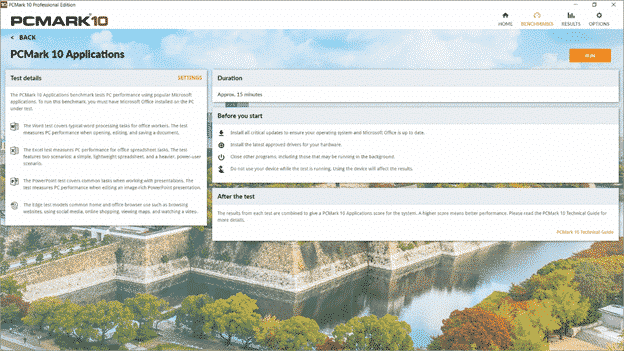
PCMark benchmarks computers with Microsoft Office
The benchmarking software PCMark 10 has added a new test that directly checks the performance of Microsoft Office programs on various hardware and software configurations. There are three separate Office Applications tests: Word covers typical word processing tasks for office workers. The test measures PC performance when opening, editing, and saving a document. Excel test […]
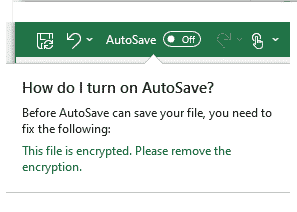
Office/OneDrive feature Microsoft needs to fix
Office 365 documents can be autosaved to OneDrive or SharePoint Online but there’s a major exception which Microsoft needs to fix. AutoSave is prominent in Word, Excel and PowerPoint for Office 365, on the left of the top bar. It will regularly save your document for you but only if it’s saved to OneDrive or […]

Visual Crossing Unveils Weather Services for Microsoft Excel, Web, and API users
Reston, VA, May 16, 2019 – Visual Crossing Corporation is proud to announce the release of the next component of its Weather Services platform, Weather Data Services immediately available for Microsoft Excel, interactive web, and web services API. Users can choose between an interactive add-in for Microsoft Excel, a web page, and a web services API […]
Office bug patch highlights for May 2016
A few of the May 2016 patches Microsoft Office caught our eye with embarrassing bug fixes, previously not disclosed to customers. They all apply to older Office releases: Office 2016 and before. It’s a long-standing Microsoft trick to hide embarrassing bugs from customers until they have a fix. In the meantime, customers waste time and […]

Put the latest Stock and Fund prices in Excel workbooks
Excel 365 for Windows and Mac has a clever way to add the latest stock prices into spreadsheets in a truly quick and easy way. Stock data type has been in Excel 365 for Windows since late last year but has gradually improved as the development team react to feedback and changeover to a better […]
Date Formatting considerations in Excel & Office
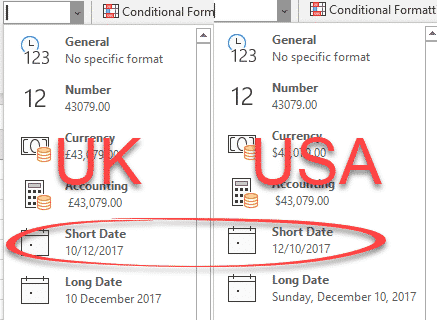
Unclear date formatting in documents, worksheets, presentations and other media is a pet peeve of ours. These days it’s bad practice to show dates in digits only such as 01-05-2019 12/3/18 etc. Yet we often see these formats used in booking confirmations and other documents. Either of those dates can be misunderstood by a global […]
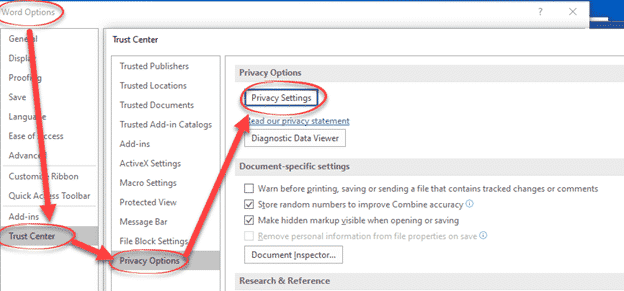
New Office 365 software privacy settings
Office 365 for Windows has new look privacy settings, hidden deep in the menus where, presumably, Microsoft hopes customers won’t find them. These changes are in conjunction with the renamed Office cloud features now called ‘Connected Experiences’. They apply to Office 365 for Windows build 1904 and later. A series of opening screens may appear […]
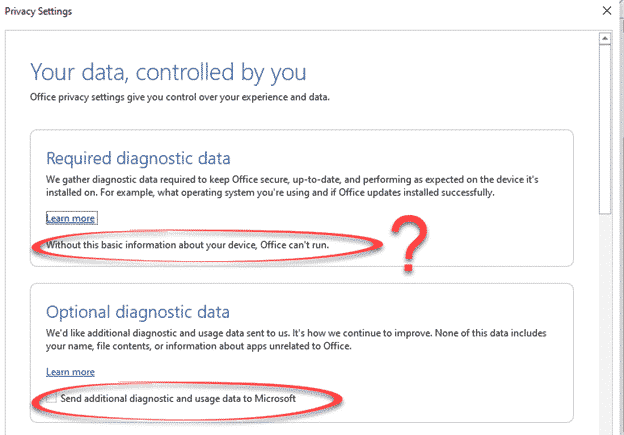
Office 365 Privacy Reminder aka Microsoft covering it’s legal behind
Office 365 customers will be seeing a set of opening screens about how Microsoft gathers and uses customer data. Those screens are carefully worded to avoid some hard truths about modern cloud connections and cover Microsoft from legal liability. Cloud features can be great and very useful. Companies do their best to hide the problems, […]

Connected Experiences now in Office 365
Microsoft has something ‘new’ in Office 365 they call ‘Connected Experiences’. It’s really a new, fancy name for things we already have. Connected Experiences is the new catchphrase for the cloud services already in Office 365 software or apps. It’s the various features which require customer data sent to Microsoft’s servers. According to Microsoft: “Office […]









